#net

Posts tagged net

Converting a IEnumerator to IEnumerator<T>

When generics where introduced with .NET 2.0 there was a ton of 1.1 code lying around that was still built without generics. So the obvious answer by Microsoft was that most generic specialization classes can be cast to their non-generic counterparts to avoid problems for users.

Now, years later we have the opposite phenomenon. Few people are actually using untyped collections, so a new problem has come: What if you are looking at legacy code that has to call into new API that has no non-generic support.

Well, it’s simple: IEnumerator becomes IEnumerator<object> and all is well. But there is no conversion from IEnumerator to IEnumerator<object>, so you have to write your own little facades when trying to put square blocks into round holes:

public class CastEnumerator<T> : IEnumerator<T>
{
    private readonly IEnumerator enumerator;

    public CastEnumerator(IEnumerator enumerator)     {         this.enumerator = enumerator;     }

    public void Dispose()     {     }

    public bool MoveNext()     {         return enumerator.MoveNext();     }

    public void Reset()     {         enumerator.Reset();     }

    public T Current     {         get { return (T)enumerator.Current; }     }

    object IEnumerator.Current     {         get { return Current; }     } }

The call then looks like this:

public IEnumerator<T> GetEnumerator()
{
    return new CastEnumerator<T>(untypedEnumerator);
}

As Julian Birch explained in the comments, if you are using .NET 3.5 it’s even simpler to get from an untyped IEnumerable to a IEnumerable<T> (while not technically a IEnumerator, the typed one will then return a IEnumerator<T>):

IEnumerable untypedEnumerable = ...;
IEnumerable<string> typedEnumerable = untypedEnumerable.Cast<T>();

Read more →

Using ILMerge to hide your dependencies

When developing a library that should be used by 3rd parties one major concern is dependency versioning. Meaning, if your code uses a common library like Castle.Windsor, things will get ugly if your users also use Castle.Windsor in another version.

Especially with very popular infrastructure libraries like Castle you can’t expect all your users not to use it, after all you’re probably using it for the same reason they do: Best of breed solution to a common problem.
To avoid trouble, many library authors decide not to take external dependencies so they won’t see versioning issues, while having to re-implement some infrastructure themselves.

Coming up with something simple usually isn’t that hard. If you just need a very limited feature set you can build your own Inversion of Control container quite easily without relying on external libraries. Yet, if you do you still have to spend time building, maintaining and extending the thing over time.

The other option is to use the fabulous tool ILMerge by Microsoft that allows you to munch multiple assemblies into one DLL. This is also handy if your product consists of many assemblies that you want to bundle, but in this case there is one cool thing ILMerge does: /internalize

ILMerge usually is called from the command line and works like this:

ILMerge.exe <main-assembly.dll> [<library1.dll> <library2.dll>] /out:<output-file.dll> /t:library

Now if you add the magic parameter /internalize ILmerge will hide all type names inside <library1.dll> and <library2.dll> from assemblies that reference the output assembly.

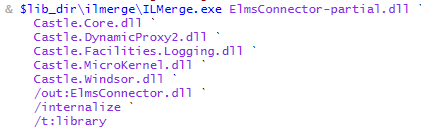
So in ElmsConnector’s case where Windsor is used internally the ILMerge call looks like this:

image

ElmsConnector-partial.dll is the original output dll from my msbuild process while ILMerge will merge all of these Castle assemblies into the output ElmsConnector.dll.
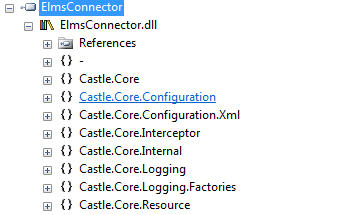
Now the real magic here is that if I open the resulting assembly in Reflector it still lists all Castle assemblies:

image

But inside Visual Studio none of the Castle.* namespaces exists because they are hidden.

This technique allows us to use our favorite tools in libraries without having to think too hard about versioning.

Now, obviously there are also some things to consider here:
If you want to expose any class that is inside one of the internalized assemblies, you have to tell ILMerge so through the exclude file (an example of this can be seen with Rhino.Mocks). Once you exclude one type and your users try to use that type they will see a “ambiguous type” compile-time error. That’s why Rhino.Mocks also comes in a unmerged flavor

Another thing to remember is (especially with web-apps) that your users can’t see any internalized assemblies, so any configuration you put into your web.config for them won’t work. Best example may be the PerWebRequest lifesyle for Windsor: It relies on a httpModule to be registered through the web.config, you can’t make that happen with the externalized assembly (and it leads to versioning problems once you exclude it).

Read more →

Introducing ELMS-Connector v.1 Beta

When I joined the imagineClub in Klagenfurt and started building the new website I kept avoiding one major feature for a very long time: Implementing the remote-login for the MSDN-AA system by Microsoft.

The way imagineClub members get to MSDN-AA software is through a web-store called ELMS that handles licensing and downloading for us. ELMS supports two modes: integrated authentication or campus authentication. Integrated means that accounts have to be maintained inside ELMS while campus authentication means you manage accounts in your own system and ELMS will ask your services to authenticate users.

Now the first approach works for very small organizations where you can easily keep track of your members and (as admin) respond to their “oh god I lost my password” requests.
But with about 200 members like the imagineClub this alley leads into a world of pain and despair. So the only real solution is to implement the campus authentication that requires a authentication handshake between ELMS and imagineClub.

The documentation on the whole process is quite scarce, but with some reverse engineering of our old site and some FireBug network analysis I was able to eventually figure out how the whole system was supposed to work. It’s not that complicated after all, yet it’s not funny to have to re-invent it over and over again.

Since I knew that the Institute of Technology at Klagenfurt University has also acquired a MSDN-AA license for it’s staff I started working on the idea of a re-useable and easily pluggable library that could encapsulate all ELMS campus authentication logic to spare others the pain of implementing the thing from not so great documentation.

My main goals for this where:

  • Minimum configuration
  • Pluggable (being able to drop it into an existing ASP.NET app)
  • Variable authentication method (not everyone is using the same auth services we do)

Especially for pluggability I wanted the whole thing to live inside a DLL so I decided to implement a HttpHandler that will then handle the authentication.

The handler will look for a Login.htm file in your application’s root folder and display that file to users that need to log in. This means that you can easily modify the look&feel of your login page without having to mess with any ASP.NET code that can break. As long as you leave the name attribute of the username/password field intact all modification is fair game.

Once the user hits login the connector will then look into it’s configuration (I use Windsor for that) and invoke a supplied IAuthenticationService class. That means that you tell Windsor through the config what class servicing IAuthenticationService you want to call and it will get called with username/password.

This is the interface that users may need to implement:

public interface IAuthenticatonService
{     bool AuthenticateUser(string username, string password);
}

I intentionally said may because ELMS-Connector comes with a built-in LDAP auth service that you can use to simply hook up the login to your existing LDAP system without having to write any code at all (although that part is still in development).

Now, let’s get to the gory details.

How to set up:

1: Grab the release from the project’s download page

ElmsConnector download

2: Add reference to ElmsConnector.dll

ElmsConnector uses Castle Windsor internally but that dependency is merged into ElmsConnector.dll so you won’t run into any versioning issues.

3: Add httphandler to web.config

Add the following to your <httHandlers> section in the web.config:

<add verb="*" path="*.elms" type="ElmsConnector.ElmsHandler, ElmsConnector"/>

This makes all requests that end in .elms go to the ElmsConnector component that then does it’s magic.

4: Configure ELMS

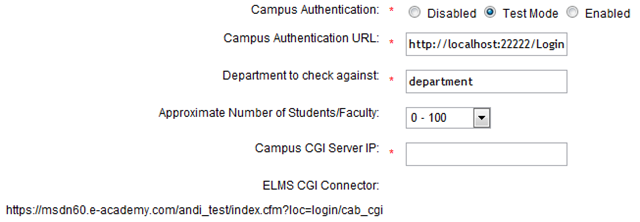
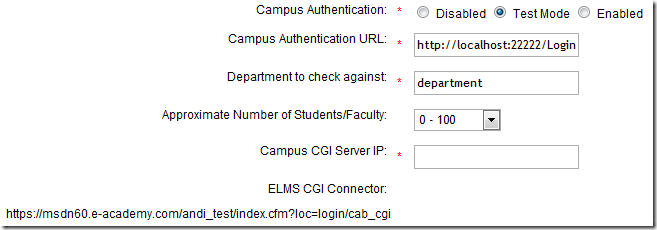
Log into your ELMS dashboard and go to User Management –> Integrated Campus Authentication.
image

Set the Campus Authentication to Test Mode (while testing the connector).
The Campus Authentication URL should look like this: http://<yourserver>/Login.elms (or wherever the *.elms HttpHandler will be accessible).


Set Department to department (the suggested default value).

Campus CGI Server IP should be set to the IP your Server is using since ELMS will use the destination IP address to verify your identity.

Now don’t forget to copy the ELMS CGI Connector url since it will become of importance during the configuration of the connector.

4: Copy and modify sample elms.xml

Inside the release zip there should be a file called elms.xml, this file is the main configuration for the ElmsConnector. Copy it to the root of your web application and open it inside Visual Studio.

You now need to paste the ELMS CGI Connector url into the <cgiConnector> tag:

<component
  id="ElmsSessionRequestService">
  <parameters>
    <cgiConnector>https://msdn60.e-academy.com/<campus>/index.cfm?loc=login/cab_cgi</cgiConnector>
  </parameters>
</component>

And you’ll have to tell ElmsConnector where to find a type servicing IAuthenticationService. This is done by modifying the type attribute on the AuthenticationService component:

<component
  id="AuthenticationService"
  service="ElmsConnector.IAuthenticatonService, ElmsConnector"
  type="ElmsConnector.Web.FakeAuthenticatonService, ElmsConnector.Web" />

(I suggest you look at the provided sample project ElmsConnector.Web to see how this works)

5: Add the Login.htm

Inside the zip there is also a file called Login.htm. That file is nothing more than an empty template of the future Login dialog ElmsConnector will expose to users. Copy it to your web application’s root and edit it to your heart’s extend. All modifications are fair game as long as you don’t change the form parameter names or remove the $error$ placeholder.

6: Done

Yes. that’s it. You can now test the whole thing by visiting your ELMS portal page and hit Login. If your Campus Authentication Url is set correctly you should see the ElmsConnector’s Login.htm and be able to log in.

License

ElmsConnector uses the ASL-2 license and is therefore open-source-software. ASL-2 is a very permissive license that allows use of the code even in commercial closed-source scenarios. Still I’d appreciate if you’d let me know that you like ElmsConnector.

Problems

There may still be some problems with this release, if you notice anything strange or broken please open a Ticket on GitHub or shoot me a email.

Extending

ElmsConnector is very extensible through the use of Castle.Windsor internally. If you know your way around Windsor XML configuration you should be able to change everything about the connector without the need to recompile. Still I suggest you check out the source to find out what goes on there.

Future

I’ll be dogfooding this component during this week while getting the iC-Website ready for launch. After that I want to implement the LDAP authentication service that will ship with ElmsConnector so if you have an existing LDAP infrastructure you don’t need to write any real code at all.

Need help?

If you have any more questions regarding ElmsConnector or how to set it up in your special case, please feel free to send me an email or contact me through IM (Contact info). I’ll be happy to help you use ElmsConnector!
Read more →

How to ruin my day

In case you are somewhere stuck in a plan on how to make my day miserable I’ve got a tip for you:

Write absolutely horrible code like this and leave the maintenance to me:

Method signature:

internal void TryRequestSession(string securityToken, ref Guid secID)

Call site:

public ActionMethod Open(string securityToken)
{
	Guid secID = Guid.Empty;
	try
	{
		secID = new Guid(securityToken);
	}
	catch
	{}
	Guid oldSecID = secID;
	provider.TryRequestSession(securityToken, ref secID);
	if (oldSecID == Guid.Empty)
	//....
}

There are many things wrong with this code, but I’ll spare you the details and say that new Guid(securityToken) will always throw a ArgumentException and that I have absolutely no tolerance for void methods that have ref parameters!


Whatever was going on in that chimps mind who wrote that, it couldn’t have anything to do with programming.

So, recap: If you expect other people to maintain your code (I’m currently rewriting this thing, it’s easier) make sure you do the following:

  1. Have Unit tests that specify the behavior
  2. Leave an actual spec that can be looked at
  3. NEVER use ref if you can use return
  4. Don’t swallow exceptions (and if you have to, leave a comment!)
  5. Make it run!

Yes that’s right. If you leave a piece of crap behind, at least make it compile! I had to search for 3 totally outdated libraries to even make this piece of junk compile on my machine. Again: The GAC is your enemy!

Thank you, you now may go on with your lives while I feel a lot better and my actually start enjoying my coffee :)

Read more →

Using ActiveRecord&rsquo;s Field mapping to map custom enumeration classes

One thing that may be overlooked sometimes (I certainly did) is the ability of ActiveRecord to not only bind to properties but also to instance fields (yes, even private ones). This little feature came in very handy when I was looking for a way to persist a class based enumeration. I’ll tell you why in a minute.

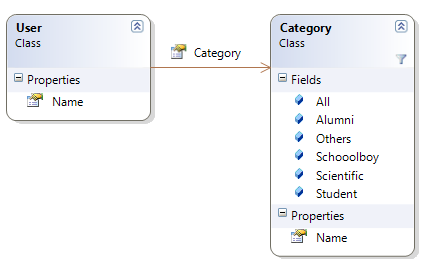
First, I have Users that can be in one of 5 categories. None of which were important enough to warrant a foreign-key relationship modeling in the database, but I still wanted to encapsulate them in some sort of object to avoid doing string checking inside my code. The model looks like this:

image

I clearly didn’t want to have a Category table in my database, so I decided on creating the Category class while saving the Name property to the database.

Here is my implementation of the User.Category field:

[Field]
private string category;

public Category Category {     get { return Category.GetCategoryByName(category); }     set { category = value.Name; } }

As you can clearly see. My code is only dealing with Category objects (that can have implementations attached) while behind the scenes I only write the name of the category to the backing field. This way I get rid of magic strings inside my code while not having to burden my database with foreign key constraints.

Read more →

NDC 2009 Videos online

The Norwegian Developer Conference is over for quite some time now, and by looking at their speaker line-up it’s quite clear that I would have loved to be there.

Good for me that they videotaped all talks and decided to share them with the general public.

So, if you are interested in seeing Ayende, Michael Feathers, Scott Hanselman, Jeremy D. Miller, Phil Haack or Udi Dahan doing their talks, you can either stream them online, or you can go ahead and download a 30GB torrent with all of their talks.

The videos are online on the official conference page, or if you prefer a per-speaker listing:
Mark Nijhof has a list of all NDC videos for your streaming pleasure and Rune Grothaug has the torrent.

(Please keep seeding the torrent for a bit after your download has finished)

Read more →

How MonoRail selects it&rsquo;s best ActionMethod candidate: CalculateParamPoints

James Curran pointed me at one interesting flaw with my implementation of the DefaultValueAttribute for MonoRail I blogged about some weeks ago. This tipped me off to actually read the MonoRail code to find out how exactly MonoRail selects what overload of a ActionMethod to call.

MonoRail’s approach is as simple as it is brilliant, and reading the code that does this is a very pleasant experience. It took about 5 minutes to figure out the following:

If there are multiple public methods in a SmartDispatcherController that match the request’s action, MonoRail calculates a score of parameter points of each overload, picking the “heaviest” and executes it.
How that score is calculated is quite simple: Every matched parameter gets 10 points, unmatched 0.

But there’s more detail to this:

Every regular parameter (types not defining a attribute of IParameterBinder) where the parameter-name could be matched to the request parameter’s key, MR assumes assumes a weight of 10

In detail this means: Given the following ActionMethod with two parameters:

public void Test(string category, int page)
{    
}

Monorail will assign 10 points if the key “category” could be found in the server’s request object (Request["category"]) and another 10 if a parameter key called “page” is also present.


So the following call /Test.rails?category=beer&page=1 would account for 20 parameter points, whereas omitting page would result in only 10 points. MonoRail will then pick the method with the highest score of matched parameter points and call it with those parameters.

Now, obviously the following would lead to a disambiguation:

/Test.rails?category=beer

public void Test(string category, int page)
{    
}
public void Test(string category)
{
}

Category is present in both cases and page is unmatched, so both methods get 10 points and no useful distinction can be made. This is where MonoRail will award a bonus of 5 points to a method where all parameters could be matched. Thus giving Test(string) 15 points and Test(string, int) only 10, leading to the right match.

Now, in case of a parameter that is decorated with a IParameterBinder attribute (like ARFetch, DataBind etc) calculating those parameter points is delegated to the attribute class that then returns a score following it’s own logic (e.g.: if one attribute collects data from multiple request parameters it could return more than 10)

Let’s look at a sample implementation of CalculateParamPoints of the ARFetchAttribute:

public virtual int CalculateParamPoints(IEngineContext context, IController controller, IControllerContext controllerContext, ParameterInfo parameterInfo)
{
	String paramName = RequestParameterName ?? parameterInfo.Name;

return context.Request.Params.Get(paramName) != null ? 10 : 0; }

As you can see, ARFetch follows the usual MonoRail behavior and will return 10 in case it’s parameter-name could be matched, or 0 otherwise.

Still, all this doesn’t negate the fact that you could end up with ambiguities between action methods. In case many methods received the same number of parameter points MonoRail will simply call the first.

Oh, and did I mention that ASP.NET MVC can overload only on a per-http-verb basis? (Given that that’s a quite finite number of exactly 5)

Read more →

Introducing IronLess.Net &ndash; your duct tape solution to LessCss in ASP.NET

Some time ago while writing the CSS for the ImagineClub website I found out the hard way that there are two ways of developing XHTML sites: Clean presentation/markup separation or mixing of the both to achieve CSS reusability.

What I mean by mixing is markup code like the following:

<div class="floated thick-border highlight">
	<p>Stuff</p>
</div>

I have problems with the above, since I am clearly mixing presentation with data. I want my XHTML to transport structured data that gets styled through CSS. Separation of concerns teaches us that we should rarely have to touch the markup if we want to change appearance, and we should not have to touch the markup if we change the data we are presenting.
So the above code clearly blurs the line somewhat, and while still being somewhat semantic markup, it’s also intermingled with presentation concerns what I don’t like at all.

Why code like the above exists has a reason: CSS is endlessly verbose and leads to tons and tons of code-duplication if only applied to DOM structures and IDs, so naturally webdesigners have started to use the mixing of classes in markup to avoid some of the duplication while still leveraging the power of CSS.

During a chat with Kristof about this particular issue the conclusion we reached was that my way of doing it was theoretically better, but only if backed by some sort of server-side framework that would enhance CSS to avoid duplication and verbosity that comes with my approach.

And looking over the Microsoft fence, somewhere in those fluffy green lands inhabited by Ruby people, I found the answer to my problems: LessCss!


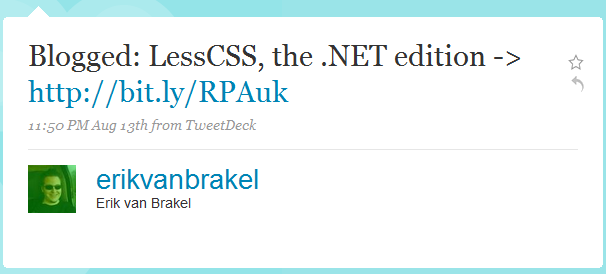
But I don’t do ruby development so I filed it away under “cool but unreachable”, until I came across this tweet some two weeks ago:

image

I was immediately sold to the idea and contacted Erik, to contribute to the project. Turns out, he’s a really nice guy and working hard on writing a parser to read LessCss fully in managed code through the use of ANTLR.

But being the simple guy I am one of the first questions I had for Erik was: “Why don’t we just wrap the original Less project inside the DLR and run it from there?”.

Well, at that time Erik had no real answer for that, and I didn’t either so I decided to give it a try while Erik had some very valid reasons to continue working on a full C# implementation.


And now this is the post to tell you of my pyrrhic victory:

First: I did it. It’s here and it can be used: IronLess.Net.


Disclaimer: It’s a pain in the ass to use.

Installing IronLess.Net

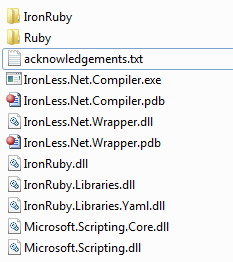
When I write a library I want it to be one thing: self-contained. I don’t want to mess with your local IronRuby installation or with your current gem setup on the machine. So IronLess comes packed with a full catalog of IronRuby/Ruby class libraries all packed into a 0.9mb 7zip file. This file contains 2.228 files in 482 folders all together forming the complete IronRuby environment needed to run the original LessCss.

I did some (simple) magic with NAnt to alleviate that pain, so if you checkout the code you’ll just have to run build.bat and NAnt will compile IronLess and also extract the IronRuby libraries to your build folder, making it completely self-contained. You’ll end up with the following folder structure you just need to move (copy will take forever) to your /bin folder:

image

Once that’s done you only have to add the following HttpHandler to your ASP.NET web.config and add some initialization code to your Global.asax.cs to be all set.

web.config

<add verb="*" path="*.less" type="IronLess.Wrapper.IronLessHandler, IronLess.Wrapper" validate="false"/>

Global.asax:

protected void Application_Start()
{
    IronLess.Wrapper.RubyEngine.Initialize(Context);
}

That should suffice to redirect all request for a .less file to the IronLessHandler that will compile .less to .css using LessCss.

Downsides:

There are a thousand reasons to use this, but I’ve another thousand why you shouldn’t:

  1. Startup is painfully slow: Initializing the LessCss ruby script takes >20 seconds. So every application start takes 20 seconds now since we call the RubyEngine initializer in Application_Start (that will kick off the init of the LessCss script that itselfs makes IronRuby parse all the imported libraries resulting in a 20 second library load). That itself makes it completely unbearable since every debug run in Visual Studio now takes 20 seconds to load.
  2. LessCss through the DLR can’t read windows line-endings. You have to open up your.less file in a editor like Notepad++ and convert it to UNIX style endings (CR-LF -> LF). Not pretty and even less practicable.
  3. Error handling / debugging is impossible. I didn’t dare to modify the LessCss.rb script so errors will be outputted to the command-line that you aren’t seeing. So if your .less file has errors you’ll see no useable results on why it failed to load.
  4. Compilation of .less to .css takes between 50 to 200ms inside a running web-app. Running the IronLess.Compiler takes about 30 seconds. Both figures are way to slow to be actually useable, going with the native Ruby gem from the commandline would be much faster.

So, why bother?
Actually, that’s the question I asked myself halfway through doing IronLess. Since it’s so painful to deploy and startup, I don’t see any real use for this at this point. If someone has the skills to make the DLR run LessCss faster than light by flipping some magic bit, please go ahead and fork my repository on github and tell the world about it.


Also I find the installation process to be just too painful. C’mon, 2.228 files in the /bin directory just to write CSS just isn’t cutting it for me. What I want is one simple dll I reference from /lib and I’m set.

Going further

I’ll be going to help Erik get Less.Net out of the door as quickly as possible, in the hopes of bringing something much needed to the ASP.NET world while avoiding all the troubles with external dependencies you get when trying to call into the ruby world from .NET code.
Also it’s a nice excuse for me to dig into ANTLR.

So finally, if you decide to use this you are entering a world of hurt. Either you can improve IronLess to a point where it gets useable (I can’t), or you wait for Less.Net.

Read more →

Storing binary data in NHibernate / ActiveRecord

I believe the simplest way to store binary data is to just put in the database. Whenever I’ve agreed to throw data to a disk I’ve had issues with deployment, administration or disaster recovery.

Simply put: Once you have a dependency from your database to your file system, you no longer have the luxury of only thinking about recovering the database. You now need to keep two pieces of your system “safe”, both requiring a completely different toolset than the other.

Besides the obvious second point of headache for backup/recovery, you also bring yourself into a world of hurt for deployment / maintenance scenarios.
Filesystem access rights can be a huge pain in the ass, and having to set them right (and keep them that way) is usually a time-bomb waiting to go off.

So, storing your binary data in the db solves many problems, but some new ones arise. Mostly implementation details, but I’d like to show you some things to keep in mind when writing binary data to db.

NHibernate supports no lazy loading of instance fields

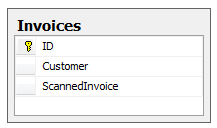
image While with conventional ADO.NET I’d just put the binary data as a column inside the table it belongs to, NHibernate requires you to do things different. If you map your data like that NHibernate will fetch it whenever you read objects from that table, meaning that you’ll be querying large binary data fields for no reason, causing you application performance to significantly degrade over time.


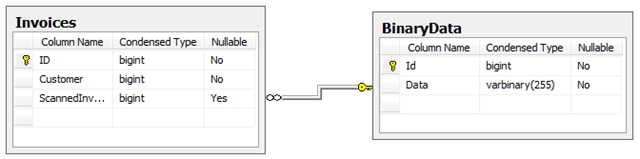
What you want is to have NHibernate fetch that field only if it is accessed (lazy load it), and that’s not possible for fields inside a class, but it is possible for references. So your database schema should look like this:

image

And your mapping will look similar to this (I’ll use ActiveRecord for easier understanding):

[ActiveRecord]
public class Invoice : ActiveRecordBase<Invoice>
{
    [PrimaryKey]
    public int Id { get; set; }

    [BelongsTo(Lazy = FetchWhen.OnInvoke, Cascade = CascadeEnum.SaveUpdate)]     public BinaryData ScannedInvoice { get; set; } }

[ActiveRecord] public class BinaryData : ActiveRecordBase<BinaryData> {     [PrimaryKey]     public int Id { get; set; }

    [Property(ColumnType = "BinaryBlob", SqlType = "IMAGE", NotNull = true)]     public byte[] Data { get; set; } }

Now whenever your Invoice is saved/inserted NHibernate will also check if BinaryData has to be updated/inserted, while only loading the binary field if you actually access the Invoices.ScannedInvoice field.

Read more →

The fairy tale of binary blob fields

One of the main advantages students get from being members of imagineClub is that they get access to uploaded course materials through the website. Naturally, the new site has to support file upload and download somehow, and yesterday I started implementation of that feature.

In theory this sounds really simple, especially since the file upload in MonoRail is so trivial I figured it wouldn’t be a problem to implement.

One major thing to consider when designing a file upload feature is the question: Save to disk or save to database? Let’s look at the two options:

Save to disk:

Pro: Very easy
Con: Requires metadata to be kept in the database. Could go out of sync with the db. Requires backup. Requires special permissions.

Save to db:

Pro: Zero setup. Data all in one place, backup hugely simplified. Enforces data integrity
Con: Non-trivial implementation.

Now, I naturally went with the db option. Deployment is hugely facilitated if you don’t need to look at file permissions, and most hosters have databases backed up anyway. So things go south, the only thing I need to recover the site would be the database file.

Some searching revealed that binary data could be mapped to the database through AR quite easily:

[Property(ColumnType = "BinaryBlob", SqlType = "varbinary(MAX)")]
public byte[] BinaryData { get; set; }

Problem with that is that it crashed ALL of my database dependant unit-tests:

------------ System.Data.SQLite.SQLiteException : SQLite error
near "MAX": syntax error

Apparently SqlLite can’t figure out that MAX thing and will crash. Since it would accept a numeric value instead I looked at the SqlServer 2008 documentation for varbinary to find out what MAX would be. Turns out it’s exaclty 2147483647 (2^31-1), so my natural reaction was to change the SqlType to be exactly varbinary(2147483647) instead of MAX. Now SqlLite can interpret it and all tests run great again, but creating the schema on SqlServer isn’t possible any more due to the following (odd) error:

The size (2147483647) given to the column 'BinaryData' exceeds the maximum allowed for any data type (8000).

So, what we just saw is a leaky abstraction inside the ORM. But NHibernate never claimed to abstract the DB completely away from me, so we’ll not use that against it. NHibernate explicitly supports these scenarios and in a real NHibernate scenario it’s just a matter of having two different mapping files, one mapping to the appropriate SQLite datatype and the other mapping to the Sql2008 datatype that would be varbinary(MAX).
But, I’m not using NHibernate here, I’m using ActiveRecord that handles mapping through attributes on the data classes, and I’ve no intention of using #ifdef statements anywhere around my code.

The problem here is mainly that whenever you are trying to use two different RDBMS at once you are limiting yourself to the least common denominator, and you have to deal with that.


I won’t be able to use advanced Sql2008 features, and I also won’t be able to use anything fancy inside SQLite either.

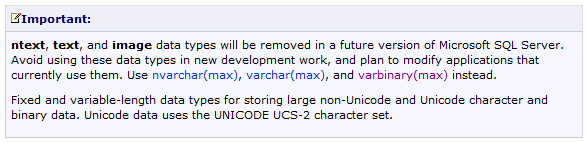
The least common denominator in this case is the datatype IMAGE, something that Microsoft is discouraging people to do in their documentation:

image

This puts me in a delicate position since the imagineClub website is hosted on a server I don’t control. So I could just wake up one morning and seeing the iC website down because the hosting company decided to upgrade all users to 2010 (or whatever version the next SQL Server will have).


And I know, usually providers send out warning for stuff like this, but I doubt that through all the structural changes with imagineClub lately they even know where to send those warnings to.

So: Long story short, use image over varbinary(MAX) if you plan on doing in-memory SQLite testing, just keep in mind that your app will break when you upgrade to a newer version of SqlServer.

Update: Looks like Krzysztof Kozmic had the same issues and found a quite clever solution for that. I’m not totally clear on how to do this with ActiveRecord, but it’s a very pragmatic approach to a problem that seems to not have a perfect solution anyway.

Read more →