#net

Posts tagged net

ImagineClub Website: File upload/download works

Oh it’s been quiet for a very very long time around here imagineClub-wise. And I’m afraid to say that progress has been rather slow.

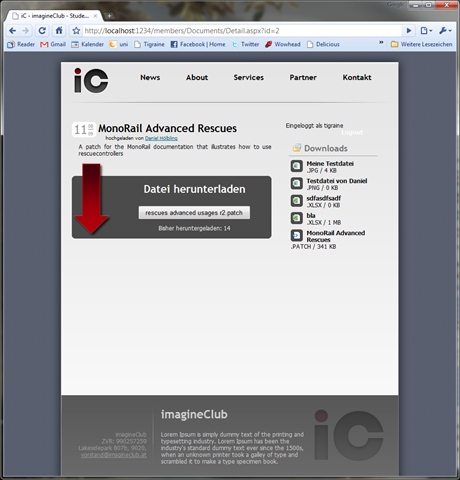
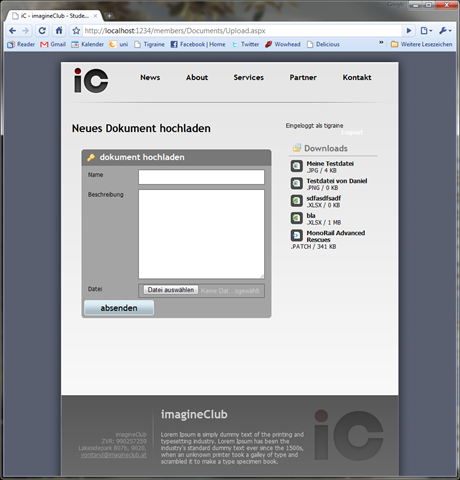
Well, today I finally around to implement file downloads/uploads and the file listing in the sidebar section. In all it’s glory it was nothing more than 10 lines of C# code and tons and tons of XHTML and CSS that I’d rather not go into.

Here are some screenshots of the current version:

 image image

It’s really rough around the edges and I will probably need to bring in a markdown editor to allow formatting when posting. I plan on stealing Ken Egozi’s Windows Live Writer integration for the news section, but when users upload files to the site they need to have some way of formatting their text.

Also I’ll look into Less.NET to manage my CSS because it is becoming very very verbose at the moment and restructuring it is just painful. This is mainly due to the fact that I want to keep the markup was ignorant to presentation as possible and as expressive as possible. All forms are built with accessibility in mind and are passing the webaim tests.

Next up on my list is a search/list option for uploaded files. Maybe improve the file organization a bit more and then start to write the ELMS integration to allows logged in users access to the MSDN-AA. Once we are done with the ELMS thing I’d dare to launch the site.

Read more →

DefaultValue attribute for Castle MonoRail

While reading through ScottGu’s announcement of the ASP.NET MVC 2 Preview 1 I noticed this rather interesting little feature that’s in there:

DefaultValue attribute in ActionMethod

MonoRail is much smarter about action methods than MVC so there are already things going on with default values through routing etc. But this particular thing wasn’t in the framework until now. So I took Ken Egozi’s sample about using IParameterBinder to implement the DefaultValueAttribute in MonoRail.

The result in syntax is identical to ASP.NET MVC 2 P1 and it was very easy to do:

public void Browse([DefaultValue("beer")] string category, [DefaultValue(1)] int page)
{
    
}

How is this done? Well, I suggest you read Ken Egozi’s post since he does a much better job at explaining that thing. Anyway, here is the code to make that happen:

using System;
using System.Reflection;
using Castle.MonoRail.Framework;

[AttributeUsage(AttributeTargets.Parameter, AllowMultiple = false, Inherited = false)] public class DefaultValueAttribute : Attribute, IParameterBinder { private readonly object value; public DefaultValueAttribute(object value) { this.value = value; }

public int CalculateParamPoints(IEngineContext context, IController controller, IControllerContext controllerContext, ParameterInfo parameterInfo) { var token = context.Request[parameterInfo.Name]; if (CanConvert(parameterInfo.ParameterType, token)) return 10; return 0; } private static bool CanConvert(Type targetType, string token) { if (token == null) return false;

try { Convert.ChangeType(token, targetType); return true; } catch (FormatException) { return false; } }

public object Bind(IEngineContext context, IController controller, IControllerContext controllerContext, ParameterInfo parameterInfo) { string token = context.Request[parameterInfo.Name]; Type type = parameterInfo.ParameterType; if (CanConvert(type, token)) return Convert.ChangeType(token, type); return value; } }

Read more →

Most annoying thing to ever happen: Configuration manager screwup

I think I was pretty close to a major nervous breakdown due to this one misconfiguration of my Visual Studio that I have no explanation for:

image

Imagine yourself trying to test some new behavior that according to your unit tests works, but simply refuses to work inside your web-app because the call to it hasn’t been compiled yet!

Breakpoints don’t get hit, changes don’t appear.. Mayhem! (Oh, and to top it off, since views aren’t compile you still see some of your changes, just not the ones in real code).

I first thought it’s some problem with the ASP.NET MVC project type, but eventually I noticed that if I don’t manually recompile the project none of my changes appear.

Way to go, I should have seen that yesterday instead of spending almost an hour hunting bugs where none where to be found.

Update: To add insult to injury I again forgot that checkbox turned off after taking the above screenshot.

Read more →

A better way to write enumerations

One thing I constantly struggle with is enumerations. They are inherently dumb, carry little more than one integer of actual information and usually mean a lot more than their name conveys.

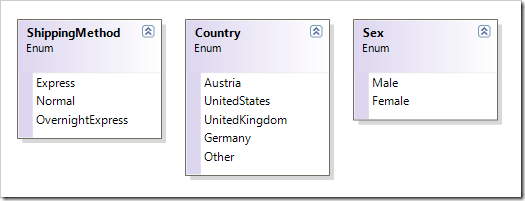
Let aside Enumerations as method option flags (where they actually do make sense!), the usual line of business application will have these three enumerations somewhere:
image

Now, let’s ignore all the others our most basic example would be the Sex enumeration that has usually one but only one use: How to salute your user when communicating.

Like the obvious emails you get:

Hello Mr. Hölbling, we’d like to thank you for your …

You get the drift. If I’d perform a sex change someday the system should address me as Mrs. Hölbling (and actually, that type of thing is much more of a problem in German than in English, but anyway).
And the code to do that would look something like this:

string salutation = "Mr.";
if (sex == Sex.Female) salutation = "Mrs.";

Console.WriteLine("Dear {0} Hölbling", salutation);

In a typical web application you’ll be repeating this piece of code numerous times, since being polite doesn’t hurt. Where this would actually hurt is if you’d mindlessly copy&paste that piece of code wherever you have to greet your user. You’d be violating DRY and the guy maintaining your code in 2 or 3 years will find out where you live and kill you in your sleep some day.

What I’d like to see as a solution to this is to simply have a method living on that enumeration. Like:

Console.WriteLine("Dear {0} Hölbling", sex.GetSalutation());

And that’s possible, just not very convenient. You’ll have to emulate the enumeration through a class:

public class Sex
{
    public int Id { get; private set; }
    public string Salutation { get; private set; }
}

Should work like a charm, but you loose the benefit of typing Sex.Female when setting a gender. So here is how to make a class look & feel like a enum without the limitations:

public class Sex
{
    public static Sex Male = new Sex{Id = 0, Salutation = "Mr."};
    public static Sex Female = new Sex{Id = 1, Salutation = "Mrs."};

    public int Id { get; private set; }     public string Salutation { get; private set; } }

You can now do stuff like:

new User()
    {
        Name = "Daniel",
        Sex = Sex.Male
    };

And if you have added equality on the id (as you always should) you could make decisions like with real enumerations:

if (user.Sex == Sex.Female)
{
    //Do Something
}

Now you could even go ahead and subclass your Sex class and dump logic in there if you please. Hell, even persist that type to a database using NH and the WellKnownInstanceType as Fabio points out.

The full implementation of our above Sex enumeration is beyond the jump.

public class Sex
{
    public static Sex Male = new Sex {Id = 0, Salutation = "Mr."};
    public static Sex Female = new Sex {Id = 1, Salutation = "Mrs."};

    public int Id { get; private set; }     public string Salutation { get; private set; }

    #region Equality methods

    public bool Equals(Sex other)     {         if (ReferenceEquals(null, other)) return false;         if (ReferenceEquals(this, other)) return true;         return other.Id == Id;     }

    public override bool Equals(object obj)     {         if (ReferenceEquals(null, obj)) return false;         if (ReferenceEquals(this, obj)) return true;         if (obj.GetType() != typeof (Sex)) return false;         return Equals((Sex) obj);     }

    public override int GetHashCode()     {         return Id;     }

    #endregion }
Read more →

MVC vs MonoRail – Action Methods

Many people have said nasty things about the Castle MonoRail framework since ASP.NET MVC has come out. Both serve the same purpose but both frameworks are pretty different. I did/do projects in both these days, and usually all features of A are also present in B, just slightly different.

One thing where this isn’t true is the layout of ActionMethods in MVC:

In short, MonoRail can have unlimited method overloads for ActionMethods while MVC can only overload twice (once for each HttpVerb).

What do I mean?

MVC:

public class HomeController : Controller
{
    public ActionResult Index()
    {
        return View();
    }

    [AcceptVerbs(HttpVerbs.Post)]     public ActionResult Index(int id)     {         return View();     } }

MonoRail:

public class ContactController : SmartDispatcherController
{
    public void Index()
    {
        
    }

    public void Index(int id)     {              }

    public void Index(int id, string name)     {              } }

You can see clearly, MonoRail as a framework is much smarter about what action method it will invoke. Based on what parameters you supply it will pick the best match. 
MVC will simply use reflection to invoke any method with that name that matches the HttpVerb, so once you remove the AcceptVerbs attribute MVC will break with a AmbiguousMatchException.

MVC vs MonoRail

Just to get bias out of the way: I believe MVC is technically still inferior to MonoRail but makes that up in larger community and (much) better documentation. What you pick is largely dependant on how well you know your way around missing documentation and open source code mailing lists.

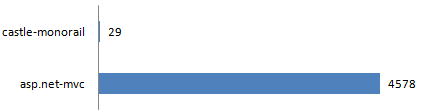
To illustrate this I went to stackoverflow and compared the number of questions tagged with asp.net-mvc with those tagged castle-monorail. The results may very well speak for themselves:

image

It’s a shame I have to say. MonoRail is such a nice framework and it really does not deserve getting stomped by ASP.NET MVC. As funny as this may sound for a OSS project, currently the best way to contribute to MonoRail is to write about it and if possible improve documentation around it. I guess that says everything about the quality/maturity of the framework.

Read more →

Bad poor man’s IoC in default MVC template

This is directly from the standard MVC template upon starting a new project:

// This constructor is used by the MVC framework to instantiate the controller using
// the default forms authentication and membership providers.

public AccountController()     : this(null, null) { }

// This constructor is not used by the MVC framework but is instead provided for ease // of unit testing this type. See the comments at the end of this file for more // information. public AccountController(IFormsAuthentication formsAuth, IMembershipService service) {     FormsAuth = formsAuth ?? new FormsAuthenticationService();     MembershipService = service ?? new AccountMembershipService(); }

I didn’t realize this is in the default template of ANY MVC install when Ayende pointed this out in his NerdDinner review yesterday. Wow, speaking of bad defaults..

If you don’t want to burden yourself with “real” IoC, at least do it right:

// This constructor is used by the MVC framework to instantiate the controller using
// the default forms authentication and membership providers.

public AccountController()             : this(new FormsAuthenticationService(), new AccountMembershipService()) { }

// This constructor is not used by the MVC framework but is instead provided for ease // of unit testing this type. See the comments at the end of this file for more // information. public AccountController(IFormsAuthentication formsAuth, IMembershipService service) {     FormsAuth = formsAuth;     MembershipService = service; }

Read more →

Keeping up with Castle

Especially when trying to follow the development of a big project like Castle you can get lost quickly. There is no real “main” endpoint to refer to. Some news get out there through the development mailing list, sometimes they come through blogs and sometimes they are only present in code.

What I found useful in following the project are the following places:

  1. Castle Project aggregator – a aggregate feed of most known figures involved in the castle development process
  2. Castle Project development mailing list – The place where discussion about features and structure happens
  3. Castle Project svn log – I like to look at commits to see what’s going on
    Note: Especially with castle where the last “official” release was in 2007 it’s imo quite important to know what’s going on when you are running the trunk version.

Read more →

Keeping up with Castle binaries through NAnt

One of the main annoyances of running from the castle trunk for me was copying new assemblies to my projects. Whenever I see something interesting pop up in the mailing list I usually run a SVN update to see what changed. While the castle build process is pretty simple at this point, picking the right assemblies and copying them to an ongoing project manually is just painful.

I did this exactly twice before I remembered the golden rule: automate!

This little NAnt target is now in charge of copying assemblies I need to my project’s lib directory:

<target name="castle-update">
<if test="${property::exists('castle-trunk-dir')}">
	
	<if test="${property::exists('skip-castle-compile') == false}">
		<echo message="Compiling castle trunk release binaries..." />
		<exec program="build.cmd" basedir="${castle-trunk-dir}" workingdir="${castle-trunk-dir}">
		</exec>
	</if>
	
	<echo message="copying castle binaries" />
	
	<copy todir="lib\castle">
		<fileset basedir="${castle-trunk-dir}\build\net-3.5\release\">
			<include name="Castle.ActiveRecord.???" />
			<include name="Castle.Components.Binder.???" />
			<include name="Castle.Components.Common.EmailSender.???" />
			<include name="Castle.Components.Common.TemplateEngine.???" />
			<include name="Castle.Components.Common.TemplateEngine.NVelocityTemplateEngine.???" />
			<include name="Castle.Components.DictionaryAdapter.???" />
			<include name="Castle.Components.Pagination.???" />
			<include name="Castle.Components.Validator.???" />
			<include name="Castle.Core.???" />
			<include name="Castle.DynamicProxy2.???" /> 
			<include name="Castle.MonoRail.ActiveRecordSupport.???" />
			<include name="Castle.MonoRail.Framework.???" />
			<include name="Castle.MonoRail.Framework.Views.NVelocity.???" />
			<include name="Castle.MonoRail.TestSupport.???" />
			<include name="Castle.Services.Logging.Log4netIntegration.???" />
			<include name="Iesi.Collections.???" />
			<include name="log4net.???" />
			<include name="*.license.txt" />
			<include name="NHibernate.ByteCode.Castle.???" />
			<include name="NHibernate.???" />
			<include name="NVelocity.???" />
		</fileset>
	</copy>
</if>
<if test="${property::exists('castle-trunk-dir') == false}">
	<fail message="Please specify the directory to castle-trunk through -D:castle-trunk-dir=<directory>" />
</if>
</target>

This little script will compile castle and then copy over all files I need to my /lib/castle folder, making a castle update as easy as writing:

build castle-update -D:castle-trunk-dir=..\open-source\castle-trunk

Make sure you have your /lib/ folder under source control in case some breaking changes come from the new castle binaries.

Read more →

FileUpload in MonoRail

After a stressful week of non-computer related stuff eating up my time today I finally got around to continue some work on the imagineClub website.
I approached the section of file uploads and just wanted to quickly point out an excellent post by Ken Egozi about how to properly handle file uploads with MonoRail.

FileBinderAttribute to ease FileUpload in MonoRail – by Ken Egozi

It’s really nice to see that MonoRail has File upload baked directly into the framework. It’s as easy as that:

public void Upload([DataBind("Document")] Document document, HttpPostedFile uploadedFile)
{
	if (uploadedFile != null)
	{
		//TODO: Save File to Disk, Test this properly
	}
}

But what Ken addresses is a neat way to keep this testable without obscuring the controller code.

Also, apparently Ken has written his own weblog engine ontop of MonoRail and even opensourced it for the public to look at and hopefully learn something from it. It’s really great to see real application code somewhere instead of just samples and short demos. Also from what I saw in the repository it’s not too complex to make you cry and yet real enough to show you some interesting things about MonoRail.

Read more →

ARFetch attribute in MonoRail

MonoRail and ASP.NET MVC while being very different both almost mirror their features. Few things are impossible in one of both and the only really major difference between those two is that MonoRail comes packed with a suggested data access strategy: ActiveRecord.

This pre-packing is completely optional, it’s very easy to implement whatever data access logic you like, but if you choose ActiveRecord you’ll benefit from some nice things like the ARFetch attribute.

See this action method and judge for yourself:

public void Detail([ARFetch("Id")] NewsPost post)
{
    PropertyBag["post"] = post;
}

You just tell MonoRail through ARFetch what request-parameter is the object’s Id and it will fetch that entity from your DB and pass it into your method. It’s so simple that it’s almost tragic, yet it’s a huge time saver in most CRUD cases (edit, update and delete usually involve fetching the entity first).

Also, for a change, ARFetch is one of those few things inside MonoRail that needs zero documentation. It just works! (Besides the fact that you need to know it exists of course).

Read more →