#net

Posts tagged net

Writing ELMAH Exceptions to Log4Net

Yesterday a friend asked me if I know how to make ELMAH write exceptions to a Log4Net appender.
My first idea was to write a custom ErrorLog that would do that, but that’s not really possible since ELMAH must be able to retrieve errors after the fact so they can be displayed in ELMAH’s web interface.

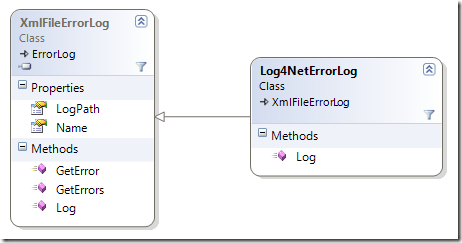
Well, turns out it’s even simpler and more obvious by simply subclassing an existing ErrorLog and hook into the Log method:

image

Assuming you use the XmlFileErrorLog (you can use this method with all of them) you simply subclass it and put your call to Log4Net before the base.Log call:

public class Log4NetErrorLog : XmlFileErrorLog
{
    public Log4NetErrorLog(IDictionary config) : base(config)
    {
    }

    public Log4NetErrorLog(string logPath) : base(logPath)     {     }

    readonly ILog log = LogManager.GetLogger("bla");     public override string Log(Error error)     {         //Write whatever you want to Log4Net         log.Fatal("Exception logged through ELMAH: " + error.Message, error.Exception);         return base.Log(error);     } }

Now the only thing you have to do is change the errorLog line in your ELMAH configuration (found in web.config) to reference your new ErrorLog subclass:

<elmah>  
    <errorLog type="MyAssembly.Log4NetErrorLog, MyAssembly" logPath="~/App_Data" />  
</elmah>

It will still log to XML, but also generate one entry per log to Log4Net. If you don’t want to save anything you can simply subclass the MemoryErrorLog class and set it’s size to 1.

Read more →

The joy of working with dotless

Ok, I just spent some time on the imagineClub website adding our board’s bio page. The HTML is not really interesting, but since imagineClub was written while dotless was still in development I wrote the CSS the old fashioned way.

Since dotless has reached some maturity I’ve been dogfooding it on imagineClub to make use of the minifier and the caching, but never had any real LESS code in there.
When I had to fix something today I was so happy to be able to write CSS like this:

div#team
{
    width: 414px;
    p
    {
        float: right;
        width: 300px;
    }
    h2
    {
        clear: right;
        font-size: @title-fontsize - 4;
    }
    img
    {  
        width: 100px;
        margin-bottom: 4px;
    }
}

This is how CSS was supposed to be, and with dotless it has become just mindlessly easy to do..

Read more →

ELMS-Connector documentation available

I decided not to invest any work in writing docs for a tool only I am using, due to the fact that it quite rapidly outdates during active development.

Well, ELMS-Connector development is mostly finished and after getting an email by someone from Amsterdam asking how to use ELMS-Connector I decided to finally write the docs.

The documentation is in the GitHub repository alongside the code, but I also saved it as PDF and uploaded it.

It’s by no means perfect, but it should be enough to get anyone who wants to use ELMS-Connector up and running quite smoothly. Comments are always welcome.

Read more →

EMLS-Connector v1.0 RTW

After almost a month and 3 weeks of having the connector in production I finally feel that it’s time for a v1.0. So, here it is. I just pushed the v1.0 tag to GitHub!

You can grab the release zip containing everything you need here:

ELMS-Connector v1.0 RTW

Note on this release: Some of the existing code I published in my initial article is now outdated. Some refactoring (and a annoying typo) has gone on and I don’t have any docs ready for people trying to use this. So if you want to use ELMS-Connector on your campus, just contact me through email at [email protected] and I’ll be glad to walk you through the setup process. Docs will follow, but at the moment I don’t feel like writing documentation for something only I am using.

Changes since the Beta:

1: Configurable file extensions

2: Session Authentication

Session Authentication

The main annoyance with ELMS-Connector so far has been that whenever a User hits the MSDN-AA he has to re-authenticate himself even if he is authenticated to the source system.

I found a way to elegantly prevent that without breaking anything: IExtendedAuthenticationService

While IAuthenticationService only requires you to implement one method:

bool AuthenticateUser(string username, string password);

IExtendedAuthenticationService comes with another two:

public interface IExtendedAuthenticationService : IAuthenticationService
{  
    bool IsAlreadyAuthenticated();
    string Username { get; }
}

IsAlreadyAuthenticated should return true if the current user already has a open session, and Username should then return his current username. If you use IPrincipal in your web app this would look like this:

public bool IsAlreadyAuthenticated()
{
    return HttpContext.Current.User != null && HttpContext.Current.User.Identity.IsAuthenticated;
}

public string Username {     get     {         return HttpContext.Current.User.Identity.Name;     } }

This way ELMS doesn’t prompt the user again for his credentials but rather directly redirects him to Microsoft’s ELMS server, making for a very smooth user experience.
If IsAlreadyAuthenticated is false, the user is presented with the usual login form and authentication works like it used to before (this happens if the user comes from the Microsoft ELMS site without having a session on your campus site).

Read more →

Simplifying releases through git

I confess: I love writing build scripts. They are usually insanely easy to write, and provide you with a disproportional amount of value over time that it’s almost tragic not to have them. And, I love git.
So, what’s better than to see git simplifying my buildfiles :).

Imagine the usual: Your assembly version is encoded in your buildfile, so whenever you want to release you do the following:

  1. Increment version number in buildfile
  2. Run buildfile
  3. Create a tag in your SCM for the released version

Now, thanks to the smart people at the castle mailing list I found out about the git describe command. By using git-describe you can simplify the above to just:

    1. Create a tag in your SCM
    2. Run buildfile

The function for that is quite simple:

function Get-Git-Commit
{
    return git describe
}

function Get-Git-Version {     $v = git describe --abbrev=0     return $v -replace "v", "" }

Get-Git-Commit is returning the full name of the build, giving me a string like: v0.1.0.2-2-gd19ce0f.
And Get-Git-Version will output the tag-name without the leading v so it can be used as the product version inside the assembly info.


My buildscript then uses this version information from git to write my AssemblyInfo.cs files and build numbers have started to magically change!

This technique helps me to avoid all the hassle of incrementing build numbers, but instead allows me to focus on my work more. Once I feel the release is done, I simply hit:

git tag –a v1.0.0.1

(don’t forget to use git push –tags to get them to your server)

Hey, that’s awesome! There has to be a catch right? Indeed, there is:

If git is not installed, you can’t compile. Bummer I know, especially since the unwashed masses are in the process of slowly grasping the concept of SVN, who would want to throw a DVCS like git at them?
This is why all of my build script have a step called release that packs everything together in one nice zip file and I can then upload it to some server. In case someone has no git, he’s stuck with my binary files.

You can see this in action by looking at these open-source buildfiles I wrote lately: dotless, elms-connector.

Read more →

Setting up TeamCity + git + psake for dotless

Let me say one thing upfront: Setting this up has been a HUGE pain in the ass (PITA for short), and I really hope this gets fixed sometime in the future, because those 3 hours I just spent getting this done are never coming back..

Ok, just to make sure everybody understands: dotless is built using a PSake build script that has to be run through Powershell. The script itself calls out to git and therefore relies on git being installed into the PATH.

First: Git-Teamcity

Since our build relies on executing a git command during build the official JetBrains plugin doesn’t cut it (it only copies the sources, not the .git folder). So I downloaded git-teamcity from GitHub and built it using maven (at least something worked).

After that I followed this tutorial on how to install the plugin on TeamCity:

  • package the plugin by following the steps outlined in file pkg in the Git plugin folder: create a foldergitAgent/lib in the folder target, copy all the .jar files (should only be Git-vcs.jar) to this folder, and then zip gitAgent to gitAgent.zip
  • deploy the plugin by following the steps outlined in file deploy in the Git plugin folder: copygitAgent.zip to \webapps\ROOT\update\plugins, and copy Git-vcs.jar to\webapps\ROOT\WEB-INF\lib

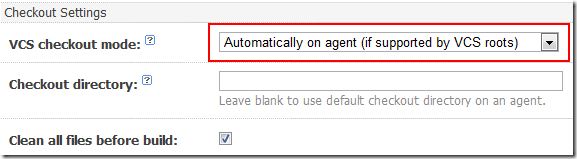
Well, after setting up a new VCS Root inside TeamCity the most important part is to set the VCS checkout mode to “Automatically on agent (if supported by VCS roots)”
image

Warning: Also make sure that you have git installed at C:\Program Files\git, because that is the only place git-teamcity will look for the bin (unless you change the code).

Second: Execute Powershell

Apparently there is some major bug with the ConsoleRunner inside TeamCity so all attempts to simply run the Powershell didn’t work. Directly invoking Powershell led to the build timing out. After some digging I found this thread that explained the problem and hinted at a possible solution: Touble with Powershell and NAnt during build

So, I created a .bat file called TeamCity.bat that calls Powershell directly from it’s full path (C:\Windows\System32\…) like this:

C:\WINDOWS\system32\windowspowershell\v1.0\Powershell.exe .\psake.ps1

But this doesn’t work due to the above bug in TeamCity. The build kept hanging and eventually got terminated due to an timeout. So I had to change it to something like this:

echo abc | C:\WINDOWS\system32\windowspowershell\v1.0\powershell.exe .\psake.ps1

Putting echo in front of it made it work, I have no idea why, but id worked.
Now the next problem came up: although I explicitly ran Set-Executionpolicy on the box the runner’s executionpolicy was not set. So I added the Set-Executionpolicy to the .bat file:

echo abc | C:\WINDOWS\system32\windowspowershell\v1.0\powershell.exe Set-ExecutionPolicy remotesigned
echo abc | C:\WINDOWS\system32\windowspowershell\v1.0\powershell.exe .\psake.ps1

Now, finally the script was executing, but due to no environment variables, my buildscript could not locate git (due to the ConsoleRunner not having ANY environment variables present).

The final version of my TeamCity.bat then included a change to the PATH variable and it finally worked:

Set "path=%path%;C:\Program Files\git\bin" 
echo abc | C:\WINDOWS\system32\windowspowershell\v1.0\powershell.exe Set-ExecutionPolicy remotesigned
echo abc | C:\WINDOWS\system32\windowspowershell\v1.0\powershell.exe .\psake.ps1

At that point the build was finally executing and I then only had to tell TeamCity where to find the build artifacts and I was done.

Conclusion

Now that it works, I’m glad I took the time to set it up. But the process could have gone smoother.
Anyway, the good news is:

You can now get a release version from every future commit to the dotless repository right from our dotless TeamCity server!
Read more →

imagineClub.at is now finally online

logo After almost 4 months of work I am pleased to announce that the new imagineClub Website is finally online at

http://www.imagineclub.at

You can read what this is all about here.

Besides the obvious design refresh the new website has numerous administrative improvements that allow us to more easily share information with members and also allow new members to join the fun since we are now able to unlock their accounts without having to hack SQL together.

As you may already know, the new website is also licensed as open-source software and the code is freely available from my GitHub Repository. Since we allow our users to use MSDN-AA the site internally uses my other open-source project elms-connector (source on GitHub) to connect up to the Microsoft servers.

And to take dogfooding to a new level, I already have a unpublished changeset that will make imagineClub.at use the dotlesscss project to improve the project's CSS.

You may have guessed by now that the whole site is completely built ontop of open-source frameworks. It is based on Castle MonoRail, running ontop of Castle ActiveRecord with some (but not deep) Castle Windsor integration.
In fact, I would have used Windsor more, but using the ActiveRecord pattern with all it's static goodness somehow limited the use of inversion of control.

I primarily chose Castle MonoRail due to the fact that I had come off a ASP.NET MVC project and wanted to learn another MVC framework besides the blue one. I can't say I'm sorry for that decision. MonoRail has proven itself to be a very mature and very extensible framework that supported me all the way to releasing the site. 
I do regret however chosing NVelocity as my viewengine, Spark seems to be the better choice at the moment and NVelocity is really awful when it comes to debugging problems.

Anyway: Thanks to all these great open-source projects that made this possible, and also a big thanks to Kristof who sponsored the new design!

Read more →

It&rsquo;s a kind of magic: MonoRail

I never cease to be amazed about Castle MonoRail, but this time I was really puzzled.
While working on a simple CRUD page I wrote code like this:

public void Unlock([ARFetch("id")] Member member)
{
    PropertyBag["member"] = member;
}

public void Unlock([ARFetch("id")] Member member, DateTime expiration) {     ...

My view was then just a standard form, a textfield and a submit button.

<form action="" method="POST">
    <ul>
        <li>
            $FormHelper.LabelFor("expiration", "Account expiration date")
            $FormHelper.TextFieldValue("expiration", "29.01.2010")
        </li>
        <li>
            <input type="submit" value="Unlock" />
        </li>
    </ul>
</form>

And, you may have guessed it, I forgot to put a hidden field with the UserId in there somewhere!
Yes, I know – what a common mistake and what a bad one at that. But, and that’s the scary part. It worked still! I checked and re-checked, there is no Id anywhere passed as a result of the form submit, yet MonoRail somehow gets the Id from my previous call and works with that.

I couldn’t find the code inside MonoRail responsible for this behavior, and it seems only to work with Post requests to an empty action so far, but still amazing.

Well, since I can’t see the code, I remain skeptical and added the hidden id anyway. Witchcraft like this feels wrong, I like mysteries though.

Read more →

ElmsConnector configurable file extension

Seriously, nothing makes you more aware of problems with your stuff than dogfooding! I’ve been busy all day trying to get the new imagineClub website out of the door (yes we finally launched!) and just when I thought I had everything nailed one thing about ElmsConnector made me panic:

IIS6 is not passing *.elms requests on to the ASP.NET pipeline, so ElmsConnector was never called.

To fix this you need to have access to the server configuration and change that through IIS Manager. Since we (and I guess many other people) are on a shared host we could not do that, and so I had to change all paths to *.axd on short notice.

But, I felt like *.axd may also not work for everyone, so I decided to just make that an optional setting through the elms.xml:

<component id="FileExtensionProvider">
  <parameters>
    <extension>ashx</extension>
  </parameters>
</component>

This little XML will change all paths inside ElmsConnector to .ashx instead of the default .axd. (Omitting that XML will result in all your paths being .axd)

Also note that I had to introduce one additional placeholder into the Login.htm.


Make sure that you include the $EXTENSION$ placeholder into your form action:

<form method="post" action="VerifyUser.$EXTENSION$">

This feature is available through release v0.1.0.3 from GitHub.

Read more →

Beggars can&rsquo;t be choosers: Dependency injection through global factories

Whenever you listen to testability talks you usually take away one universal truth:

Global state is bad, singletons are essentially global state.

So, if you want to have it done right, use dependency injection and don’t let your code depend on global state.

But: Sometimes it’s just not possible. My current project for example does not use dependency injection. Why? I didn’t know better and used ActiveRecord with all it’s static design. And besides, I’m just lazy and have no intention of diving into the Castle documentation to find out how to teach ActiveRecord to use an IoC container when creating entity objects.

And if you have no control over your constructor, your options for dependency injection are limited to two things:

Public fields (aka optional dependencies) and Global factories.

Public fields

While in theory a pretty decent method that allows you to swap out parts it falls very short once you have multiple classes that need the same service:

public class Entity
{
    public IDateProvider DateProvider { get; set; }

    public Entity()     {         DateProvider = new DateProviderImpl();     } }

Since the default implementation is hardcoded into every consumer, you end up with a big pile of DRY violations that will one day bite you when you try to refactor DateProviderImpl’s constructor.

Global factories

Now the words global and testability don’t go well together, but in this case it’s ok. You try to battle the DRY violation while still making your service optionally interchangeable when testing.

public class Entity
{
    public Entity()
    {
        var now = DateProviderFactory.Provider.Now;
    }
}

public class DateProviderFactory {     private static IDateProvider _provider;

    public static void SetProvider(IDateProvider provider)     {         _provider = provider;     }     public static IDateProvider Provider     {         get         {             if (_provider == null)                 _provider = new DateProviderImpl();             return Provider;         }     } }

Now obviously you should NEVER call SetProvider inside your production code. It’s a pure testability helper so if you start messing with it expect to see some really hard to debug errors pop up.

But as long as you don’t mess that up, you can write tests like this one:

public class TestFixture
{
    [Fact]
    public void DoesSomethingWhenGivenDate()
    {
        var mock = new MockedDateProvider();
        DateProviderFactory.SetProvider(mock);
        var entity = new Entity();
        //.....
    }
}

I know it’s not perfect, but nobody expected it to be that way. The best solution to the problem obviously is a very clean separation of object construction and business logic, and the proven way to achieve that is dependency injection through a container like Windsor or StructureMap. Yet, often you have to look at old codebases where you just need to get the job done, and then it’s nice to know your way around the limitations sometimes.

Oh, and btw: The example I did above was chosen deliberately to be something as simple as a abstraction of DateTime.Now. As said before, never depend on moving parts in your tests.

Read more →