#programmierung

Posts tagged programmierung

Never assume! Stack iterators in Java

I spent almost 2 hours of debugging Java code yesterday due to one assumption that proved fatally wrong: I assumed a Stack, by definition a LIFO data structure would iterate over it’s elements from the top of the stack to the bottom.

So inserting 1, 2, 3 the resulting order when iterating through the stack should be 3, 2, 1.

Well, at least that’s what .NET does. Java is different. Look at the following Java code:

Stack<Integer> stack = new Stack<Integer>();
stack.push(1);
stack.push(2);
stack.push(3);

for(Integer i : stack) { System.out.println(i); }

And this C#:

var stack = new Stack<int>();
stack.Push(1);
stack.Push(2);
stack.Push(3);

foreach (var i in stack) {     Console.WriteLine(i); }

Well, they look exactly the same, but Java will return 1,2,3 while C# will honor the Stack’s special semantics and return 3,2,1. Great stuff isn’t it?

The workaround was quite simple, yet it had cost me 2 hours of my life trying to hunt a bug in my code, never thinking the bug could lie in a simple foreach iteration through the stack..

Lesson learned: Never assume you know anything about data structure semantics unless you have checked that your assumptions are indeed true. Implementations differ and sometimes this will bite you.

Oh and did I mention that the way Java does it is simply wrong?

Read more →

Useful Resharper Live Template for WPF development

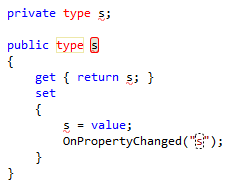
While doing some work in WPF for a customer project I found myself writing far too often code like this:

private bool isSelected;

public bool IsSelected {     get { return isSelected; }     set     {         isSelected = value;         OnPropertyChanged("IsSelected");     } }

Auto-properties simply don’t work with INotifyPropertyChanged so you have to do all the grunt work over again .. Thank god there is Resharper!

It’s said lazyness is a virtue on a programmer, so I made this little Live Template that will create all that code with you only having to fill in type and name of your property:

image

Download it here: wpfprop.xml

Read more →

Keep away from regions!

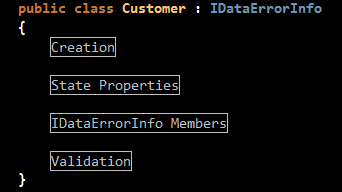
Well, I’m currently digging a bit deeper into WPF and the thousand little things you can do with it. Naturally I’ve been looking through my fair share of demo apps and tutorials too. And that’s where I stumbled upon this little gem of information hiding:

image

Exactly, that is what you get to see of a 200 LoC file when opening it up in Visual Studio. And the author did that for every single file, so whenever I opened a file I had to hit “Toggle all outlining” (Shortcut by default is CRTL+M, L).

Now, I’m all for clean code and tidy classes. But there are one thing fundamentally flawed with regions:

Once you need regions – Your code is simply too long.
My most successful (and biggest) project to date had no class that exceeded 100 lines of code, and you simply can’t imagine what a joy it was to work with that codebase. You simply can’t put enough logic into 100 LoC to make it hard to test, just by limiting the length of a class  you also lower the possible complexity of test and maintenance by a huge amount. Nice side effect: 100 LoC almost fit onto one screen so you understand the code without having to scroll through 3 pages of code to look up the name of a field.

Fix the root problem, not hide it!

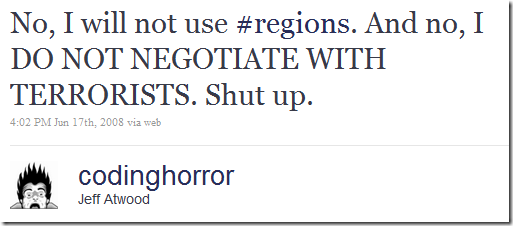
What again reminds me of Jeff Atwood and he is totally right:

image

Read more →

The dark side strikes again!

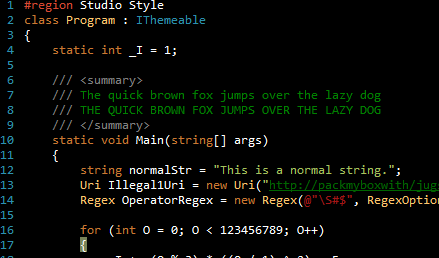
image

Oh, Microsoft took it’s sweet time with Visual Studio 2010 and C#4 but now that it’s finally here I had to find out that the Vibrant Ink theme I’ve been using for years now needs an update to match new stuff in the language.

Thank god I did a quick search to see if someone already did that, and I stumbled on a pretty cool little website: studiostyles.info
A website dedicated to Visual Studio Themes, apparently written in ASP.NET MVC it allows users to create styles with a pretty simple editor and then share it with the world. They also added voting and some community stuff to it, but even if it was only a user-generated theme gallery for VS I’d love it. Cool stuff.

Anyway, Luke Sampson (the creator of studiostyles.info) updated Rob’s Vibrant Ink theme for VS2010 and shared it through studiostyles. Thanks a lot.

You can find it here: http://studiostyles.info/schemes/wekeroad-ink

Read more →

.less repository has moved to it&rsquo;s own GitHub account

github Until now we stored the main source of the .less project in Chris Owen’s GitHub account. We now decided to create a dedicated GitHub user to host the project since Chris is no longer actively contributing and may or may not want to add changes that are not meant to be immediately committed into the mainline.

The new repository is at: http://github.com/dotless/dotless

We are still updating all references to the old project (website etc) but the move should be done fairly soon. If you are watching Chris’ repository make sure to also watch the new one as Chris’ repository may start lagging behind the mainline (depends on how often Chris will update his fork).

Oh, and btw: Thanks to the GitHub guys for providing this awesome service. Git + GitHub has simply revolutionized the way I write code and collaborate with people.

Read more →

.less Compiler now supports &ndash;watch

It’s been on our feature list for some time and it’s been in the code for some time too. But after fixing a final bug today I guess we can tell the world about it.

The main idea behind –watch is to free you of the burden of having to configure anything but lets you just run the console-compiler once and it keeps refreshing the resulting .css files whenever a change occurs to the .less input file.

How to use? Well, simple. First grab the latest release from our website http://www.dotlesscss.com and then go to your favorite commandline and start the compiler with the –watch parameter:

dotless.Compiler.exe <filename> –watch

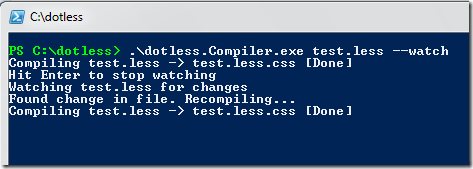
You will then get a nice console output telling you what is going on (and informing you of errors if any happen during compilation)

image

Read more →

New stuff in .less

Do you remember that little project I am involved in? That .less thingy I always forget to write about? Well, it’s still around and we are going very strong. We are seeing a decent amount of activity on our mailing list and people throw code at me at various occasions for fixing different problems within the the project.

One of those persons is James Foster, a really nice guy from the UK with some mad programming skills who set out to make .less awesome. Well, he sort of did already, by contributing some major code changes to the .less parser that enabled him to port over some SASS functions to .less. Sadly he does not blog himself, so the honor is mine to report to the world what he did.

Color functions

Before going into details, the main idea is that you are now able to modify any component of a color separately. So far .less has only supported arithmetic operations on colors (like #abc000+ #000def => #abcdef) so if you e.g. want to darken a color while adding 10 points of green to it you where out of luck, making the feature not really all that useful. Well, thanks to James now we can!

Creating colors

.less understands that #FFFF is supposed to be treated as a color, so if you start working off web colors you can just use the hex notation and ignore the following functions. In case you are more the designer type settled in the RGB world and want to have lightness and alpha around, you will need functions to create the colors. And while at it James also added color literals so .less detects a @color: blue; instruction just like it would a @color:#0000FF one. Anyway, if you have your colors RGB or HSL you need to use the following functions to create them:

rgb(red, green, blue) rgba(red, green, blue, alpha) hsl(hue, saturation, lightness) hsla(hue, saturation, lightness, alpha)
You might guess from the parameter names how they work. But to be thorough:
@mainColor: rgb(0, 0, 255); //Blue
Modifying colors

Now, once you hold on to a variable that contains a color you can do some pretty exciting stuff with the following color manipulation functions:

red(color, value) green(color, value) blue(color, value) hue(color, value) saturation(color, value) lightness(color, value) alpha(color, value)

the value can be positive or negative, for instance, to darken a color by 20% you can use "lightness(color, -20%)".

You pass in a color and then the amount you want to change it. If you omit the change value part the method will return the appropriate component of the given color (meaning: red(@color) will return the red portion of that color, while red(@color, 10%) will increase the amount of red by 10%).

And while at it, James also added some convenience functions for good measure to make your day easier:

greyscale(color) this is equivalent to saturation(color, -100%)

complement(color) this is equivalent to hue(color, 180)

mix(color1, color2, weight) mixes 2 colors together. The weight argument is optional and specifies the percentage of the first color to use compared to the second color. it also takes into account transparency - if a color is more transparent it has less effect on the resulting color.

You can get all of that functionality through the latest .less build from our website http://www.dotlesscss.com or just grab the code from GitHub. If you have any questions or suggestions feel free to participate through our mailing list.

And lastly, let’s give credit where credit is due: Thanks to James for the great work he put into .less. James himself stated that he based most of his work on stuff he saw on the Sass project, you can read about their color functions implementation here: Powerful Color Manipulation with Sass. The initial code for Sass was created by Chris Eppstein for the “compass-colors” project which has now been merged into the main Sass codebase. You can also see his pretty impressive demo here: http://chriseppstein.github.com/compass-colors/
Read more →

Disable AutCrlf in MsysGit!

Ok, today I got this really cool pull request from Jon Galloway for .less. He did some improvements to the T4 Template for .less so that it will run the template on every build if you want that, or that Visual Studio opens up .less.css files. Cool stuff, and thanks a lot Jon! Of course I quickly looked through the changesets and then went ahead and committed it, but I noticed one novice mistake many people run into with MsysGit on Windows.

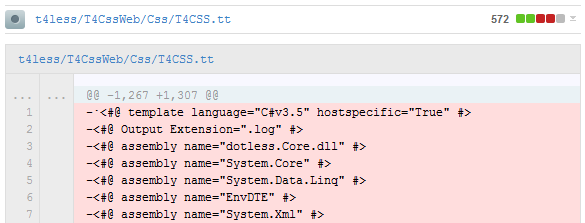
image

I am pretty sure Jon only changed a few lines of code, yet the changeset logs every file in the document as changed, thus making it pretty unreadable. This happened to me a lot when I started out with GIT, and finding the solution to this wasn’t easy either. So here is how to fix your MsysGit.

This is caused by a little setting called core.AutoCrlf that is set in MsysGit by default to true. MsysGit will then go ahead and localize the line-ending depending on what machine you are running on. This happens on checkout, so even with abolutely zero changes to the repository you’ll see a lot of local changes where there haven’t been any.

Needless to say how stupid this setting is, it only generates a ton of useless insertions and deletions while sticking to the pipe dream that everyone on the team will use the same tools to generate consistent line feeds (I’ve even had issues with only Windows machines and this setting).

Now the solution to this is rather simple:

image

By running “git config –global core.autocrlf false” you disable this and the text files will not get changed upon checkout. This now means that Visual Studio will maybe ask you to fix inconsistent line endings when opening a file, but it is still better than having your source control screw you over upon checkout.

Read more →

Print dialog not showing up on Windows 64 Bit on a AMD CPU

Imagine the following: Clint calls telling me “Hey Daniel, I just got a new computer with Windows 7 64 Bit installed, everything is working great so far. The Software you wrote a year ago works fine on it too, only problem: I can’t print”

My immediate reaction: “Reboot the system” (ok kinda lame, but I have spent too much time with problems that went away through a reboot to not suggest it).
Well, but the reboot didn’t help here. Even after rebooting the print dialog was still not showing up.

Now, I know for a fact that the Software runs fine on Win7, I also know it runs fine on Win7 x64 (since I developed it running both x32 and x64 Win7 Beta builds back in the day). And since I am using the PrintDialog class provided by the .NET framework I wasn’t really sure what  could be the issue. I mean, hey that’s a framework class, those things are supposed to run cross platform and be CPU ignorant. But hey, why not simply ask Google the most stupid question I could think of: “windows 64 .net print dialog” ..

And the answer was right there on Microsoft’s MSDN page as a remark:

Also, The PrintDialog class may not work on AMD64 microprocessors unless you set the UseEXDialog property to true.

WTF? (Ok more words come to mind, but since I don’t want to get hatemail for my language I’ll leave it at that).

We are talking about a class in the .NET BCL that is supposed to work cross plattform (at least Windows), be completely CPU ignorant (fully managed), and yet I have to set UseExDialog to true to see this dialog on a AMD CPU? Are you kidding me Microsoft?

Well, the fix was quite easy (thankfully). I went into my PrintDialogFactory and changed one line of code, packed a new release and sent it to my client, yet my confidence in BCL classes has been severely shaken.

I really don’t know anything about the reasons for this odd (to say the least) behavior, but I can say that I am a bit sad to see it monkey-patched like this. Especially in a VM environment like the .NET framework I expect Microsoft to solve their system-specific problems under the hood where I can’t see them and don’t have to care about them.

Read more →