#programmierung

Posts tagged programmierung

.Less now supports files from the VirtualPathProvider!

Ok, I’ve just spent almost the whole day refactoring the hell out of our .less codebase just to add one tiny change:

Allow users to not only load files present on the current file system, but also directly from in-memory strings and VirtualPaths (as requested on the list). The problem here being that not everyone wants to serve his .less files right from the server’s file system but sometimes people have pretty sophisticated virtualized storage systems in place that require them to use the VirtualPathProvider abstraction that was added to .NET 2.0.
You can read up on that in ScottGu’s blog or David Ebbo’s blog, but in a nutshell it’s just another way to open files besides using System.IO.File.Open(), letting you forget about all the nasty stuff of where the file is really located. 

To do so I had to allow uses to plug in different “Sources” for .less code, and so I also had to make a breaking change to the main ILessEngine interface. The Interface was taking a filename as parameter, but in light of our recent support emails on the development list I decided that has to go away in favor of a more open approach (mainly to allow users to simply throw in-memory strings at the engine).

Because I know this will break some code, all implementors of ILessEngine still offer the old string parameter as an overload that then defaults to the default FileSource.

Now, for changing the source provider:

If you want to use anything besides the default filesystem based FileSource provider, you now have the ability to plug in a type implementing ILessSource through the DotLessConfiguration (thus through web.config).
.Less comes with three sources built in: VirtualPathSource, FileSource (default).

FileSource by default just opens a file through System.IO.File, while VirtualPathSource will use the HostingEnvironment.VirtualPathProvider.GetFile() method to open a Stream and read the .less code from there.

To enable the VirtualPathSource in your web application you simply need to modify your web.config a bit:

<dotless minifyCss="false" cacheEnabled="true" source="dotless.Core.VirtualPathSource">
  
</dotless>

The important part is the source attribute as it has to reference a type name implementing ILessSource. So if you want to create your own less source you could simply create another implementation of ILessSource and reference it’s name in the .less config.

If you want to use .less directly from your code to transform something you can just new up a LessSourceObject (the very output we get from ILessSource) and throw your code in there like this:

ILessEngine lessEngine = new EngineFactory().GetEngine(new DotlessConfiguration());
var output = lessEngine.TransformToCss(new LessSourceObject() {Content = "my .less code here"});

As always you can get the latest code from GitHub, or the latest binary release through our TeamCity build server. You can read more about .less (pronounced dot-less) on the project’s website at http://www.dotlesscss.com.


And while at it, we’d appreciate it if you spread the word about .less :).
Read more →

Introducing: Tigraine.Logging

Stop rolling your eyes, I know there are more logging infrastructure libraries out there than there are projects using them. And I won’t say this one is different, it’s not. It’s more or less a little experiment I did to get accustomed to VS2010 and R#5.
Also note that most of the code originated from me writing a logging architecture for a Java OSS project I’m involved with and I wanted to carry the idea over to .NET.

But: I believe it turned out to be quite nice while very very lightweight. So I thought I’d just go ahead and share it.

Usage

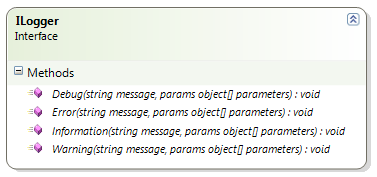
Tigraine.Logging has a ILogger interface that exposes the usual suspects:

image

You just instantiate the appropriate ILogger implementation and are set to go, it will write everything you pass to it.

What makes out most of the code though is the ability to render objects passed into the logger as parameters. This idea came from the Java codebase where there was code like this scattered all over the place:

@Override
public String toString() {
	String ret = this.getClass().getSimpleName();

if (Config.logVerbosity >= Log.Verbosity.VERBOSE) { ret += "(" + this.hashCode() + ")"; } if  (Config.logVerbosity >= Log.Verbosity.VERBOSE) { ret += " A={" + this.a + "}, B={" + this.b + "}"; }

return ret; }

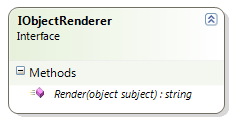
Now, I hate that sort of code. It’s just noise and it tends to get messy really soon. And so I started implementing my idea of ObjectRenderers (I know this term is already used by other logging frameworks, and the idea is not new either):

image

You add a renderer to the logger and whenever a object is passed in of the type, the renderer is invoked to transform the object to a string representation of your choosing. So instead of having to rely on .ToString() to give accurate results, you implement a class that takes care of writing all relevant information of your object down.

Here is a sample:

var consoleLogger = new ConsoleLogger(LogLevel.Debug);
consoleLogger.AddObjectRenderer<TestClass>(new TestClassRenderer());

consoleLogger.Error("Something went wrong with {0}", new TestClass());

The logging framework will call TestClassRenderer.Render to get a string representation of TestClass. This now also means you can have two different renderers, one verbose and one brief, and only hook up the one that’s right for you right now. The calling code does not need to be touched.

You can also define a renderer for a supertype and all subclasses will use that one if no more specific renderer is hooked up. If no renderer is found whatsoever .ToString() will get called.

And since implementing all renderers in their own classes would lead to a lot of code, there is a little helper class that should work for most of you by using some lambda syntax:

var compositeRenderer = new CompositeRenderer<TestClass>
    (p => p.Firstname + " " + p.Nickname + " " + p.Age);

Where to get

You may have already guessed, Tigraine.Logging can be found on GitHub and is open-source under the Apache License Version 2

Read more →

Castle.Pagination v1.1.0 released

Finally the Castle.Pagination component has reached v1.1.0 and is ready to be incorporated into the upcoming Castle Monorail 2.0 release.

As for the changes: There are hardly any. Pagination is a solved problem and most of the code changes where bug fixes and minor improvements.

Anyway, thanks Jonathan Rossi for helping me with the release! I can’t wait for Castle to move to GitHub so we can finally put that whole “non-committer sends patches” misery behind us.

Read more →

Don&rsquo;t forget to turn of the debugger when doing performance testing

Recently our dotless lead tester Gert discovered a little bug in the dotless minifier that made the minifier “loose” css expressions that where not followed by a semicolon.

The fix to this was in theory quite simple, simply treat all closing braces } as semicolons so expressions are still terminated. Doing so then led to one new cause for problems: ; }.

Semicolons followed by a closing brace call the ExpressionBuilder with a empty value, the ExpressionBuilder can now either throw an exception or return null. I decided to try throwing exceptions first.

Returning null somehow felt less elegant and I did not consider the performance impact of throwing an exception. So after implementing I decided to test this and wrote a little benchmark console program to test my theories.

In Shock I watched the exception case to be 10 times slower than simply doing a null check. Hastily I reverted the exception check and started implementing the null-check in the dotless code when I remembered the debugger.

Doh! How could I run a performance test with the debugger attached. Ran the program without the debugger: exceptions where only twice as slow as the null check. Not too bad, but still not fast enough for dotless.

So, here some wisdom: Always make sure you run without the debugger when testing performance. Exceptions while debugging are roughly 10 times more expensive than without debugger.

Read more →

Removing .svn folders with Powershell

I needed one simple thing: Delete all .svn folders from a repository so I can send it to my customer. While searching most of the results I got where either wrong, or completely besides the point, so I decided it may be worth sharing:

get-childitem -Include .svn -Recurse -force | Remove-Item -Force –Recurse

Read more →

Pandora used in dotless and moved to GitHub

Pandora, my personal IoC Container (mostly written for educational purposes) has recently been integrated into dotless. This has helped us improve the design of dotless without having to take on a big dependency like Windsor or StructureMap.

I chose to implement Pandora through the Common Service Locator interface by Microsoft, so if we ever feel restricted by Pandora we can easily switch to a more potent container without touching the actual dotless code.

This step also made me bring the Pandora repository from mercurial to git with some help from Horst. He was kind enough to run hg-fast-import for me.

Pandora can now be found on GitHub with a similar build process as dotless and elms-connector.

Pandora on GitHub

Read more →

Writing ELMAH Exceptions to Log4Net

Yesterday a friend asked me if I know how to make ELMAH write exceptions to a Log4Net appender.
My first idea was to write a custom ErrorLog that would do that, but that’s not really possible since ELMAH must be able to retrieve errors after the fact so they can be displayed in ELMAH’s web interface.

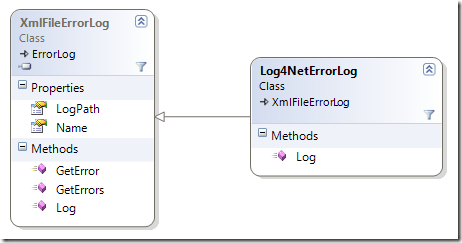
Well, turns out it’s even simpler and more obvious by simply subclassing an existing ErrorLog and hook into the Log method:

image

Assuming you use the XmlFileErrorLog (you can use this method with all of them) you simply subclass it and put your call to Log4Net before the base.Log call:

public class Log4NetErrorLog : XmlFileErrorLog
{
    public Log4NetErrorLog(IDictionary config) : base(config)
    {
    }

    public Log4NetErrorLog(string logPath) : base(logPath)     {     }

    readonly ILog log = LogManager.GetLogger("bla");     public override string Log(Error error)     {         //Write whatever you want to Log4Net         log.Fatal("Exception logged through ELMAH: " + error.Message, error.Exception);         return base.Log(error);     } }

Now the only thing you have to do is change the errorLog line in your ELMAH configuration (found in web.config) to reference your new ErrorLog subclass:

<elmah>  
    <errorLog type="MyAssembly.Log4NetErrorLog, MyAssembly" logPath="~/App_Data" />  
</elmah>

It will still log to XML, but also generate one entry per log to Log4Net. If you don’t want to save anything you can simply subclass the MemoryErrorLog class and set it’s size to 1.

Read more →

The joy of working with dotless

Ok, I just spent some time on the imagineClub website adding our board’s bio page. The HTML is not really interesting, but since imagineClub was written while dotless was still in development I wrote the CSS the old fashioned way.

Since dotless has reached some maturity I’ve been dogfooding it on imagineClub to make use of the minifier and the caching, but never had any real LESS code in there.
When I had to fix something today I was so happy to be able to write CSS like this:

div#team
{
    width: 414px;
    p
    {
        float: right;
        width: 300px;
    }
    h2
    {
        clear: right;
        font-size: @title-fontsize - 4;
    }
    img
    {  
        width: 100px;
        margin-bottom: 4px;
    }
}

This is how CSS was supposed to be, and with dotless it has become just mindlessly easy to do..

Read more →

ELMS-Connector documentation available

I decided not to invest any work in writing docs for a tool only I am using, due to the fact that it quite rapidly outdates during active development.

Well, ELMS-Connector development is mostly finished and after getting an email by someone from Amsterdam asking how to use ELMS-Connector I decided to finally write the docs.

The documentation is in the GitHub repository alongside the code, but I also saved it as PDF and uploaded it.

It’s by no means perfect, but it should be enough to get anyone who wants to use ELMS-Connector up and running quite smoothly. Comments are always welcome.

Read more →

EMLS-Connector v1.0 RTW

After almost a month and 3 weeks of having the connector in production I finally feel that it’s time for a v1.0. So, here it is. I just pushed the v1.0 tag to GitHub!

You can grab the release zip containing everything you need here:

ELMS-Connector v1.0 RTW

Note on this release: Some of the existing code I published in my initial article is now outdated. Some refactoring (and a annoying typo) has gone on and I don’t have any docs ready for people trying to use this. So if you want to use ELMS-Connector on your campus, just contact me through email at [email protected] and I’ll be glad to walk you through the setup process. Docs will follow, but at the moment I don’t feel like writing documentation for something only I am using.

Changes since the Beta:

1: Configurable file extensions

2: Session Authentication

Session Authentication

The main annoyance with ELMS-Connector so far has been that whenever a User hits the MSDN-AA he has to re-authenticate himself even if he is authenticated to the source system.

I found a way to elegantly prevent that without breaking anything: IExtendedAuthenticationService

While IAuthenticationService only requires you to implement one method:

bool AuthenticateUser(string username, string password);

IExtendedAuthenticationService comes with another two:

public interface IExtendedAuthenticationService : IAuthenticationService
{  
    bool IsAlreadyAuthenticated();
    string Username { get; }
}

IsAlreadyAuthenticated should return true if the current user already has a open session, and Username should then return his current username. If you use IPrincipal in your web app this would look like this:

public bool IsAlreadyAuthenticated()
{
    return HttpContext.Current.User != null && HttpContext.Current.User.Identity.IsAuthenticated;
}

public string Username {     get     {         return HttpContext.Current.User.Identity.Name;     } }

This way ELMS doesn’t prompt the user again for his credentials but rather directly redirects him to Microsoft’s ELMS server, making for a very smooth user experience.
If IsAlreadyAuthenticated is false, the user is presented with the usual login form and authentication works like it used to before (this happens if the user comes from the Microsoft ELMS site without having a session on your campus site).

Read more →