#programmierung

Posts tagged programmierung

Weird errors with .NET Framework Client Profile referencing Full Profile Assemblies

I am currently working on a little demo project with NServiceBus and ran into this so I thought I’d share it:

If you create a new WPF project in VS2010 it will target by default the .NET FX Client Profile. That’s nice for a  number of reasons, but you will see very weird behavior once you reference an assembly that requires the full .NET profile.

In my case it was NServiceBus that I was referencing. Although the using directives where there, and I got full IntelliSense (and the reference showed up in VS) I got this compile error:

image

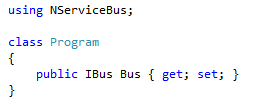
The code in question looks innocent:

image

Well: The reason for this weirdness is the .NET Client Profile. NSB requires stuff that’s not in the Client Profile thus the compiler will not resolve the reference. Visual Studio has no clue about that and isn’t displaying meaningful errors.

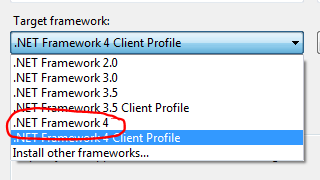
The solution is obviously simple: Go to the project preferences and select the appropriate Target framework:

image

Hope this helps!

Read more →

Don’t rely on exception messages

Since the dotless 1.1 release we are finally able to present you with good error messages, telling you what line/column the problem was encountered etc. This has led to some tests like this one:

public void DivisionByZero()
{
    AssertExpressionError("Attempted to divide by zero.", 5, "20px / 0");
    AssertExpressionError("Attempted to divide by zero.", 14, "1 + 2 - 3 * 4 / 0");
    AssertExpressionError("Attempted to divide by zero.", 6, "1 + 2 / 0 - 3 * 4 / 0");
}


Usually you just check the exception type, but in this case it’s a generic ParseException that has the additional line/column  info on it and does not wrap the DivideByZeroException in it’s InnerException. Obviously the above failed on my machine due to my German locale and I was getting a different exception message.

I first tried to set the thread’s culture to en-GB but this only changes how formats are handled, there are no English exception texts installed on a German Windows machine.

The obvious solution then was to not hard-code the exception message but retrieve it from the DivideByZeroException:

[Test]
public void DivisionByZero()
{
    var divideByZeroException = new DivideByZeroException();
    AssertExpressionError(divideByZeroException.Message, 5, "20px / 0");
    AssertExpressionError(divideByZeroException.Message, 14, "1 + 2 - 3 * 4 / 0");
    AssertExpressionError(divideByZeroException.Message, 6, "1 + 2 / 0 - 3 * 4 / 0");
}


Takeaway: Make sure you tests run on all locales if your tests rely on exception messages. Smile

Read more →

www.dotlesscss.com is down

In case you haven’t noticed, the main dotless website is down. To be frank: We have no clue why, and I couldn’t reach Chris who owns the server we are running on.
Unfortunately Chris also owns the hostname so we can’t easily migrate to a new host so see this post as a guide to where to get your stuff while we are working to resolve this.

Getting the Source is straight forward, just hit the GitHub repository.

Documentation: I’ve moved all our Documentation to the GitHub Wiki. We do lose the ability to let you try out dotless, but at least the docs are somewhere to be found.

Binary releases: Unfortunately we don’t have a build server, but I’ll try to keep the latest version of the binaries uploaded to the GitHub downloads page.

Read more →

C# Object Initializers are Expressions!

Object initializers got introduced into C# as part of .NET 3.5 and allow you to define properties through a nice concise syntax that makes code easier to read. Here’s an example:

var daniel = new User()
                    {
                        Username = "Tigraine",
                        Age = 25,
                        Email = "[email protected]"
                    };

In a .NET 2.0 environment the above code would have looked like this:

var daniel = new User();
daniel.Username = "Tigraine";
daniel.Age = 25;
daniel.Email = "[email protected]";

The funny thing here is that the .NET 2 code is not thread safe. If daniel is a public field or static field anywhere, the scheduler could interrupt the Thread right after setting the age, leaving you with an empty email field. This is also the reason why I’d call object initializers expressions: Expressions do by definition yield a value. And if we look at the code the compiler generates for an object initializer you will see this:

User <>g__initLocal0 = new User();
<>g__initLocal0.Username = "Tigraine";
<>g__initLocal0.Age = 0x19;
<>g__initLocal0.Email = "[email protected]";
User daniel = <>g__initLocal0;


The compiler does emit code that constructs the new object in a local variable that gets discarded right afterwards, and only the completed object, with all properties initialized will then be assigned to the variable. This makes this code thread safe. But, you’ll say it doesn’t yield a result thus it’s not really an expression.

Well, rewrite it a bit and you get a expression:

Func<User> expr = () =>
                    {
                        var user = new User();
                        user.Username = "Tigraine";
                        user.Age = 25;
                        user.Email = "[email protected]";
                        return user;
                    };
var daniel = expr();


It’s essentially a function that the compiler generates inline to save the cost of a method call, but it’s semantically a function, thus it yields a value and is a expression.

Read more →

NHibernate removes items from Many-To-Many upon Update of Entity due to Model Binding

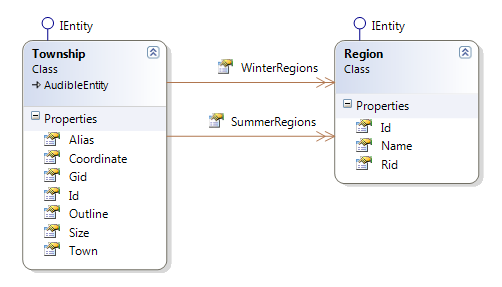
Imagine the following scenario:

nh

Townships has two m:n collections mapped to Region. My Controller has special actions for updating these collections, while there is a generic Edit method that takes care of updating normal properties on Township. The code in question looks quite innocent:

[HttpPost]
public virtual ActionResult Edit([Bind]T item)
{
    if (!ModelState.IsValid) return View(item);
    using (var trans = session.BeginTransaction())
    {
        session.Update(item);
        trans.Commit();
    }
    return RedirectToAction("List");
}

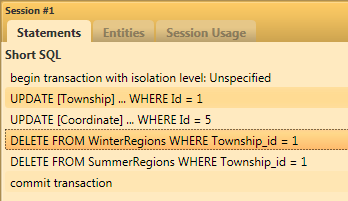
Well, the problem is quickly found using NHProf:

image

Whenever I updated the Township entity all it’s associated Regions where cleared.

Turns out, the problem lies with the ModelBinder in MVC2: Since it reconstructs a new Township item and populates it with values from the request, there is no way for MVC to fill the WinterRegions and SummerRegions collection. So NHibernate got empty collections and assumed I removed all items from them and decided to persist that removal to the database, resulting in a DELETE.

There are two solutions to the problem: a) turn off Cascade.All b) Fill the collections before the update.

Since I already used the Cascade Behavior in other places I decided to go with b and select the entity prior to updating it. The resulting code looks like this:

[HttpPost]
public override ActionResult Edit([Bind]Township item)
{
    using (var trans = session.BeginTransaction())
    {
        var township = session.Get<Township>(item.Id);
        session.Evict(township);
        item.WinterRegions = township.WinterRegions;
        item.SummerRegions = township.SummerRegions;
        session.Update(item);
        trans.Commit();
    }
    return RedirectToAction("List");
}

Notice that it is important to first evict the fetched entity from the session, otherwise you’ll get an Exception stating that the same identified is already associated with this session cache.

To be honest: I don’t feel particularly fond of this solution, if anyone can point out a better solution please leave a comment or email me. While at it, it would be nice to be able to change the cascade behavior of entities for one session (like FetchMode for one criteria).

Read more →

dotless Version 1.1 Released!

logo

After a lot of work we finally released a new version of dotless. And this release is really sweet. We switched parsers from the troubled PEG parser we had to an all-new implementation of the less.js parser that gave us a ton of room for improvements and little tweaks.

Here’s a rundown of the most important features:

New Parser

New parser also means we finally have meaningful error messages and if there are syntax errors we tell you what line the error occured and what went wrong. So that’s a huge improvement for all the people who saw empty .css files trying to figure out what broke the compilation.

Parameter passing

One thing users have  been asking us for are parameters to be passed to the scripts. We finally found a good way to implement this and now it’s in.

If you use the HttpHandler you can simply pass parameters through the querystring. Let’s say you have a basecolor you want to pass to your .less file you simply call it from the site like this:

http://www.myserver.com/site.less?basecolor=#34679a

and the variable @basecolor will be set to #34679a for you in your script. This is especially handy if you are using the HSL functions where you can modify saturation, lightness etc.

If you are using the console compiler you can also leverage this new functionality through a very Ant like parameter syntax:

dotless.Compiler.exe test.less –Dbasecolor=%2334679a

Note: Parameters in querystrings have to be URL encoded or some browsers will act up.

Improved Caching

We also made sure that the cache works properly with parameters, so if two requests have the same parameters the cache will be used. If not, dotless will insert for every parameter/file combination one cache entry. Since parameters are by no means user-input values but usually limited to a set of values the designers specify this should still give you very good performance. Behind the scenes we are still using the ASP.NET cache infrastructure.

While at the topic of caching, we also improved cache invalidation. The old version did not watch all imported files for changes but only the main .less file. This has changed, you should now never have to think about disabling the cache during development.

The same change was also applied to the console compiler, if you start it with –watch the compiler will regenerate the CSS whenever any of the imported changes or the main file gets changed.

Runnable in medium trust

Well, nothing really exciting here, but you should now be able to run dotless in a shared hosting environment.

Other improvements

  1. Cleaner output
  2. better support for CSS3
  3. Many more..
    A big thanks goes to James Foster who did most of the heavy lifting involved with bringing you this new release. You can download the new version from our website at http://www.dotlesscss.com. Remember, dotless is open source and released under the Apache License, Version 2.0, the source can be easily found on GitHub.

Read more →

ASP.NET MVC2 &ndash; Make Custom ControllerFactory less painful

When starting a new project on ASP.NET MVC2 I noticed something very annoying. When used with a custom ControllerFactory the framework will throw a HttpException whenever a browser requests a file that is not present on the file system or not mapped by a route.

That means you’ll hit an exception about once per page-load just because Google Chrome is requesting the favicon all the time unless it finds one.

The solution to this is to make the Debugger just step through your CreateController method so no Exceptions will be visible to Visual Studio there:

[System.Diagnostics.DebuggerStepThrough]
public override IController CreateController(System.Web.Routing.RequestContext requestContext,
                                                string controllerName)
{
    return base.CreateController(requestContext, controllerName);
}

This works reasonably well for me right now, at least the pain of hitting F5 every 10 seconds while debugging has gone away. It’s still not perfect since it makes it impossible to actually debug the method if something really goes wrong, but you’ve always got the yellow screen of death to figure out what’s wrong.

Hope this helps!

Read more →

Git Source Control Provider for Visual Studio 2010

During my presentation at Barcamp Vienna today I got asked what GUI to use with Git. My plain and simple answer was: “Use the command line, its just better that way.. “. Well, after the talk Andreas approached me and raised a very good point: Mainstream adoption of tools (like Git) often depends on GUIs to help people during the transition phase.

Besides the obvious Guis like TortoiseGit or GitGui there is now one more tool aimed at .NET developers to make the transition easier: Git Source Control Provider for Visual Studio 2010. It looks like Microsoft got VS2010 extensibility right this time, and someone managed to implement Git integration right into the VS2010 solution explorer:

Git Source Control Provider

The Plugin is available through Visual Studio Gallery and seems to be Ms-Pl licensed and free, although I couldn’t find the code anywhere, it’s still worth checking out: Git Source Control Provider.

Read more →

Presenting dotless at Barcamp Vienna

Barcamp_Vienna_2010

Next weekend (29-30th of May) I’ll be attending Barcamp Vienna and plan on having a talk about dotless and it’s advantages over regular CSS. Since my last dotless presentation at Barcamp Klagenfurt was a pretty huge success I guess I’ll keep to the basic structure of the talk and also go into some detail around the organizational stuff that’s involved when managing an OSS project.

Since I expect the crowd in Vienna to be more technical than the usual web2.0 enthusiasts/blogger mix we see in Klagenfurt I also plan on maybe delivering a talk on the best SCM there is: Git.

Since the whole thing is hosted by Microsoft I expect a lot more .NET developers to show up, so it should be a fun and interesting weekend.

See you there!

Read more →

Displaying git branch in your powershell prompt

When I started out with git I didn’t start using the commandline right away. I fiddled around with TortoiseGit and GitGui quite a bit before I found out that it’s just so much faster to do all those things from the commandline. As we all know, the windows commandline is not the most powerful thing on the planet, but I also loathe the unix commandline that comes installed with git (gitbash). Obviously, the only alternative is Powershell so I went with that and am very happy with it.

One thing though: I envied Linux users who could extend their bash prompt to display git specific information directly on the shell. Well, after a bit of digging and through some Stackoverflow articles, I managed to find this:

image

Powershell is quite extensible, and by placing a file called Microsoft.PowerSehll_profile.ps1 in your Documents\WindowsPowerShell folder you can define a function called prompt that allows you to modify your prompt text.

I’ve been using this now for quite some time, so I can’t recall where I found the script before I modified it, but here it is anyway (credit goes to whoever created it in the first place): Microsoft.PowerShell_profile.ps1.

Read more →