The deprecated target attribute and jQuery

It's usually not considered polite to open new windows whenever somebody clicks one of your external links. Those back and forward buttons are there for a reason, so I strongly encourage people to avoid opening new windows.

But, we all know customers. They get this "but I want this" look the second they discover that users may leave their web site too early (can't say how much this attitude sucks..).

One popular way to do this is to use jQuery to open all external links on your page in a popup (making code that obviously violates the "don't open new windows" rule still validate).

$(document).ready(function() {
    $("a[rel='external']").click(function(event) {
        window.open($(this).attr("href"));
        event.preventDefault();
    });
});

Now all you have to do is, add a rel="external" attribute to all outgoing links, and this little jQuery function will take care of making them popup.

Still, this is bad. It contradicts the whole idea why they removed the target attribute in the first place, so consider this as a quick'n'dirty hack to satisfy stupid customers.

Read more →

Anatomy of a pattern: Singleton

Singleton is one of the simplest patterns that does just one thing: Ensure that there is one object to rule them all, one object to bind... (Ok sorry got dragged away).

The idea is simple: Sometimes (especially when writing to disk with open file handles) you need to ensure that there is only ONE instance of a class going on at any time. And that's it. It's so simple, you could turn it into a 1-liner:

public static Singleton _Instance;

But things never are that simple ;). By using only a shared variable you may end up calling the constructor twice, resulting in 2 objects that may get used by two different clients.

To avoid this you'll need to get an exclusive lock of the Singleton to ensure it's really empty before you instance it.
And that's how it's usually done

private static Singleton _Instance;
private static Object __LockObject = new object();

public static Singleton GetInstance() {     if (_Instance == null)     {         lock(__LockObject)         {             if (_Instance == null)                 _Instance = new Singleton();         }     }     return _Instance; }

In the singleton implementation the static Singleton variable holds the reference to the Singleton, and whenever we try to get a reference to this instance we check if it's already set and return the value.

If not, it get's tricky when 2 threads are getting a cache-miss at the exact same time (_Instance == null). If you aren't synchronizing at this point you may end up with two different references of a singleton object being used (and causing problems with resources being consumed twice, causing ). So it's important to perform another check when you have exclusive reign over the shared object (by using a lock object here).


This ensures that no two threads will try to create a new instance to your singleton, while not slowing down your read-performance at all.

Sample code: Singleton.cs

Read more →

Useful tools: Windows Installer Clean Up

Although we all love the Windows Installer, sometimes it can give you a really hard time when it breaks (it does rarely, but it does).

That's the time when you need the Windows Installer Clean Up tool that will remove all install related information from your database so you can start over with the install.

I strongly advice not to use this tool for software that's properly installed. You'll have to clean registry/filesystem by hand if you delete the installer information. It's only really helpful to remove stuff you may have already deleted on the filesystem or to recover from a broken install.

You can download the Windows Installer Clean Up here, make sure to run it as administrator (Vista won't prompt you, it will just fail).

Read more →

What I like about Windows Vista: Sound Mixer

Welcome to my new (almost) infinite series about Windows Vista. The much hated, tiny little operating system Microsoft has released over a year ago and everybody loves to criticize.

So, what's in for a first post? Something not everybody is aware of: The new sound mixer with the new API behind it.

image

In the dark days before Microsoft's new shiny OS, applications output volume was determined by the master volume control in Windows. This has led to almost all applications having some sort of volume control built in to let users fine tune their experience.

Some examples:

Windows Media Player World of Warcraft
image image

Etc.. So everyone is searching for the right knobs to turn inside the application when it comes to sound.

Something, Vista has changed drastically, because now all applications have their own volume slider and you can control all of those (and tune them relative to each other) through the Windows Sound Mixer (available through the normal sound control in your system tray).

So, next time you do something with sound, make sure you don't try to access the master volume settings through the API but instead your settings. Here's a good article on how to do that: Vista Core Audio API Master Volume Control

Read more →

AnkhSVN 2.0 Subversion client for Visual Studio

I complained before that Visual Studio has no built in support for Subversion, as SVN is currently one of the most common source control choices for open source projects.

One commenter pointed me towards AnkhSVN as a source control provider, but I wasn't working on anything involving SVN so I didn't install AnkhSVN right away - I should have done!

AnkhSVN 2.0 is exactly what I was looking for!
I installed it and it integrated itself very nicely with Visual Studio. Not acting as a AddIn but as a source control provider similar to Visual Source Safe.

image

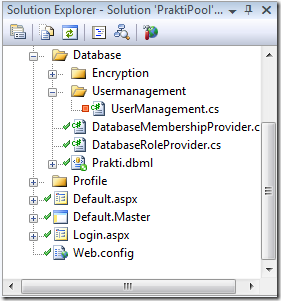
So it hooks itself into your solution explorer, showing you the file status within Visual Studio

You can open projects directly from Subversion, and the Pending Changes window helps in keeping track of what changes need to be committed to the SVN (never forget to commit your .csproj file after adding files to your project ;)).

Overall, AnkhSVN works very well and the UI is clean and does what you'd expect from your Subversion client, and it's good integration into Visual Studio helps. No more exception list hacking for file-based clients like Tortoise SVN.

As with most open source software, AnkhSVN is still work in progress, and I've already found some bugs. But if this project continues to evolve I think we have a really powerful tool at our hands!

So, if you want to try it for yourself (strongly suggested), go and grab the latest release (I suggest installing the daily build) from the AnkhSVN project site.
If you find any bugs while using the tool, please make sure to tell the developers. Their issue tracker sucks, you'll need to register and request access to the tracker (but they are pretty fast in granting access).

Read more →

Visual Studio and .NET 3.5 SP1 released

Ok, this is old news to some. But mainly because the beta has been around for quite some time and Scott Guthrie didn't make an official announcement on this.
So, although it slipped my attention (some Download Notification letter brought it to my attention), you should definitely check out the SP1.

It's more than just the usual bugfix SP1 that came out of Redmond this time. The feature list is pretty impressive, and they incorporated RTM versions of Astoria and Entity Framework!

For the feature list of the Visual Studio SP1 (source):

      • Improved WPF designers
      • SQL Server 2008 support
      • ADO.NET Entity Designer
      • Visual Basic and Visual C++ components and tools (including an MFC-based Office 2007 style ‘Ribbon’)
      • Visual Studio Team System Team Foundation Server (TFS) addresses customer feedback on version control usability and performance, email integration with work item tracking and full support for hosting on SQL Server 2008
      • Richer JavaScript support, enhanced AJAX and data tools, and Web site deployment improvements

And the features of .NET Framework 3.5 SP1:

  • Performance increases between 20-45% for WPF-based applications – without having to change any code
  • WCF improvements that give developers more control over the way they access data and services
  • Streamlined installation experience for client applications
  • Improvements in the area of data platform, such as the ADO.NET Entity Framework, ADO.NET Data Services and support for SQL Server 2008’s new features

So, I've been using the beta for some time now, and can't live without it any more. Go and get SP1, it really delivers on many things (like the C# background compiler in Visual Studio):

Visual Studio 2008 Service Pack 1 and .NET Framework 3.5 SP1 Download

Btw: you don't need to download .NET 3.5 SP1 if you're already installing VS2008 SP1. The VS2008 SP1 setup installed .NET 3.5 with it.

Read more →

Inline Styles aren't all that evil

Everyone who did some web stuff and had to do some HTML had fun with the style="" tag.
It's the simplest way to change the appearance of something and also very intuitive (right at the point where you want the change to happen). So, everyone of us is sometimes hacking some style="" stuff from time to time ;).

You usually continue to do so until the whole thing backlashes and you have absolutely unreadable code because every <div> tag is 3 lines long and you can't distinguish between style and markup.
So, that's the point where we all learned: Inline Styles are evil!

Now, while reading some RSS feeds today I discovered that inline styles aren't completely useless nowadays. Especially in times of RSS content syndication, sometimes it's very important to attach the style to the markup, so your markup remains readable at the external source.
Most RSS readers don't strip the inline CSS markup, and you may very well use this to format your feed accordingly. E.g. images that should be floated don't look good in a feed reader if they break the article they should illustrate, so attaching the "float: left; margin-right: 10px;" isn't too obscuring, but helps your readers a lot.

So, although inline styles really contradicts the DRY principle, sometimes it's cool to use them for syndication reasons.

Read more →

Precompiled deployment in ASP.NET

The usual deployment of as ASP.NET web app is just a basic FTP upload of everything you have in your solution. The whole aspx and aspx.cs stuff that you can then edit and change on the server.

All the source (except for class libraries) is fully available and visible on the server, so if your customer is like mine you're destined to see some self-patched applications appear over time.

This doesn't only hurt revenue, but it also brings some serious version issues when you get tasked with changes afterwards.

So, sometimes it's important to lock your customer out of their app (yeah, that sounds evil doesn't it?). And that is where ASP.NET has a neat feature in place called "Precompiled deployment".

image You just go into Visual Studio and select your Project, click Publish Web Site and follow the wizard.
You can select to directly deploy the page to a server via FTP etc, or to just put it onto your file system.

If you open the folder afterwards you will see that some files have gone missing :).



image

All .cs (or .vb) files are gone and a new (randomly named) library has appeared in your bin\ folder that contains a compiled version of your .cs files.

Also, you need to note that precompiling your application is something that will not significantly speed up your website performance. If you just deploy the .cs files to the server they will still get compiled to IL code and run just as fast as the precompiled version you deployed binary.
What get's speeded up is the startup process of your application, because compilation takes place when the first request gets served.

I guess it's safe to say that if you see a somewhat significant improvement in performance through precompiling, your app is somewhere broken or should be broken into smaller chunks. Compiling code shouldn't take long on today's hardware, and if you end up with folders with thousands of thousands of files, you're in trouble anyway. (The server compiles your .cs files per folder when the first request gets served)

Finally, although there is a compiled library out there doesn't mean your customer can't change it at all. He could still go out and decompile your dll, change his stuff and recompile it. But if he's that smart, he probably deserves to change it anyway.
(To really protect your IP you should look for Obfuscators)


Read more →