#net

Posts tagged net

Validation Controls in ASP.NET

So, yesterday I noticed something funny while doing some data-driven ASP.NET programming.

There are those really great Validation controls that really reduce the amount of code you need to write on average input forms.

So, imagine you have quite usual code like this:

<asp:TextBox runat="server" ID="MyTextbox"></asp:TextBox><br />
<asp:RequiredFieldValidator ControlToValidate="MyTextbox" runat="server"><br />
    Textbox shouldn't be empty
</asp:RequiredFieldValidator>

<asp:Button runat="server" Text="Submit" OnClick="Submit_Click" />

This will result in a simple form with a textbox and a submit button. The handler code for the button looks like this:

public void Submit_Click(object sender, EventArgs e)
{
    this.Title = "Hello World";
}

Now, if you click on the button while leaving the textbox blank, you'll see the red message that the field needs to be filled.

If you disable Javascript in your browser, the handler code will get executed without getting validated!

Actually, the validation is done solely on the client if you don't manually check for the Page.isValid property on the Webform.

So, here is the revised handler code:

public void Submit_Click(object sender, EventArgs e)
{
    if (this.IsValid)
    {
        this.Title = "Hello World";
    }
}

This isn't something unknown, MSDN points it out on some occasions. But yet, something you might overlook too easily.

Keep this in mind when working with validator controls, hope this helps!

Read more →

Custom ASP.NET Membership provider

I've been ranting too much lately, so I guess it's time to get back into coding.

This time around I've been challenged with a new project that involves a legacy database, while my task is to rewrite the ASP.NET application that runs ontop of that database without actually touching the database.

So first: What is ASP.NET Membership?

Simple answer: A great way to build authentication with little to zero coding effort with very cool draggy-droppy developer experience :). You simply drag a Login control to your ASP.NET page and your application just learned how to authenticate and keep the session of users.

To achieve this on a already existing database you simply need to do one thing:

Implement the abstract class MembershipProvider and implement just one method: ValidateUser

public override bool ValidateUser(string username, string password)
{
    if (username == "tigraine" && password == "tigraine")
        return true;
    return false;
}
You see where I'm going here, you basically just need to return true or false given a username and a password. How you do it is entirely up to you as long as you return either true or false.

To make the magic actually work you need to add the new MembershipProvider (i've called it DBMembershipProvider) to your root web.config:

<authentication mode="Forms">
	<forms loginUrl="Login.aspx"></forms>
</authentication>
<membership defaultProvider="DBMembershipProvider">
	<providers>
		<add name="DBMembershipProvider" type="DBMembershipProvider" />
	</providers>
</membership>
The <authentication mode="Forms"> is quite important because it tells asp.net to actually use forms driven authentication instead of windows authentication or microsoft passport. I also defined the loginUrl attribute to tell the app where to redirect anonymous users, but that's optional.

The membership stuff now is important, because here we glue the new provider into our system.

We just add a new provider in the <providers> section and name it conveniently, and most important: we tell .net what type to instantiate.

The defaultProvider property then tells .net what provider to use (if you've got multiple providers to log into your website, eg: Windows and Forms auth)

And, that's it. As long as the ValidateUser method returns true/false, your users can now use a fancy Login form to authenticate and their login session will get stored in a cookie. You can now drag LoginStatus and LoginName controls to your form and watch the goodness work :).

Hey! How do you actually secure something with this?

Yeah, I was so happy with that login working so I almost forgot to do this part. Usually you want to protect some files or directories from unregistered users. This also happens at the web.config level and is quite easy.

In case of a folder, just put a blank web.config in there and add the following directives:

<system.web>
	<authorization>
		<deny users="?"/>
	</authorization>
</system.web>
Now only registered users have access to this directory and you're done.

If you don't want to lock the whole directory but only some files in there you can do this through the verb attribute by either specifying a regex or a filename to be affected by your rule. (You could also use the <allow> tag to add exceptions to your deny tag I think)

Actually, if you look at the MembershipProvider, there's a ton more functionality I just skipped here. But this has been everything I needed to get login and user restriction for my current project, so I thought it's worth sharing how darn easy this actually is. If you want to delve deeper into the topic I'd suggest you either read 4GuyFromRolla or search through MSDN.

Read more →

ASP.NET HttpModule that detects debug mode on production servers

So, after reading some stuff about HttpModules lately I thought it would be fun to create one myself. And, so I came up with something that might be useful in some scenarios.

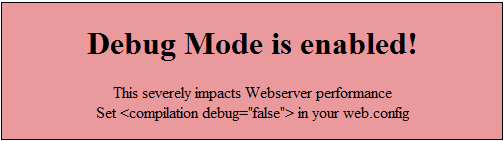
A HttpModule that will cry foul when you try to put up a ASP.NET website with debug="true" onto a production server.
It is actually rather simple. Just a standard HttpModule that will check wether the request is local and wether debug is enabled. The local request check is done to make the module transparent to you while developing the app on cassini, while you'll see it instantly when you copy it over to your web server.

The code is rather simple:

public class DebugWarner : IHttpModule
{

    public void Dispose()     {    }

    public void Init(HttpApplication context)     {         context.BeginRequest += new EventHandler(context_BeginRequest);     }

    void context_BeginRequest(object sender, EventArgs e)     {         if (!HttpContext.Current.Request.IsLocal &&             HttpContext.Current.IsDebuggingEnabled)         {             HttpContext.Current.Response.Write(                 "<div style=\"background: #ea999d; border: 1px solid black; width: 500px; text-align: center;\">\n" +                 "<h1>Debug Mode is enabled!</h1><p>This severely impacts Webserver performance<br />" +                 "Set <compilation debug="false"> in your web.config</p>" +                 "</div>");         }     } }

Making this work is quite easy too, simply put the above class in your App_Code directory and add this line to your <httpModules> (or <modules> on IIS7) section:

<add name="DebugWarner" type="DebugWarner"/>

If you now try to access the page with debug="true" you'll get:

image

Read more →

IT-Camp at Klagenfurt University

As Mathias has already hinted, today was the final presentation of the ongoing computer games implementation week I was instructing at klagenfurt university. During the last week I and Christian where working together with a small group of 7 high school students (of age 15-17) on some pretty amazing computer games with Microsoft's XNA framework.

We started out with some basic talk about computer games in general and introduced the students to Microsoft XNA on the second day. Most of them had some basic Java experience and absolutely no knowledge of C# or XNA. After pointing out some syntax differences between Java and C# we started with a very basic boulder game tutorial from the XNA creators club website that should teach 2D rectangle collision detection with XNA. Afterwards the students were asked to expand on this idea and create their own 2D computer game.

And now I am very happy to show some of their great work they did during the last 4 days!

This is where we started out:

And these are screen shots from our student's projects (click to get the full view):

Argon Abwechslungsreiche Einöde Block Fighters Space Impact Sweet Sattelites


I also promised Mathias to create videos from the projects that we did so he can show them at future computer games courses, I'll post these videos on YouTube once I've recorded them.
We will also be releasing the games source code, but I am still trying to figure out the license for some of them.

I've had a great time with those talented kids and hope they enjoyed learning as much as I did enjoy teaching!

Read more →

Source Control, Open Source and Microsoft

Something hit me today when I went into the "Team Synchronization Perspective" in Eclipse/Subclipse while trying to merge some changes a colleague made with my repository:

Visual Studio 2008 doesn't sport ANY source control of ANY kind that's for free!

If this isn't true I'm eager to hear about it.
But I only know about Visual Studio Team System, and that's not free:

Typically, customers purchase an MSDN Premium subscription when licensing the Team Editions and Team Suite, which provides Software Assurance that entitles users to product updates over the life of the subscription. This includes Team Foundation Server Workgroup Edition, development licenses of many Microsoft Windows versions, Visual Foxpro 9, Visual Studio 2005 Tools for Microsoft Office, development licenses of many server-side offerings, SDKs and DDKs, a large amount of documentation, and more. The Team Edition and Team Suite products can not be purchased without an MSDN Premium subscription.

Last time I checked, MSDN Premium costs $2,499 and additional $1,999 every following year.

I also used Visual Source Safe before (VSS 2005), and it was a huge pain in the ass trying to work with it due to the "one-guy-check-out" policy it enforces. So if you need some field/method in another class to continue working on your class, you'll be running circles through the office trying to get others to check the file back in (resulting in half-broken check-ins etc).

So I wonder, with all that commitment Microsoft has been showing to supporting and promoting open source (CodePlex, CodeGallery), why in the hell do they keep all the tools that would support open source development away from their users? I think that even Visual Studio Express edition should at least come with decent support for source control inside the IDE that is actually able to connect to CodePlex! (There is a SVN bridge, a command line client and the suggestion to get the team edition of VS.).
So, bottom line my CodePlex source control experience has been "lacking", while I'm getting more and more fond of subversion combined with subclipse.

While I'm seeing subversion becoming more and more "standard" among open source projects (if not THE standard), I wonder why Microsoft is making it intentionally hard to work with Visual Studio on shared projects.

So, as I already hinted at in my post about ASP.NET Wiki, Microsoft seriously needs to get more consistent in their efforts. Either support OSS and developer collaboration, or don't. But don't try to do so badly. The way they try right now isn't really going anywhere.

Update: Btw, Eclipse just released a new version called ganymede that really rocks!

Update2: Apparently I didn't find this info last time I used Codeplex, but it looks like there is a way to integrate a Team System client into VS called Team Explore 2008. I'll be looking at this tomorrow.

Update3: Mark Phippard just pointed me at AnkhSVN for Visual Studio that seems to be a pretty decent SVN client integrated into Visual Studio. Thanks for this link.

Read more →

Exporting Data to CVS in ASP.NET

So, today I tried the ASP.NET Wiki that's currently in Beta and thought, best way to do so is to expand an article. I'll blog about my Wiki experience later, but for now I'd like to share my code on this one.

I started out with the Wiki Article Export to CSV file (revision 3) and thought on how to improve it.

As you may have noticed, the topic at hand is so simple, it doesn't really need improving, except for the main flaw where you have to specify all column headers in code.

My take on this was to use the DataBinder API from the System.Web.UI namespace and remove the whole HttpContext.Current stuff to an instance variable so it's easier to test the stuff and you can put it into a class library (if you want that).

Let's assume I have a list of type Person I want to write to CSV

public class Person
{
    public String Name
    { get; set; }
    public String Family
    { get; set; }
    public int Age
    { get; set; }
    public decimal Salary
    { get; set; }
}

Now here's the CVSExporter class that you just need to pass 3 things: Your List<Person>, your HttpContext.Current and a List<String> that specifies what columns you want printed out (eg. Name, Family).

public class CSVExporter
{
    public static void WriteToCSV(List<Object> dataList, HttpContext httpContext, List<String> columnNames)
    {
        InitializeHeaders(httpContext);

        WriteColumnNames(httpContext, columnNames);                  foreach (Object data in dataList)         {             WriteData(data, httpContext, columnNames);         }                  httpContext.Response.End(); //Everything has to end..     }

    private static void InitializeHeaders(HttpContext httpContext)     {         string attachment = "attachment; filename=PersonList.csv";         httpContext.Response.Clear();         httpContext.Response.ClearHeaders();         httpContext.Response.ClearContent();         httpContext.Response.AddHeader("content-disposition", attachment);         httpContext.Response.ContentType = "text/csv";         httpContext.Response.AddHeader("Pragma", "public");     }

    private static void WriteData(Object data, HttpContext httpContext, List<String> columnNames)     {         StringBuilder stringBuilder = new StringBuilder();         foreach (String column in columnNames)         {             AddComma(                 System.Web.UI.DataBinder.Eval(data, column).ToString(),                 stringBuilder);         }         httpContext.Response.Write(stringBuilder.ToString());         httpContext.Response.Write(Environment.NewLine);     }

    private static void AddComma(string value, StringBuilder stringBuilder)     {         stringBuilder.AppendFormat("{0}, ", value.Replace(',', ' '));     }

    private static void WriteColumnNames(HttpContext httpContext, List<String> columnNames)     {         StringBuilder stringBuilder = new StringBuilder();         foreach (String column in columnNames)         {             stringBuilder.AppendFormat("{0}, ", column);         }         httpContext.Response.Write(stringBuilder.ToString());         httpContext.Response.Write(Environment.NewLine);     }

}

So that's it for now. I guess there is still room for improvement, and if you need performance you should go with the original solution, DataBinder.Eval does some type-casting internally so it won't run at lightning speeds, but you get the idea of what can be done with the DataBinder control :).

And now I'm off to writing a Windows Live Writer Plugin that will allow me to paste longer code without jumping through loops like a madman (I posted the code in my Wordpress admin-gui because doing it from wlv simply didn't work!)

Read more →

Post Code with Dignity

After finally getting really really fed up with Windows Live Writer about the way it tries to tidy up your HTML code I decided that I need to do something about it.

So I did, writing a Live Writer plugin is very easy and straight forward, so I did a plugin that will take your clipboard, replace typical things like < > through &lt; &gt; and replace every 2 spaces through 2 &nbsp;.
So make sure you are using a even number of spaces for source indentation in your IDE.

The plugin is far away from perfect, and I think I'll make it a bit more configurable tomorrow. I also think I'll put it up on Google code and maybe release it to the Windows Live Gallery.

They key? Windows Live Writer fucks up your markup no matter what you do. So I simply departet from posting pure text as a ContentSource, yet the plugin is treating HTML as a SmartContentSource that will appear as a block inside Windows Live Writer, saving it from it's catastrophic markup-killing html-tidy algorithm.

Update: I already released the source at CodePlex and you can get the most up to date binary from there:

CodePlex Project Page: http://www.codeplex.com/wlwPostCode

Installation:
Simply put the dll into your Live\Writer\Plugins directory and start WLV!
It will now show up in your Insert-List as Insert Code..

Btw: The Plugin assumes you are using the same syntax highlighting script as I do and will put your code into a <pre> tag.

Read more →

Am I an island?

Due to the fact that most of university of klagenfurt's curriculum is biased towards Java sometimes makes it hard for a .NET developer to be able to go up to someone and say: "Hey, look what I did yesterday".
Either you just ran into one of those guys who just managed to get the last proprietary driver off his debian-unstable laptop and will chase you down some hallway by even saying the word Microsoft near his ears.
Or you will meet some insensible guy who's not into the study at all but decided that doing computer science after high-school is the right thing because he used to be playing computer a lot (people around here often use their studies as an excuse for not wanting to do real work).
Or there is that honest guy who just focuses on his studies and therefore is stuck in a world of Java :).

So, sometimes I read all those blogs out there from overseas about communities, ALT.NET, open spaces conferences and stuff, and start to feel a little lonely around here in carinthia.
I mean, there are plenty of people I really love to talk about tech, I even sometimes try bend my mind around to talk to some of the hardcore Linux guys around here. But there is nobody to whom I can talk about what I am up to lately (in .NET), nobody who is actually working with .NET (besides me) that I can call up to ask for advice on ... let's say WPF.

So today I decided to throw the words usergroup and Klagenfurt at my Google and I somehow ended up at ineta.org, short for International .NET Association.
After doing their usergroup search for Austria I found out that there ought to be two groups here around Klagenfurt university. Both of which seem to have disbanded (websites down etc).
Now what really struck me was that even the back of beyond (namely Vorarlberg) has a .NET user group, while Vienna and Graz having plenty of them.
Didn't they tell me when I signed up for my study that Klagenfurt is one of the major universities when it comes to computer science?
And now I'd like to know, if Klagenfurt is that good, why we can't have a .NET user group.

So is there an audience for a .NET user group in Klagenfurt? Or do I need to pony up the 60 euros per month for a bus ride and go to Graz if I want to meet like-minded people?
So it boils down to the initial question: Am I an .NET island?

Read more →

Setting up Cruise Control .NET

logo

Wow, what a day! After starting a new project today (I'll discuss that in another post) I decided that it is time to get serious with source control and continous integration. This time I thought I'd skip the java stuff and pass on JetBrains Teamcity, and instead went for the SourceControl.NET by ThoughtWorks that I heard of on Hanselminutes.

First things first: I am totally stunned of how great this has turned out. If you don't have a CI server yet, go get yourself one immediately. Even if you are programming by yourself, having someone run the build process and all unit tests for you never hurts and will save you time in the long run. Set-up of CruiseControl and the whole stuff was quite time-consuming (meaning 3 hours), but doing it on another project now really is a piece of cake, once you're done it feels quite natural.

So, to get started you should set up Subversion by simply installing VisualSVN, the server is running in less than 30 seconds, your users and repositories are in place after a mere minute. I can't think of any easier way to install Subversion, kudos to the VisualSVN team!

Now, this isn't quite standard, but really helps: Create a file called svn.bat in your C:\WINDOWS\system32\ folder with the following content:

@echo off
"C:\Programme\VisualSVN Server\bin\svn.exe" %*
Cool huh? Now you've got svn in your %PATH% without having to edit the variable itself. This will save you some time on the CCnet configuration.

The next thing was to install the newest CCnet version, and here I suggest you get the latest and hottest stuff directly from the svn. I ran into some troubles with some msbuild reports in version 1.3. Updating to 1.4 worked wonders.

Now that everything is set up (you can now access the WebDashboard through the http://<yourserver>/ccnet/ url), you need to get the whole thing configured. (The only painful thing in this installation).

A good starting point is the documentation that explains almost everything.

I won't go through everything in the ccnet.config file, just some things I want to point out:

  • Make sure to either run the latest CCnet build or use the doc that came with your binaries. New not used settings will stop the server from running.
  • While testing your build process go ahead and try to run the same commands from a shell. Especially with msbuild it took some time to sort out the quirks :)
  • Don't forget to blindly incorporate the whole list of <publishers>. I can't think of a scenario where I don't want almost all of those running, and if you skip some (like xmllogger and statistics) you will get some broken links on your dashboard.
  • VisualSVN sets up a https server. CCnet runs svn with the --non-interactive switch, so it will quietly break due to a unsigned SSL certificate. To bypass this simply run a svn list <repo> from a shell and accept the certificate permanently. And make sure the CCnet service is running under your login credentials, svn stores the certificate setting per user.
So, enough wisdom from my part on CCnet. I really had a blast in setting it up, and I can only recommend it. After the break I've postet my ccnet.config if you want to have a look.

<cruisecontrol>
      <project name="Valet">
        <workingDirectory>valet/WorkingDirectory</workingDirectory>
        <artifactDirectory>valet/ArtifactDirectory</artifactDirectory>
        <webURL>http://plato/ccnet/server/local/project/Valet/ViewProjectReport.aspx</webURL>
        <modificationDelaySeconds>10</modificationDelaySeconds>
        <sourcecontrol type="svn">
            <trunkUrl>https://plato:8443/svn/valet/trunk/</trunkUrl>
            <username>ccnet</username>
            <password>xEs6S-uW</password>
            <autoGetSource>true</autoGetSource>
            <!--<tagOnSuccess>true</tagOnSuccess>-->
        </sourcecontrol>
        <state type="state" />
        <labeller type="defaultlabeller">
            <prefix>Valet-alpha-0.</prefix>
            <incrementOnFailure>false</incrementOnFailure>
        </labeller>
        <triggers>
          <intervalTrigger name="continuous" seconds="30" />
        </triggers>
        <tasks>
            <msbuild>
              <executable>C:\WINDOWS\Microsoft.NET\Framework\v3.5\MSBuild.exe</executable>
              <projectFile>Valet.sln</projectFile>
              <buildArgs>/noconsolelogger /p:Configuration=Debug /v:diag</buildArgs>
              <targets>Build</targets>
              <timeout>900</timeout>
              <logger>C:\Programme\CruiseControl.NET\server\ThoughtWorks.CruiseControl.MsBuild.dll</logger>
            </msbuild>
            <nunit path="C:\Programme\NUnit 2.4.7\bin\nunit-console.exe">
                <assemblies>
                  <assembly>C:\Programme\CruiseControl.NET\server\valet\WorkingDirectory\ValetServerTest\bin\Debug\ValetServerTest.dll</assembly>
                </assemblies>
            </nunit>
        </tasks>
        <publishers>
          <xmllogger />
          <statistics />
          <modificationHistory  onlyLogWhenChangesFound="true" />
          <rss/>
          <modificationWriter />
        </publishers>
    </project>
</cruisecontrol>
Man, I hate my blog theme. I need to get this thing wider sometimes soon!

Read more →

LinQ, LinQ to SQL etc explained

I've been talking to a lot of people about LinQ and LinQ to SQL lately and always had trouble explaining them the difference between those concepts. So, obviously I could simply point you to ScottGu's posts on LinQ and Linq to SQL, but that would be cheap wouldn't it?

So, what is LinQ in the first place? People usually mix it up with LinQ to SQL and see it as a new syntax to query databases (but that's LinQ to SQL).

In a nutshell, LinQ stands for Language integrated Query and is a great way to retrieve objects from lists, arrays etc.
Basically, LinQ works an everything that implements IEnumerable, so it's quite safe to say that it works with every .NET collection out there ;).

So, the magic?
LinQ consists of 2 things.

Extension methods

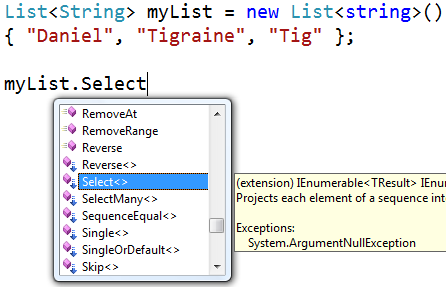
First: By importing the System.LinQ namespace you get some extension methods for your collections.
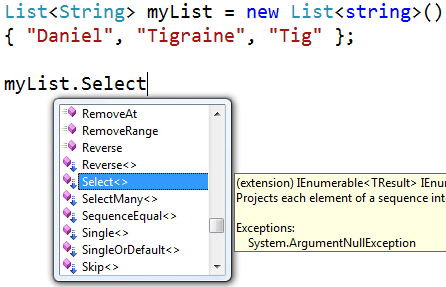
linq1

The above screenshot shows some of the extension methods you get by importing System.LinQ.
Those methods are very useful when working with collections and have become something I won't want to miss.
Here are my most used ones:

Select: Takes a lambda and returns an IEnumerable<> of all items that match the lambda.
Example:

linqselect

This statement will only return an IEnumerable with Tigraine and Tig.

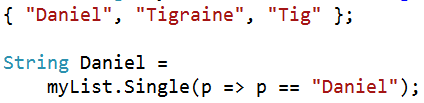
Single: I love this one! Takes a lambda and returns the single item matching the lambda (failing if there is more than one).
This really shines when doing stuff with unique id's.
Example:
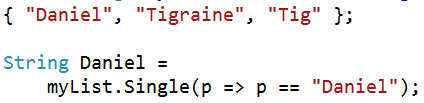
linqselect2

Any and All: Any checks if one or more items of the collection match the lambda, and All returns true if all items in the collection match the lambda.

Query syntax

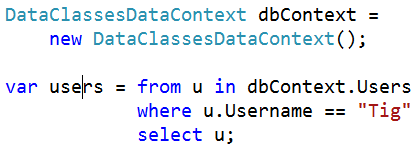
So, besides all those great overloads the LinQ namespace provides the real magic is a query like this:

linqselect3

Needless to say that this query syntax works on every collection of objects and provides a great strongly typed query syntax for objects.

LinQ to SQL

So, now that we know what LinQ is we could easily go ahead and write tons of boilerplate code that maps objects to database tables etc etc.. And then use LinQ to query all those objects we created.

But that wouldn't ever work, because having the whole database in memory won't work on any fairly large db. So LinQ to SQL jumps in on this.

LinQ to SQL consists mainly of a graphical OR/M designer in Visual Studio 2008 that allows you to simply drag and drop tables from your database to create the mappings.
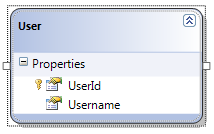
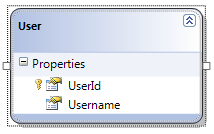
linqsqlguiOnce the mappings are created LinQ to SQL provides you with a DataContext class that represent the objects in your database.
The Users table from my database to the left result in a new collection in your data context called Users that can be queried either through extension methods or through the query syntax.
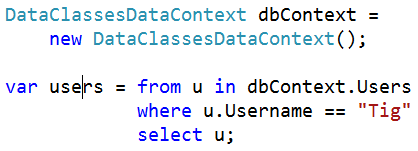
linqsql

What happens under the hood is that LinQ to SQL translates your LinQ query into SQL. The generated queries can be viewed while debugging:

linqsql2

The difference to normal LinQ is that LinQ to SQL gets executed once you are using the query data, not when doing the query. The query definition is just the generation of the SQL, while a foreach(var u in users) would actually trigger the query.

And, obviously LinQ to SQL also handles changes to the database through transactions. You just need to modify a value and hit dbContext.SubmitChanges() and LinQ packs any changes back into your database.

Conclusion:
LinQ is a clever way to query objects in memory.
LinQ to SQL is a new strong OR/M that takes advantage of the new query syntax and extending it to a database.

This post was never intended to be an exhaustive write-up about LinQ and LinQ to SQL, if you want to know more about those two please refer to ScottGu's posts.
Read more →