#net

Posts tagged net

Using Extension Methods as a Factory Method for an Adapter

Sometimes you have existing code you don't want to change. And sometimes you need to write libraries that consume these old legacy objects as input to function.
No need to say that it's usually a bad idea to couple your code to not properly tested and poorly designed legacy code.

So it's generally a good idea to abstract it away from new code and try to mask the old objects through adapters and interfaces from being too tightly coupled to your new code.

Either way, you're trying to put square blocks into round holes. And the adapter classes need to be initialized by your callers every time your class gets used.

    public class LegacyFoo
    {
        public void SomeFoo()
        {}
    }
    public interface IFoo
    {
        void Foo();
    }
    public class FooAdapter : IFoo
    {
        private readonly LegacyFoo Foo_;
        public FooAdapter(LegacyFoo foo)
        {
            Foo_ = foo; }
        public void Foo()
        { Foo_.SomeFoo(); }
    }
    public class FooConsumer
    {
        public void DoSomethingWithOldFoo(IFoo oldFoo)
        { oldFoo.Foo(); }
    }

So instead of providing yet another Factory that constructs the adapter object, you could instead just put the factory method onto the legacy object by using an extension method:

    public static class FooExtensions
    {
        public static IFoo GetFooAdapter(this LegacyFoo foo)
        { return new FooAdapter(foo); }
    }

Now your callers can conveniently construct the Adapter object by calling:

LegacyFoo foo = new LegacyFoo();
foo.GetFooAdapter()
Read more →

AnkhSVN 2.0 Subversion client for Visual Studio

I complained before that Visual Studio has no built in support for Subversion, as SVN is currently one of the most common source control choices for open source projects.

One commenter pointed me towards AnkhSVN as a source control provider, but I wasn't working on anything involving SVN so I didn't install AnkhSVN right away - I should have done!

AnkhSVN 2.0 is exactly what I was looking for!
I installed it and it integrated itself very nicely with Visual Studio. Not acting as a AddIn but as a source control provider similar to Visual Source Safe.

image

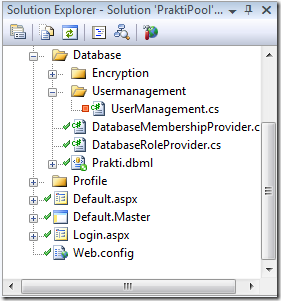
So it hooks itself into your solution explorer, showing you the file status within Visual Studio

You can open projects directly from Subversion, and the Pending Changes window helps in keeping track of what changes need to be committed to the SVN (never forget to commit your .csproj file after adding files to your project ;)).

Overall, AnkhSVN works very well and the UI is clean and does what you'd expect from your Subversion client, and it's good integration into Visual Studio helps. No more exception list hacking for file-based clients like Tortoise SVN.

As with most open source software, AnkhSVN is still work in progress, and I've already found some bugs. But if this project continues to evolve I think we have a really powerful tool at our hands!

So, if you want to try it for yourself (strongly suggested), go and grab the latest release (I suggest installing the daily build) from the AnkhSVN project site.
If you find any bugs while using the tool, please make sure to tell the developers. Their issue tracker sucks, you'll need to register and request access to the tracker (but they are pretty fast in granting access).

Read more →

Visual Studio and .NET 3.5 SP1 released

Ok, this is old news to some. But mainly because the beta has been around for quite some time and Scott Guthrie didn't make an official announcement on this.
So, although it slipped my attention (some Download Notification letter brought it to my attention), you should definitely check out the SP1.

It's more than just the usual bugfix SP1 that came out of Redmond this time. The feature list is pretty impressive, and they incorporated RTM versions of Astoria and Entity Framework!

For the feature list of the Visual Studio SP1 (source):

      • Improved WPF designers
      • SQL Server 2008 support
      • ADO.NET Entity Designer
      • Visual Basic and Visual C++ components and tools (including an MFC-based Office 2007 style ‘Ribbon’)
      • Visual Studio Team System Team Foundation Server (TFS) addresses customer feedback on version control usability and performance, email integration with work item tracking and full support for hosting on SQL Server 2008
      • Richer JavaScript support, enhanced AJAX and data tools, and Web site deployment improvements

And the features of .NET Framework 3.5 SP1:

  • Performance increases between 20-45% for WPF-based applications – without having to change any code
  • WCF improvements that give developers more control over the way they access data and services
  • Streamlined installation experience for client applications
  • Improvements in the area of data platform, such as the ADO.NET Entity Framework, ADO.NET Data Services and support for SQL Server 2008’s new features

So, I've been using the beta for some time now, and can't live without it any more. Go and get SP1, it really delivers on many things (like the C# background compiler in Visual Studio):

Visual Studio 2008 Service Pack 1 and .NET Framework 3.5 SP1 Download

Btw: you don't need to download .NET 3.5 SP1 if you're already installing VS2008 SP1. The VS2008 SP1 setup installed .NET 3.5 with it.

Read more →

Precompiled deployment in ASP.NET

The usual deployment of as ASP.NET web app is just a basic FTP upload of everything you have in your solution. The whole aspx and aspx.cs stuff that you can then edit and change on the server.

All the source (except for class libraries) is fully available and visible on the server, so if your customer is like mine you're destined to see some self-patched applications appear over time.

This doesn't only hurt revenue, but it also brings some serious version issues when you get tasked with changes afterwards.

So, sometimes it's important to lock your customer out of their app (yeah, that sounds evil doesn't it?). And that is where ASP.NET has a neat feature in place called "Precompiled deployment".

image You just go into Visual Studio and select your Project, click Publish Web Site and follow the wizard.

You can select to directly deploy the page to a server via FTP etc, or to just put it onto your file system.

If you open the folder afterwards you will see that some files have gone missing :).


image

All .cs (or .vb) files are gone and a new (randomly named) library has appeared in your bin\ folder that contains a compiled version of your .cs files.

Also, you need to note that precompiling your application is something that will not significantly speed up your website performance. If you just deploy the .cs files to the server they will still get compiled to IL code and run just as fast as the precompiled version you deployed binary.
What get's speeded up is the startup process of your application, because compilation takes place when the first request gets served.

I guess it's safe to say that if you see a somewhat significant improvement in performance through precompiling, your app is somewhere broken or should be broken into smaller chunks. Compiling code shouldn't take long on today's hardware, and if you end up with folders with thousands of thousands of files, you're in trouble anyway. (The server compiles your .cs files per folder when the first request gets served)

Finally, although there is a compiled library out there doesn't mean your customer can't change it at all. He could still go out and decompile your dll, change his stuff and recompile it. But if he's that smart, he probably deserves to change it anyway.
(To really protect your IP you should look for Obfuscators)

Read more →

Do the simplest thing you can get away with

So, yesterday I was talking to a customer about a new project I will be developing over the next month or so.
And half way through the project (revamping a legacy system), I was asked if I could insert sorting into a statistical grid view.

I immediately started thinking about using a ASP.NET grid view control with sorting and paging capabilities enabled. But just before I could open my mouth, it hit me: Why in the heck should I do something that stupid?

My customer isn't only good at using Excel, these guys are traders! They probably know better how to do sorting in Excel than I know how to do it in ASP.NET!

So, because this grid was filled through some pretty complex selection criteria, why in the hell wasn't my first idea to simply give them a CSV list with all the data they need and let them do it themselves.

This solution isn't only superior for the customer, it's also much better for me because code you don't write can't break! Excel is giving my customer all the things he otherwise would demand from my application, with added benefits like pie charts and custom functions. Why should I even bother to take on this?

The smartest code is no code at all!

If you can get away without writing code, do it immediately. Every line you write less is one you don't have to care about later.

Read more →

Good design leads to problems

Bad design is in most cases the result of people not knowing better, and while I am constantly struggling to learn more about good architecture design I sometimes feel like: How in the hell can I ever make this work inside of ASP.NET?

I mean, most "good" things like IOC, TDD, information hiding, separation of concerns etc all rely on you having total control over your classes.

But, that's something you can only achieve in ASP.NET by throwing a whole bunch of code at things that would have worked effortless without the "good" stuff.

Best example of this may be simple ASP.NET pages that come with Request, Response and Context objects that cannot be swapped out as easily.
Now your usual course of action to keep your code testable would be to simply put the business code into underlying classes that then get called by the untestable ASP.NET page. But, this now leads to the problem that I can't really use the full power of ASP.NET any more, SqlDataSource has just gotten off limits, because we don't want to expose our data access layer to the application (or at least try to avoid that).

So, because comprehensive data binding just left the building, what did we get for our good design?
We just got the even bigger task at hand to do databinding by hand. And now we are even more in trouble than we were with the untestable app, because now we will find ourselves writing even more code we need to test even more.

You see what I'm getting at? If we would have been using data binding, we could have just relied on working, well tested code (hey that's what Microsoft for!), without the hassle to reinvent the wheel again and being concerned with the wheel's quality.

So, I still can't offer a suitable solution for this dilemma, maybe use object-data-source a lot more? But what about update support? I'll be looking into this topic and when I've come up with something I'll let you know.

Read more →

Snappy Windows Recovery

Do you remember those times when you where reinstalling your OS every two weeks? Those dark Windows 98 times that have thankfully passed away?
I don't shed tears when remembering the days of old, but mainly because Windows doesn't need reinstallation every two weeks any more.

To be honest, back when I was using Windows XP: I was rarely using any restore options, because they hardly ever worked the way I wanted them.
Thankfully the system wasn't as easy to break as the 9x family (love NT for that), but still when something went terribly wrong I was pretty quick in digging up those XP cds and re-doing the system (guess that's what we were used to :)).

So, yesterday I unboxed my sweet new Dell XPS M1330 laptop and immediately started setting it up. Configuring Vista for the first time, getting Office, Windows Live and Visual Studio 2008 on the machine - all that stuff you don't want to be doing too often.
I also immediately downloaded .NET 3.5 SP1 and VS2008 SP1 (both beta), because I really liked some of the new IDE features.

Upon .NET 3.5 SP1 installation things went bad.. I mean, really bad.

Visual Studio didn't start up any more, .NET programs compiled against the 2.0 runtime refused to work any more (my pre-installed Dell Dock application).
I tried the obvious, uninstall SP1, repair 3.5.

Now, when even the setups don't start up any more, you usually flip out your OS Cds and think about reinstalling.

But, I thought, I could give Vista's recovery a try and searched for available recovery points.

image

And tada, there they where. Almost everything I installed added a recovery point to the system and I even had the luxury of choosing to what app I want to restore my system to - great!

10 Minutes after starting the recovery I was up and running again, having absolutely 0 problems! Perfect.
I even reinstalled Visual Studio 2008 and everything works just fine.

So I guess reinstalling Windows is completely out for now. When there are restore options available like this, I don't think I'll be ever reinstalling anything any more.

Oh, and I think I won't try the .NET 3.5 SP1 beta again, let's see when it gets to final. The new additions to the framework are pretty minor, but the updates to the IDE are definitely worth it.

Read more →

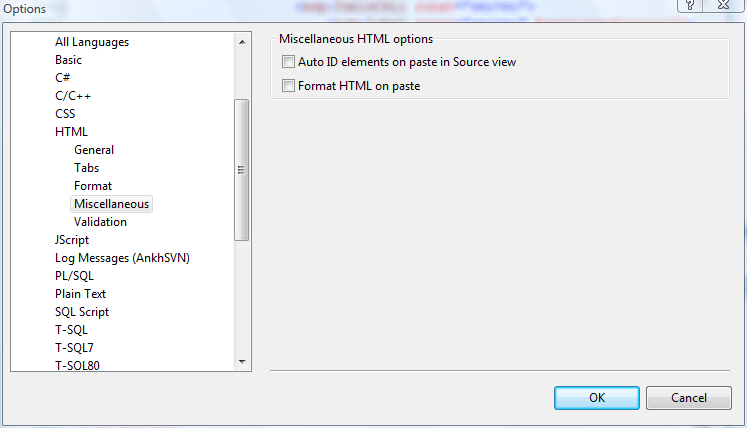
Rant: Visual Studio injecting Ids to absolutely everything!

Ha, the weekends almost in and I'm readying myself to get afk for some days.
But not before I've complained about how stupid Visual Studio gets when you're handling ASP.NET Tables!

Whenever something has a runat="server" tag Visual Studio wants to attach an ID to it.
But there is no point to attach IDs to every cell/row in table!

So, if you're writing everything by hand, you don't need to specify the ID attribute, so everything is fine. But once you want to copy&paste that code, Visual Studio will instantly attach IDs to everything (with meaningful names as "Table1, TableRow1" etc..), and that's something I find very annoying when having to create large forms or something like that.

I mean, you have code like this:

<asp:Table runat="server">
    <asp:TableRow runat="server"></asp:TableRow>
</asp:Table>

and once you hit CRTL+V it get's obscured like this:

<asp:Table ID="Table1" runat="server">
    <asp:TableRow ID="TableRow1" runat="server"></asp:TableRow>
</asp:Table>

Now, being a thoughtful developer who likes tidy markup, I'm now going to remove these useless Ids from my code once again.

Oh, and did I mention that this also happens when you cut&paste? Nothing is more annoying than getting IDs injected when you're reordering table rows.

There is merit to the idea when you are copy&pasting real controls that have IDs attached, so you don't accidentally find yourself with multiple controls with the same ID. But when there is no ID attached to the code you're having in the clipboard, Visual Studio shouldn't be putting it in there.

Read more →

Session handling in ASP.NET

Often you need to save data to a user-central location (something like a global variable per user) and you immediately think of the session as the perfect place to store that data.
So you have this just retrieved user-id and you go:

Session["userid"] = userid;

And this works perfectly fine, ASP.NET will take care of the cookie handling etc while you can conveniently read from this field from now on.
But, there is one catch (as always):

Accessing session data is a very error prone process and should never left to the business code itself. Whenever a session times out you'll get NullPointerExceptions cluttered throughout your application (because reading from Session["userid"] will quietly return null if the session isn't there or got lost).
Working directly with the session also robs you of all the type-checking goodness we are all used to from .NET, so you may get some InvalidCastExceptions while accessing your objects too.


And, whenever you call Session["useid"] you're risking spelling mistakes what would lead to completely bogus data.

So, I hope you get my point, working with the session object directly is really nothing you'd want to do over and over again (and therefore risking errors every time).
It's usually much better to centralize this in one spot and test that well.


And centralizing this can be easily done through creating a custom class for this that will not only keep the session object away from you, but also provide you type-safe access to your data.

I suggest starting off with the session data object that we will use to store our data in:

[Serializable()]
public class UserSessionData
{
    public int UserId
    { get; set; }
}

Notice that I've put the Serializable() attribute onto the class so if you want to store the session in a state server or in sql server the CLR knows how to serialize the object and store it.
The whole object is solely responsible for keeping our UserId, nothing more nothing less.

And now we need to store this object in the session, for that purpose we could just incorporate static methods into the class that would retrieve and set the object to the current session.
Because we're working with ASP.NET here we want this UserSessionData to be accessible from within our ASP.NET Webform so it's pretty cool to just subclass Web.UI.Page and use it afterwards as the base class for our Webforms:

public class SessionHandler : System.Web.UI.Page
{
    private const string SESSION_NAME = "UserSession";
    public UserSessionData SessionData
    {
        get
        {
            UserSessionData sessionData = (UserSessionData)Session[SESSION_NAME];
            if (sessionData != null)
                return sessionData;
            else
                throw new Exception("Could not retrieve session state");
        }
        set
        {
            Session[SESSION_NAME] = value;
        }
    }
}

Now we only need to open our code-behind file and change it's superclass from Page to our SessionHandler (that just wraps Page):

public partial class _Default : SessionHandler
{
    protected void Page_Load(object sender, EventArgs e)
    {
        this.Title = this.SessionData.UserId.ToString();
    }   
}

Now whenever you need to read the UserId there is this neat property called SessionData that knows all about your user, while you don't need to do any is-null checks any more in your code, that's all handled by the SessionHandler class when accessing the session object :).

Hope this helps!

Read more →