EMLS-Connector v1.0 RTW

After almost a month and 3 weeks of having the connector in production I finally feel that it’s time for a v1.0. So, here it is. I just pushed the v1.0 tag to GitHub!

You can grab the release zip containing everything you need here:

ELMS-Connector v1.0 RTW

Note on this release: Some of the existing code I published in my initial article is now outdated. Some refactoring (and a annoying typo) has gone on and I don’t have any docs ready for people trying to use this. So if you want to use ELMS-Connector on your campus, just contact me through email at [email protected] and I’ll be glad to walk you through the setup process. Docs will follow, but at the moment I don’t feel like writing documentation for something only I am using.

Changes since the Beta:

1: Configurable file extensions

2: Session Authentication

Session Authentication

The main annoyance with ELMS-Connector so far has been that whenever a User hits the MSDN-AA he has to re-authenticate himself even if he is authenticated to the source system.

I found a way to elegantly prevent that without breaking anything: IExtendedAuthenticationService

While IAuthenticationService only requires you to implement one method:

bool AuthenticateUser(string username, string password);

IExtendedAuthenticationService comes with another two:

public interface IExtendedAuthenticationService : IAuthenticationService
{  
    bool IsAlreadyAuthenticated();
    string Username { get; }
}

IsAlreadyAuthenticated should return true if the current user already has a open session, and Username should then return his current username. If you use IPrincipal in your web app this would look like this:

public bool IsAlreadyAuthenticated()
{
    return HttpContext.Current.User != null && HttpContext.Current.User.Identity.IsAuthenticated;
}

public string Username {     get     {         return HttpContext.Current.User.Identity.Name;     } }

This way ELMS doesn’t prompt the user again for his credentials but rather directly redirects him to Microsoft’s ELMS server, making for a very smooth user experience.
If IsAlreadyAuthenticated is false, the user is presented with the usual login form and authentication works like it used to before (this happens if the user comes from the Microsoft ELMS site without having a session on your campus site).

Read more →

imagineClub.at is now finally online

logo After almost 4 months of work I am pleased to announce that the new imagineClub Website is finally online at

http://www.imagineclub.at

You can read what this is all about here.

Besides the obvious design refresh the new website has numerous administrative improvements that allow us to more easily share information with members and also allow new members to join the fun since we are now able to unlock their accounts without having to hack SQL together.

As you may already know, the new website is also licensed as open-source software and the code is freely available from my GitHub Repository. Since we allow our users to use MSDN-AA the site internally uses my other open-source project elms-connector (source on GitHub) to connect up to the Microsoft servers.

And to take dogfooding to a new level, I already have a unpublished changeset that will make imagineClub.at use the dotlesscss project to improve the project's CSS.

You may have guessed by now that the whole site is completely built ontop of open-source frameworks. It is based on Castle MonoRail, running ontop of Castle ActiveRecord with some (but not deep) Castle Windsor integration.
In fact, I would have used Windsor more, but using the ActiveRecord pattern with all it's static goodness somehow limited the use of inversion of control.

I primarily chose Castle MonoRail due to the fact that I had come off a ASP.NET MVC project and wanted to learn another MVC framework besides the blue one. I can't say I'm sorry for that decision. MonoRail has proven itself to be a very mature and very extensible framework that supported me all the way to releasing the site. 
I do regret however chosing NVelocity as my viewengine, Spark seems to be the better choice at the moment and NVelocity is really awful when it comes to debugging problems.

Anyway: Thanks to all these great open-source projects that made this possible, and also a big thanks to Kristof who sponsored the new design!

Read more →

It’s a kind of magic: MonoRail

I never cease to be amazed about Castle MonoRail, but this time I was really puzzled.
While working on a simple CRUD page I wrote code like this:

public void Unlock([ARFetch("id")] Member member)
{
    PropertyBag["member"] = member;
}

public void Unlock([ARFetch("id")] Member member, DateTime expiration) {     ...

My view was then just a standard form, a textfield and a submit button.

<form action="" method="POST">
    <ul>
        <li>
            $FormHelper.LabelFor("expiration", "Account expiration date")
            $FormHelper.TextFieldValue("expiration", "29.01.2010")
        </li>
        <li>
            <input type="submit" value="Unlock" />
        </li>
    </ul>
</form>

And, you may have guessed it, I forgot to put a hidden field with the UserId in there somewhere!
Yes, I know – what a common mistake and what a bad one at that. But, and that’s the scary part. It worked still! I checked and re-checked, there is no Id anywhere passed as a result of the form submit, yet MonoRail somehow gets the Id from my previous call and works with that.

I couldn’t find the code inside MonoRail responsible for this behavior, and it seems only to work with Post requests to an empty action so far, but still amazing.

Well, since I can’t see the code, I remain skeptical and added the hidden id anyway. Witchcraft like this feels wrong, I like mysteries though.

Read more →

ElmsConnector configurable file extension

Seriously, nothing makes you more aware of problems with your stuff than dogfooding! I’ve been busy all day trying to get the new imagineClub website out of the door (yes we finally launched!) and just when I thought I had everything nailed one thing about ElmsConnector made me panic:

IIS6 is not passing *.elms requests on to the ASP.NET pipeline, so ElmsConnector was never called.

To fix this you need to have access to the server configuration and change that through IIS Manager. Since we (and I guess many other people) are on a shared host we could not do that, and so I had to change all paths to *.axd on short notice.

But, I felt like *.axd may also not work for everyone, so I decided to just make that an optional setting through the elms.xml:

<component id="FileExtensionProvider">
  <parameters>
    <extension>ashx</extension>
  </parameters>
</component>

This little XML will change all paths inside ElmsConnector to .ashx instead of the default .axd. (Omitting that XML will result in all your paths being .axd)

Also note that I had to introduce one additional placeholder into the Login.htm.


Make sure that you include the $EXTENSION$ placeholder into your form action:

<form method="post" action="VerifyUser.$EXTENSION$">

This feature is available through release v0.1.0.3 from GitHub.

Read more →

Beggars can&rsquo;t be choosers: Dependency injection through global factories

Whenever you listen to testability talks you usually take away one universal truth:

Global state is bad, singletons are essentially global state.

So, if you want to have it done right, use dependency injection and don’t let your code depend on global state.

But: Sometimes it’s just not possible. My current project for example does not use dependency injection. Why? I didn’t know better and used ActiveRecord with all it’s static design. And besides, I’m just lazy and have no intention of diving into the Castle documentation to find out how to teach ActiveRecord to use an IoC container when creating entity objects.

And if you have no control over your constructor, your options for dependency injection are limited to two things:

Public fields (aka optional dependencies) and Global factories.

Public fields

While in theory a pretty decent method that allows you to swap out parts it falls very short once you have multiple classes that need the same service:

public class Entity
{
    public IDateProvider DateProvider { get; set; }

    public Entity()     {         DateProvider = new DateProviderImpl();     } }

Since the default implementation is hardcoded into every consumer, you end up with a big pile of DRY violations that will one day bite you when you try to refactor DateProviderImpl’s constructor.

Global factories

Now the words global and testability don’t go well together, but in this case it’s ok. You try to battle the DRY violation while still making your service optionally interchangeable when testing.

public class Entity
{
    public Entity()
    {
        var now = DateProviderFactory.Provider.Now;
    }
}

public class DateProviderFactory {     private static IDateProvider _provider;

    public static void SetProvider(IDateProvider provider)     {         _provider = provider;     }     public static IDateProvider Provider     {         get         {             if (_provider == null)                 _provider = new DateProviderImpl();             return Provider;         }     } }

Now obviously you should NEVER call SetProvider inside your production code. It’s a pure testability helper so if you start messing with it expect to see some really hard to debug errors pop up.

But as long as you don’t mess that up, you can write tests like this one:

public class TestFixture
{
    [Fact]
    public void DoesSomethingWhenGivenDate()
    {
        var mock = new MockedDateProvider();
        DateProviderFactory.SetProvider(mock);
        var entity = new Entity();
        //.....
    }
}

I know it’s not perfect, but nobody expected it to be that way. The best solution to the problem obviously is a very clean separation of object construction and business logic, and the proven way to achieve that is dependency injection through a container like Windsor or StructureMap. Yet, often you have to look at old codebases where you just need to get the job done, and then it’s nice to know your way around the limitations sometimes.

Oh, and btw: The example I did above was chosen deliberately to be something as simple as a abstraction of DateTime.Now. As said before, never depend on moving parts in your tests.

Read more →

Converting a IEnumerator to IEnumerator&lt;T&gt;

When generics where introduced with .NET 2.0 there was a ton of 1.1 code lying around that was still built without generics. So the obvious answer by Microsoft was that most generic specialization classes can be cast to their non-generic counterparts to avoid problems for users.

Now, years later we have the opposite phenomenon. Few people are actually using untyped collections, so a new problem has come: What if you are looking at legacy code that has to call into new API that has no non-generic support.

Well, it’s simple: IEnumerator becomes IEnumerator<object> and all is well. But there is no conversion from IEnumerator to IEnumerator<object>, so you have to write your own little facades when trying to put square blocks into round holes:

public class CastEnumerator<T> : IEnumerator<T>
{
    private readonly IEnumerator enumerator;

    public CastEnumerator(IEnumerator enumerator)     {         this.enumerator = enumerator;     }

    public void Dispose()     {     }

    public bool MoveNext()     {         return enumerator.MoveNext();     }

    public void Reset()     {         enumerator.Reset();     }

    public T Current     {         get { return (T)enumerator.Current; }     }

    object IEnumerator.Current     {         get { return Current; }     } }

The call then looks like this:

public IEnumerator<T> GetEnumerator()
{
    return new CastEnumerator<T>(untypedEnumerator);
}

As Julian Birch explained in the comments, if you are using .NET 3.5 it’s even simpler to get from an untyped IEnumerable to a IEnumerable<T> (while not technically a IEnumerator, the typed one will then return a IEnumerator<T>):

IEnumerable untypedEnumerable = ...;
IEnumerable<string> typedEnumerable = untypedEnumerable.Cast<T>();

Read more →

Using ILMerge to hide your dependencies

When developing a library that should be used by 3rd parties one major concern is dependency versioning. Meaning, if your code uses a common library like Castle.Windsor, things will get ugly if your users also use Castle.Windsor in another version.

Especially with very popular infrastructure libraries like Castle you can’t expect all your users not to use it, after all you’re probably using it for the same reason they do: Best of breed solution to a common problem.
To avoid trouble, many library authors decide not to take external dependencies so they won’t see versioning issues, while having to re-implement some infrastructure themselves.

Coming up with something simple usually isn’t that hard. If you just need a very limited feature set you can build your own Inversion of Control container quite easily without relying on external libraries. Yet, if you do you still have to spend time building, maintaining and extending the thing over time.

The other option is to use the fabulous tool ILMerge by Microsoft that allows you to munch multiple assemblies into one DLL. This is also handy if your product consists of many assemblies that you want to bundle, but in this case there is one cool thing ILMerge does: /internalize

ILMerge usually is called from the command line and works like this:

ILMerge.exe <main-assembly.dll> [<library1.dll> <library2.dll>] /out:<output-file.dll> /t:library

Now if you add the magic parameter /internalize ILmerge will hide all type names inside <library1.dll> and <library2.dll> from assemblies that reference the output assembly.

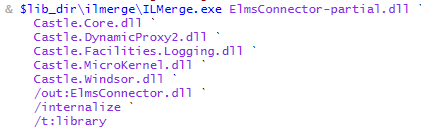
So in ElmsConnector’s case where Windsor is used internally the ILMerge call looks like this:

image

ElmsConnector-partial.dll is the original output dll from my msbuild process while ILMerge will merge all of these Castle assemblies into the output ElmsConnector.dll.
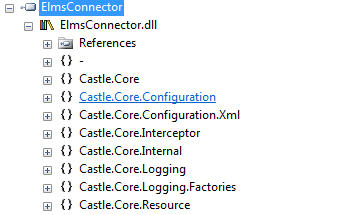
Now the real magic here is that if I open the resulting assembly in Reflector it still lists all Castle assemblies:

image

But inside Visual Studio none of the Castle.* namespaces exists because they are hidden.

This technique allows us to use our favorite tools in libraries without having to think too hard about versioning.

Now, obviously there are also some things to consider here:
If you want to expose any class that is inside one of the internalized assemblies, you have to tell ILMerge so through the exclude file (an example of this can be seen with Rhino.Mocks). Once you exclude one type and your users try to use that type they will see a “ambiguous type” compile-time error. That’s why Rhino.Mocks also comes in a unmerged flavor

Another thing to remember is (especially with web-apps) that your users can’t see any internalized assemblies, so any configuration you put into your web.config for them won’t work. Best example may be the PerWebRequest lifesyle for Windsor: It relies on a httpModule to be registered through the web.config, you can’t make that happen with the externalized assembly (and it leads to versioning problems once you exclude it).

Read more →

Introducing ELMS-Connector v.1 Beta

When I joined the imagineClub in Klagenfurt and started building the new website I kept avoiding one major feature for a very long time: Implementing the remote-login for the MSDN-AA system by Microsoft.

The way imagineClub members get to MSDN-AA software is through a web-store called ELMS that handles licensing and downloading for us. ELMS supports two modes: integrated authentication or campus authentication. Integrated means that accounts have to be maintained inside ELMS while campus authentication means you manage accounts in your own system and ELMS will ask your services to authenticate users.

Now the first approach works for very small organizations where you can easily keep track of your members and (as admin) respond to their “oh god I lost my password” requests.
But with about 200 members like the imagineClub this alley leads into a world of pain and despair. So the only real solution is to implement the campus authentication that requires a authentication handshake between ELMS and imagineClub.

The documentation on the whole process is quite scarce, but with some reverse engineering of our old site and some FireBug network analysis I was able to eventually figure out how the whole system was supposed to work. It’s not that complicated after all, yet it’s not funny to have to re-invent it over and over again.

Since I knew that the Institute of Technology at Klagenfurt University has also acquired a MSDN-AA license for it’s staff I started working on the idea of a re-useable and easily pluggable library that could encapsulate all ELMS campus authentication logic to spare others the pain of implementing the thing from not so great documentation.

My main goals for this where:

  • Minimum configuration
  • Pluggable (being able to drop it into an existing ASP.NET app)
  • Variable authentication method (not everyone is using the same auth services we do)

Especially for pluggability I wanted the whole thing to live inside a DLL so I decided to implement a HttpHandler that will then handle the authentication.

The handler will look for a Login.htm file in your application’s root folder and display that file to users that need to log in. This means that you can easily modify the look&feel of your login page without having to mess with any ASP.NET code that can break. As long as you leave the name attribute of the username/password field intact all modification is fair game.

Once the user hits login the connector will then look into it’s configuration (I use Windsor for that) and invoke a supplied IAuthenticationService class. That means that you tell Windsor through the config what class servicing IAuthenticationService you want to call and it will get called with username/password.

This is the interface that users may need to implement:

public interface IAuthenticatonService
{     bool AuthenticateUser(string username, string password);
}

I intentionally said may because ELMS-Connector comes with a built-in LDAP auth service that you can use to simply hook up the login to your existing LDAP system without having to write any code at all (although that part is still in development).

Now, let’s get to the gory details.

How to set up:

1: Grab the release from the project’s download page

ElmsConnector download

2: Add reference to ElmsConnector.dll

ElmsConnector uses Castle Windsor internally but that dependency is merged into ElmsConnector.dll so you won’t run into any versioning issues.

3: Add httphandler to web.config

Add the following to your <httHandlers> section in the web.config:

<add verb="*" path="*.elms" type="ElmsConnector.ElmsHandler, ElmsConnector"/>

This makes all requests that end in .elms go to the ElmsConnector component that then does it’s magic.

4: Configure ELMS

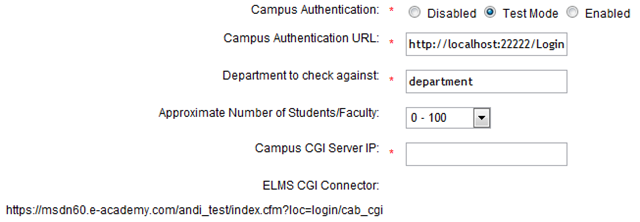
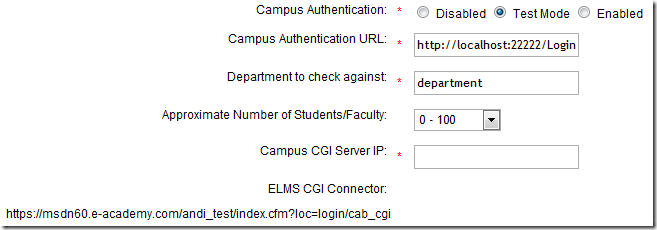
Log into your ELMS dashboard and go to User Management –> Integrated Campus Authentication.
image

Set the Campus Authentication to Test Mode (while testing the connector).
The Campus Authentication URL should look like this: http://<yourserver>/Login.elms (or wherever the *.elms HttpHandler will be accessible).


Set Department to department (the suggested default value).

Campus CGI Server IP should be set to the IP your Server is using since ELMS will use the destination IP address to verify your identity.

Now don’t forget to copy the ELMS CGI Connector url since it will become of importance during the configuration of the connector.

4: Copy and modify sample elms.xml

Inside the release zip there should be a file called elms.xml, this file is the main configuration for the ElmsConnector. Copy it to the root of your web application and open it inside Visual Studio.

You now need to paste the ELMS CGI Connector url into the <cgiConnector> tag:

<component
  id="ElmsSessionRequestService">
  <parameters>
    <cgiConnector>https://msdn60.e-academy.com/<campus>/index.cfm?loc=login/cab_cgi</cgiConnector>
  </parameters>
</component>

And you’ll have to tell ElmsConnector where to find a type servicing IAuthenticationService. This is done by modifying the type attribute on the AuthenticationService component:

<component
  id="AuthenticationService"
  service="ElmsConnector.IAuthenticatonService, ElmsConnector"
  type="ElmsConnector.Web.FakeAuthenticatonService, ElmsConnector.Web" />

(I suggest you look at the provided sample project ElmsConnector.Web to see how this works)

5: Add the Login.htm

Inside the zip there is also a file called Login.htm. That file is nothing more than an empty template of the future Login dialog ElmsConnector will expose to users. Copy it to your web application’s root and edit it to your heart’s extend. All modifications are fair game as long as you don’t change the form parameter names or remove the $error$ placeholder.

6: Done

Yes. that’s it. You can now test the whole thing by visiting your ELMS portal page and hit Login. If your Campus Authentication Url is set correctly you should see the ElmsConnector’s Login.htm and be able to log in.

License

ElmsConnector uses the ASL-2 license and is therefore open-source-software. ASL-2 is a very permissive license that allows use of the code even in commercial closed-source scenarios. Still I’d appreciate if you’d let me know that you like ElmsConnector.

Problems

There may still be some problems with this release, if you notice anything strange or broken please open a Ticket on GitHub or shoot me a email.

Extending

ElmsConnector is very extensible through the use of Castle.Windsor internally. If you know your way around Windsor XML configuration you should be able to change everything about the connector without the need to recompile. Still I suggest you check out the source to find out what goes on there.

Future

I’ll be dogfooding this component during this week while getting the iC-Website ready for launch. After that I want to implement the LDAP authentication service that will ship with ElmsConnector so if you have an existing LDAP infrastructure you don’t need to write any real code at all.

Need help?

If you have any more questions regarding ElmsConnector or how to set it up in your special case, please feel free to send me an email or contact me through IM (Contact info). I’ll be happy to help you use ElmsConnector!

Read more →

Git cheatsheet floating on your desktop as Windows 7 gadget

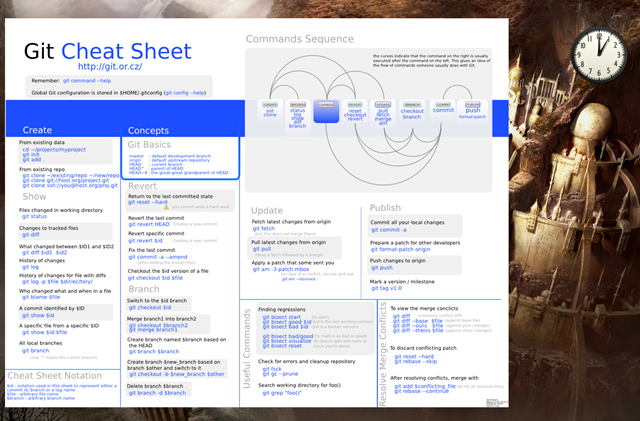
While browsing a bit through the GitHub guides section I noticed a wonderful git cheat sheet that outlines the most used commands with some basic usage instructions created by Zack Rusin.

I have a love/hate relationship with cheat sheets because most of the time I print them and then they usually merge with all the trash that’s laying around my desk so I hardly ever get to use them (except for when I really need them and they are laying face down below my mouse pad).

So the obvious place for that sheet would be my secondary monitor so I can refer to it when needed. Only problem here is that I really don’t want to run a browser window all the time just to see a cheat sheet, and setting it as my wallpaper would mean no more beautiful images changing every 10 minutes (I love Win7 for this!).

Now, what is between your applications and your desktop? Right: Windows gadgets.

By following the guide from the Microsoft developer center I very quickly ended up with a quite nice gadget that now beautifully floats above my desktop with all the common used git commands I need to check while scratching my head (dementia I hate you).

image

Pair this with the awesome Aero Peek at the desktop from Windows 7 (if you hit Win+Space all Windows become glass and you see your gadgets + desktop), and you can quickly glance at the cheat sheet without having to run any application or change your wallpaper. And if I don’t feel like doing git I just close the gadget with one click.

As said above, the cheat sheet is done by Zack Rusin. Thanks for this gem! The code for the gadget and the download is on GitHub and is licensed under the ASL-2 (yeah I like that license a lot).

The GitHub repository is at: http://github.com/Tigraine/git-cheatsheet-gadget

And to just download the gadget hit the downloads section within GitHub (or directly)

Oh and please excuse if GitHub is down sometimes right now. They are in the process of moving their servers to a new hoster and hopefully they will be reliably back up by Monday.

Read more →

Make me wait

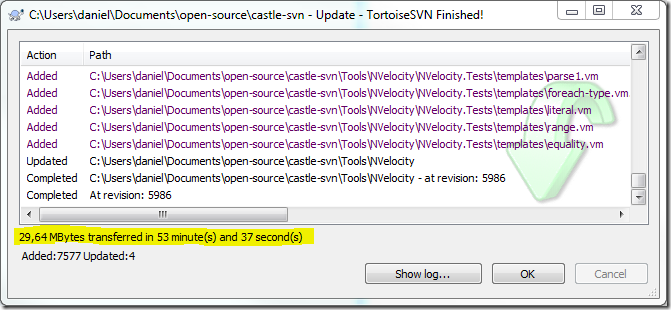
1 hour ago I noticed that I need the Castle.Facilities.Logging assembly, so I fired up SVN to checkout the newest trunk and run a build.

image

It took 53(!!!) minutes to checkout. Something is seriously wrong with SVN at times, there is no other way to explain the differences in speed I was seeing during checkout: Some files came with 50 kb/s, some with 2 kb/s and others with 100. That said: I’m sitting ontop of a 12 mbit ADSL-2 connection that peaks at about 1.6 mb/sec.

I hate waiting, and waiting an hour for a trivial operation that should not take any longer than 10 seconds is really the end. I only hope most projects get away from svn as soon as possible, the benefit in speed is just massive.

Oh and btw: I know that there are SVN mirrors of the castle project on GitHub, I already did a fork of one of those to pull it down. Only that it was 6 commits behind the current svn trunk and I couldn’t build the solution at that revision so I decided to re-pull the most current svn (big mistake).

Read more →