#projects

Posts tagged projects

Introducing ELMS-Connector v.1 Beta

When I joined the imagineClub in Klagenfurt and started building the new website I kept avoiding one major feature for a very long time: Implementing the remote-login for the MSDN-AA system by Microsoft.

The way imagineClub members get to MSDN-AA software is through a web-store called ELMS that handles licensing and downloading for us. ELMS supports two modes: integrated authentication or campus authentication. Integrated means that accounts have to be maintained inside ELMS while campus authentication means you manage accounts in your own system and ELMS will ask your services to authenticate users.

Now the first approach works for very small organizations where you can easily keep track of your members and (as admin) respond to their “oh god I lost my password” requests.
But with about 200 members like the imagineClub this alley leads into a world of pain and despair. So the only real solution is to implement the campus authentication that requires a authentication handshake between ELMS and imagineClub.

The documentation on the whole process is quite scarce, but with some reverse engineering of our old site and some FireBug network analysis I was able to eventually figure out how the whole system was supposed to work. It’s not that complicated after all, yet it’s not funny to have to re-invent it over and over again.

Since I knew that the Institute of Technology at Klagenfurt University has also acquired a MSDN-AA license for it’s staff I started working on the idea of a re-useable and easily pluggable library that could encapsulate all ELMS campus authentication logic to spare others the pain of implementing the thing from not so great documentation.

My main goals for this where:

  • Minimum configuration
  • Pluggable (being able to drop it into an existing ASP.NET app)
  • Variable authentication method (not everyone is using the same auth services we do)

Especially for pluggability I wanted the whole thing to live inside a DLL so I decided to implement a HttpHandler that will then handle the authentication.

The handler will look for a Login.htm file in your application’s root folder and display that file to users that need to log in. This means that you can easily modify the look&feel of your login page without having to mess with any ASP.NET code that can break. As long as you leave the name attribute of the username/password field intact all modification is fair game.

Once the user hits login the connector will then look into it’s configuration (I use Windsor for that) and invoke a supplied IAuthenticationService class. That means that you tell Windsor through the config what class servicing IAuthenticationService you want to call and it will get called with username/password.

This is the interface that users may need to implement:

public interface IAuthenticatonService
{     bool AuthenticateUser(string username, string password);
}

I intentionally said may because ELMS-Connector comes with a built-in LDAP auth service that you can use to simply hook up the login to your existing LDAP system without having to write any code at all (although that part is still in development).

Now, let’s get to the gory details.

How to set up:

1: Grab the release from the project’s download page

ElmsConnector download

2: Add reference to ElmsConnector.dll

ElmsConnector uses Castle Windsor internally but that dependency is merged into ElmsConnector.dll so you won’t run into any versioning issues.

3: Add httphandler to web.config

Add the following to your <httHandlers> section in the web.config:

<add verb="*" path="*.elms" type="ElmsConnector.ElmsHandler, ElmsConnector"/>

This makes all requests that end in .elms go to the ElmsConnector component that then does it’s magic.

4: Configure ELMS

Log into your ELMS dashboard and go to User Management –> Integrated Campus Authentication.
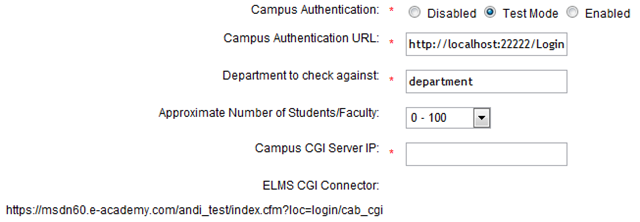
image

Set the Campus Authentication to Test Mode (while testing the connector).
The Campus Authentication URL should look like this: http://<yourserver>/Login.elms (or wherever the *.elms HttpHandler will be accessible).


Set Department to department (the suggested default value).

Campus CGI Server IP should be set to the IP your Server is using since ELMS will use the destination IP address to verify your identity.

Now don’t forget to copy the ELMS CGI Connector url since it will become of importance during the configuration of the connector.

4: Copy and modify sample elms.xml

Inside the release zip there should be a file called elms.xml, this file is the main configuration for the ElmsConnector. Copy it to the root of your web application and open it inside Visual Studio.

You now need to paste the ELMS CGI Connector url into the <cgiConnector> tag:

<component
  id="ElmsSessionRequestService">
  <parameters>
    <cgiConnector>https://msdn60.e-academy.com/<campus>/index.cfm?loc=login/cab_cgi</cgiConnector>
  </parameters>
</component>

And you’ll have to tell ElmsConnector where to find a type servicing IAuthenticationService. This is done by modifying the type attribute on the AuthenticationService component:

<component
  id="AuthenticationService"
  service="ElmsConnector.IAuthenticatonService, ElmsConnector"
  type="ElmsConnector.Web.FakeAuthenticatonService, ElmsConnector.Web" />

(I suggest you look at the provided sample project ElmsConnector.Web to see how this works)

5: Add the Login.htm

Inside the zip there is also a file called Login.htm. That file is nothing more than an empty template of the future Login dialog ElmsConnector will expose to users. Copy it to your web application’s root and edit it to your heart’s extend. All modifications are fair game as long as you don’t change the form parameter names or remove the $error$ placeholder.

6: Done

Yes. that’s it. You can now test the whole thing by visiting your ELMS portal page and hit Login. If your Campus Authentication Url is set correctly you should see the ElmsConnector’s Login.htm and be able to log in.

License

ElmsConnector uses the ASL-2 license and is therefore open-source-software. ASL-2 is a very permissive license that allows use of the code even in commercial closed-source scenarios. Still I’d appreciate if you’d let me know that you like ElmsConnector.

Problems

There may still be some problems with this release, if you notice anything strange or broken please open a Ticket on GitHub or shoot me a email.

Extending

ElmsConnector is very extensible through the use of Castle.Windsor internally. If you know your way around Windsor XML configuration you should be able to change everything about the connector without the need to recompile. Still I suggest you check out the source to find out what goes on there.

Future

I’ll be dogfooding this component during this week while getting the iC-Website ready for launch. After that I want to implement the LDAP authentication service that will ship with ElmsConnector so if you have an existing LDAP infrastructure you don’t need to write any real code at all.

Need help?

If you have any more questions regarding ElmsConnector or how to set it up in your special case, please feel free to send me an email or contact me through IM (Contact info). I’ll be happy to help you use ElmsConnector!
Read more →

How to ruin my day

In case you are somewhere stuck in a plan on how to make my day miserable I’ve got a tip for you:

Write absolutely horrible code like this and leave the maintenance to me:

Method signature:

internal void TryRequestSession(string securityToken, ref Guid secID)

Call site:

public ActionMethod Open(string securityToken)
{
	Guid secID = Guid.Empty;
	try
	{
		secID = new Guid(securityToken);
	}
	catch
	{}
	Guid oldSecID = secID;
	provider.TryRequestSession(securityToken, ref secID);
	if (oldSecID == Guid.Empty)
	//....
}

There are many things wrong with this code, but I’ll spare you the details and say that new Guid(securityToken) will always throw a ArgumentException and that I have absolutely no tolerance for void methods that have ref parameters!


Whatever was going on in that chimps mind who wrote that, it couldn’t have anything to do with programming.

So, recap: If you expect other people to maintain your code (I’m currently rewriting this thing, it’s easier) make sure you do the following:

  1. Have Unit tests that specify the behavior
  2. Leave an actual spec that can be looked at
  3. NEVER use ref if you can use return
  4. Don’t swallow exceptions (and if you have to, leave a comment!)
  5. Make it run!

Yes that’s right. If you leave a piece of crap behind, at least make it compile! I had to search for 3 totally outdated libraries to even make this piece of junk compile on my machine. Again: The GAC is your enemy!

Thank you, you now may go on with your lives while I feel a lot better and my actually start enjoying my coffee :)

Read more →

imagineClub Website source has moved to GitHub

I have been using Mercurial as my SCM of choice for quite some time now, and I’ve been loving it ever since. Working with a DVCS is a pleasure compared to the slow and painful experience I see when using Subversion. Not that Subversion is a bad product, but my workflow is just totally different from what SVN was built for.

Having used git now a bit while helping Erik on the Less.Net project, I discovered that it feels a tad better workflow wise. I especially like it’s much better branching support and it’s support for shelving changes. Both things already in hg, but not as easy to use or only available through addons.

Another thing that made the switch tempting was the fact that it seems almost the whole .NET community decided to head over to GitHub to continue development. There are NHibernate forks, there are Castle forks etc etc.. Even Ayende moved there!

So I decided to follow the herd, being familiar with the tools the community uses is very important to me, so today I finally moved the imagineClub website source to GitHub.

Why finally? Well, I’ve been trying to for now 2 days and simply failed. Today i finally decided that it’s OK for me to loose all my history and to start a fresh repo with the existing code. The migration from hg to git seems to be so uncommon that there is a significant lack of tools for that.

There is the hg2git from the GitHub crew, that didn’t work for me. And there is a hg2git script inside fast-export that I couldn’t run on Windows. Although Zerok managed to convert it on his Mac machine, all the linefeeds were wrong and therefore the history was rendered useless. So I decided to quit trying and simply wipe the history, start from scratch and be done with it.

So, now the new home of the imagineClub source is located here:
http://github.com/Tigraine/ic-website/tree/master

Feel free to watch / fork the repo.

Read more →

Introducing IronLess.Net &ndash; your duct tape solution to LessCss in ASP.NET

Some time ago while writing the CSS for the ImagineClub website I found out the hard way that there are two ways of developing XHTML sites: Clean presentation/markup separation or mixing of the both to achieve CSS reusability.

What I mean by mixing is markup code like the following:

<div class="floated thick-border highlight">
	<p>Stuff</p>
</div>

I have problems with the above, since I am clearly mixing presentation with data. I want my XHTML to transport structured data that gets styled through CSS. Separation of concerns teaches us that we should rarely have to touch the markup if we want to change appearance, and we should not have to touch the markup if we change the data we are presenting.
So the above code clearly blurs the line somewhat, and while still being somewhat semantic markup, it’s also intermingled with presentation concerns what I don’t like at all.

Why code like the above exists has a reason: CSS is endlessly verbose and leads to tons and tons of code-duplication if only applied to DOM structures and IDs, so naturally webdesigners have started to use the mixing of classes in markup to avoid some of the duplication while still leveraging the power of CSS.

During a chat with Kristof about this particular issue the conclusion we reached was that my way of doing it was theoretically better, but only if backed by some sort of server-side framework that would enhance CSS to avoid duplication and verbosity that comes with my approach.

And looking over the Microsoft fence, somewhere in those fluffy green lands inhabited by Ruby people, I found the answer to my problems: LessCss!


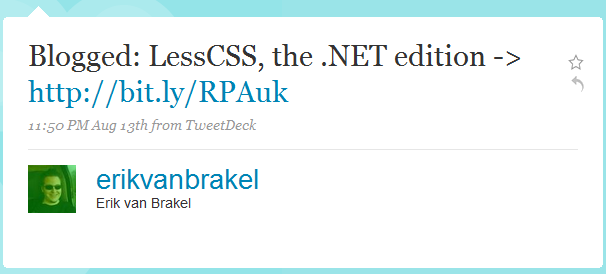
But I don’t do ruby development so I filed it away under “cool but unreachable”, until I came across this tweet some two weeks ago:

image

I was immediately sold to the idea and contacted Erik, to contribute to the project. Turns out, he’s a really nice guy and working hard on writing a parser to read LessCss fully in managed code through the use of ANTLR.

But being the simple guy I am one of the first questions I had for Erik was: “Why don’t we just wrap the original Less project inside the DLR and run it from there?”.

Well, at that time Erik had no real answer for that, and I didn’t either so I decided to give it a try while Erik had some very valid reasons to continue working on a full C# implementation.


And now this is the post to tell you of my pyrrhic victory:

First: I did it. It’s here and it can be used: IronLess.Net.


Disclaimer: It’s a pain in the ass to use.

Installing IronLess.Net

When I write a library I want it to be one thing: self-contained. I don’t want to mess with your local IronRuby installation or with your current gem setup on the machine. So IronLess comes packed with a full catalog of IronRuby/Ruby class libraries all packed into a 0.9mb 7zip file. This file contains 2.228 files in 482 folders all together forming the complete IronRuby environment needed to run the original LessCss.

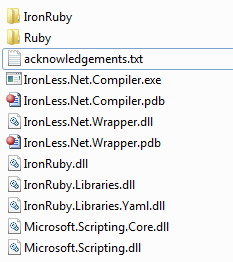
I did some (simple) magic with NAnt to alleviate that pain, so if you checkout the code you’ll just have to run build.bat and NAnt will compile IronLess and also extract the IronRuby libraries to your build folder, making it completely self-contained. You’ll end up with the following folder structure you just need to move (copy will take forever) to your /bin folder:

image

Once that’s done you only have to add the following HttpHandler to your ASP.NET web.config and add some initialization code to your Global.asax.cs to be all set.

web.config

<add verb="*" path="*.less" type="IronLess.Wrapper.IronLessHandler, IronLess.Wrapper" validate="false"/>

Global.asax:

protected void Application_Start()
{
    IronLess.Wrapper.RubyEngine.Initialize(Context);
}

That should suffice to redirect all request for a .less file to the IronLessHandler that will compile .less to .css using LessCss.

Downsides:

There are a thousand reasons to use this, but I’ve another thousand why you shouldn’t:

  1. Startup is painfully slow: Initializing the LessCss ruby script takes >20 seconds. So every application start takes 20 seconds now since we call the RubyEngine initializer in Application_Start (that will kick off the init of the LessCss script that itselfs makes IronRuby parse all the imported libraries resulting in a 20 second library load). That itself makes it completely unbearable since every debug run in Visual Studio now takes 20 seconds to load.
  2. LessCss through the DLR can’t read windows line-endings. You have to open up your.less file in a editor like Notepad++ and convert it to UNIX style endings (CR-LF -> LF). Not pretty and even less practicable.
  3. Error handling / debugging is impossible. I didn’t dare to modify the LessCss.rb script so errors will be outputted to the command-line that you aren’t seeing. So if your .less file has errors you’ll see no useable results on why it failed to load.
  4. Compilation of .less to .css takes between 50 to 200ms inside a running web-app. Running the IronLess.Compiler takes about 30 seconds. Both figures are way to slow to be actually useable, going with the native Ruby gem from the commandline would be much faster.

So, why bother?
Actually, that’s the question I asked myself halfway through doing IronLess. Since it’s so painful to deploy and startup, I don’t see any real use for this at this point. If someone has the skills to make the DLR run LessCss faster than light by flipping some magic bit, please go ahead and fork my repository on github and tell the world about it.


Also I find the installation process to be just too painful. C’mon, 2.228 files in the /bin directory just to write CSS just isn’t cutting it for me. What I want is one simple dll I reference from /lib and I’m set.

Going further

I’ll be going to help Erik get Less.Net out of the door as quickly as possible, in the hopes of bringing something much needed to the ASP.NET world while avoiding all the troubles with external dependencies you get when trying to call into the ruby world from .NET code.
Also it’s a nice excuse for me to dig into ANTLR.

So finally, if you decide to use this you are entering a world of hurt. Either you can improve IronLess to a point where it gets useable (I can’t), or you wait for Less.Net.

Read more →

The fairy tale of binary blob fields

One of the main advantages students get from being members of imagineClub is that they get access to uploaded course materials through the website. Naturally, the new site has to support file upload and download somehow, and yesterday I started implementation of that feature.

In theory this sounds really simple, especially since the file upload in MonoRail is so trivial I figured it wouldn’t be a problem to implement.

One major thing to consider when designing a file upload feature is the question: Save to disk or save to database? Let’s look at the two options:

Save to disk:

Pro: Very easy
Con: Requires metadata to be kept in the database. Could go out of sync with the db. Requires backup. Requires special permissions.

Save to db:

Pro: Zero setup. Data all in one place, backup hugely simplified. Enforces data integrity
Con: Non-trivial implementation.

Now, I naturally went with the db option. Deployment is hugely facilitated if you don’t need to look at file permissions, and most hosters have databases backed up anyway. So things go south, the only thing I need to recover the site would be the database file.

Some searching revealed that binary data could be mapped to the database through AR quite easily:

[Property(ColumnType = "BinaryBlob", SqlType = "varbinary(MAX)")]
public byte[] BinaryData { get; set; }

Problem with that is that it crashed ALL of my database dependant unit-tests:

------------ System.Data.SQLite.SQLiteException : SQLite error
near "MAX": syntax error

Apparently SqlLite can’t figure out that MAX thing and will crash. Since it would accept a numeric value instead I looked at the SqlServer 2008 documentation for varbinary to find out what MAX would be. Turns out it’s exaclty 2147483647 (2^31-1), so my natural reaction was to change the SqlType to be exactly varbinary(2147483647) instead of MAX. Now SqlLite can interpret it and all tests run great again, but creating the schema on SqlServer isn’t possible any more due to the following (odd) error:

The size (2147483647) given to the column 'BinaryData' exceeds the maximum allowed for any data type (8000).

So, what we just saw is a leaky abstraction inside the ORM. But NHibernate never claimed to abstract the DB completely away from me, so we’ll not use that against it. NHibernate explicitly supports these scenarios and in a real NHibernate scenario it’s just a matter of having two different mapping files, one mapping to the appropriate SQLite datatype and the other mapping to the Sql2008 datatype that would be varbinary(MAX).
But, I’m not using NHibernate here, I’m using ActiveRecord that handles mapping through attributes on the data classes, and I’ve no intention of using #ifdef statements anywhere around my code.

The problem here is mainly that whenever you are trying to use two different RDBMS at once you are limiting yourself to the least common denominator, and you have to deal with that.


I won’t be able to use advanced Sql2008 features, and I also won’t be able to use anything fancy inside SQLite either.

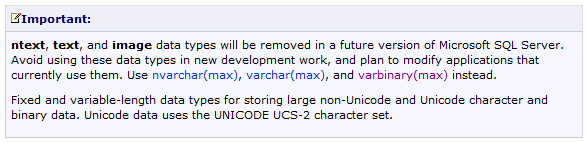
The least common denominator in this case is the datatype IMAGE, something that Microsoft is discouraging people to do in their documentation:

image

This puts me in a delicate position since the imagineClub website is hosted on a server I don’t control. So I could just wake up one morning and seeing the iC website down because the hosting company decided to upgrade all users to 2010 (or whatever version the next SQL Server will have).


And I know, usually providers send out warning for stuff like this, but I doubt that through all the structural changes with imagineClub lately they even know where to send those warnings to.

So: Long story short, use image over varbinary(MAX) if you plan on doing in-memory SQLite testing, just keep in mind that your app will break when you upgrade to a newer version of SqlServer.

Update: Looks like Krzysztof Kozmic had the same issues and found a quite clever solution for that. I’m not totally clear on how to do this with ActiveRecord, but it’s a very pragmatic approach to a problem that seems to not have a perfect solution anyway.

Read more →

ImagineClub Website: File upload/download works

Oh it’s been quiet for a very very long time around here imagineClub-wise. And I’m afraid to say that progress has been rather slow.

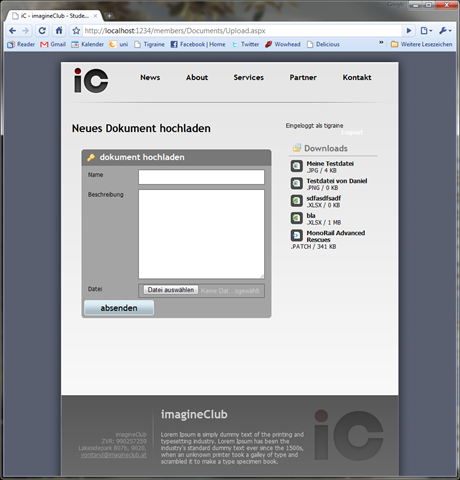
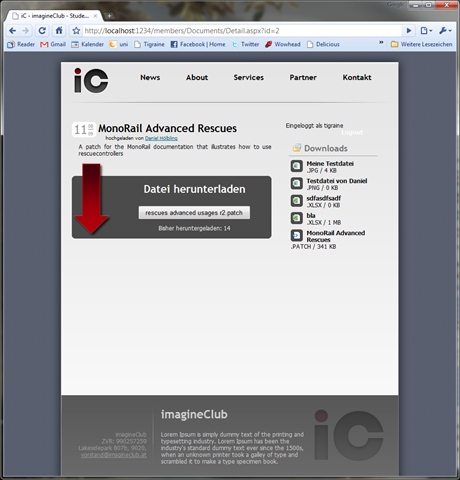
Well, today I finally around to implement file downloads/uploads and the file listing in the sidebar section. In all it’s glory it was nothing more than 10 lines of C# code and tons and tons of XHTML and CSS that I’d rather not go into.

Here are some screenshots of the current version:

 image image

It’s really rough around the edges and I will probably need to bring in a markdown editor to allow formatting when posting. I plan on stealing Ken Egozi’s Windows Live Writer integration for the news section, but when users upload files to the site they need to have some way of formatting their text.

Also I’ll look into Less.NET to manage my CSS because it is becoming very very verbose at the moment and restructuring it is just painful. This is mainly due to the fact that I want to keep the markup was ignorant to presentation as possible and as expressive as possible. All forms are built with accessibility in mind and are passing the webaim tests.

Next up on my list is a search/list option for uploaded files. Maybe improve the file organization a bit more and then start to write the ELMS integration to allows logged in users access to the MSDN-AA. Once we are done with the ELMS thing I’d dare to launch the site.

Read more →

Windows Live Writer Plugin: Wrap code in &lt;tt&gt;

As of late I try to mark code parts inside normal text with the <tt> tags to make them stand out as code. While writing my MonoRail tutorial yesterday I got really annoyed by switching between source and normal view inside Windows Live writer to add <tt> all over the place, so I figured I’d use the WLW Plugin API to write a plugin that wraps text inside <tt>.

namespace wlwWrapIn
{
    using System;
    using System.Windows.Forms;
    using WindowsLive.Writer.Api;

    [WriterPlugin("37CB2E7F-1809-4344-9527-526768A99E9F", "WrapInTT", PublisherUrl = "http://www.tigraine.at")]     [InsertableContentSource("Wrap in <tt>", MenuText = "Wrap in <tt>", SidebarText = "Wrap in <tt>")]     public class WlwWrapIn : ContentSource     {         public override System.Windows.Forms.DialogResult CreateContent(System.Windows.Forms.IWin32Window dialogOwner, ref string content)         {             content = String.Format("<tt>{0}</tt>", content);             return DialogResult.OK;         }     } }

Oh yeah it is that simple, just reference the WindowsLive.Writer.Api class and you can write a plugin like that.

In case someone needs my <tt> wrapping plugin, you can get it here: WrapInTT.dll

Read more →

Dropping IE6

This one’s going to be quick. While doing the xhtml/css for the new iC-Website I decided that there will be no IE6 support. The site will be standards compliant and should pass W3C XHTML 1.0 strict validation.

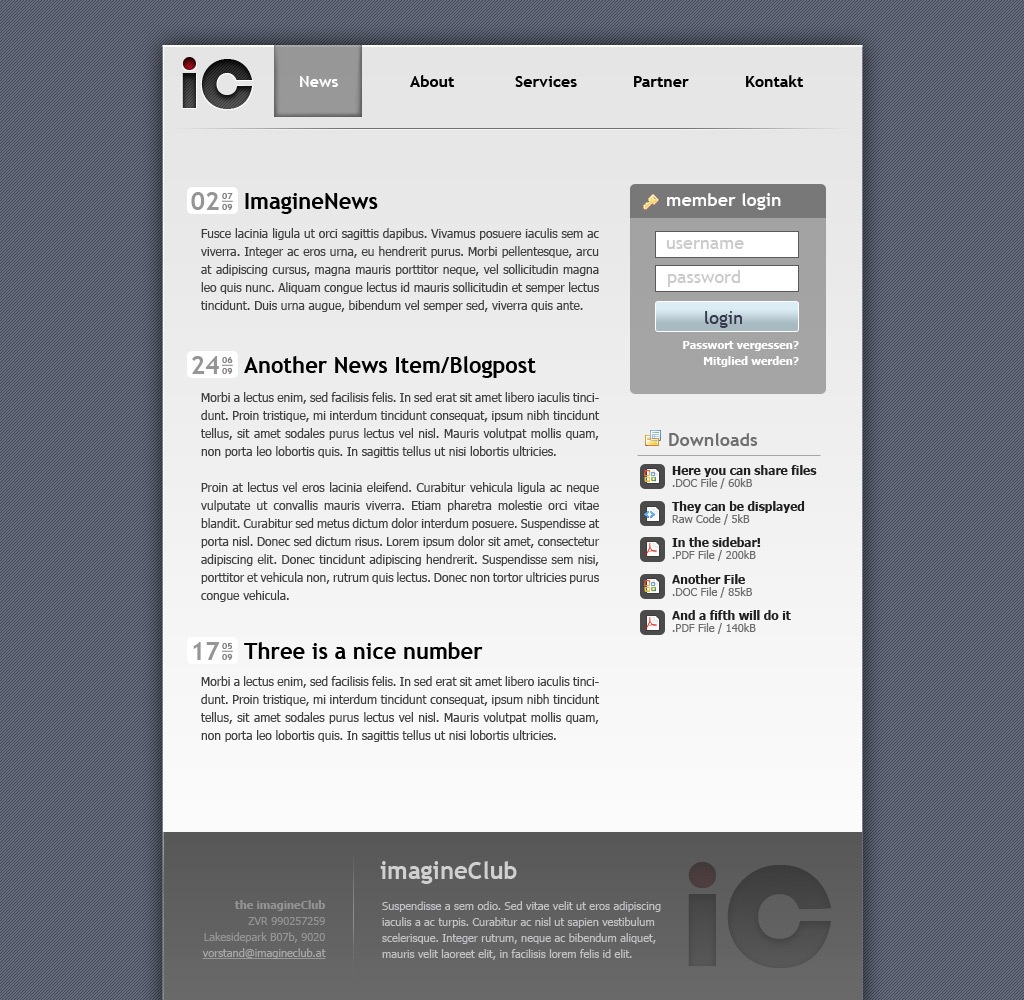
The current markup already works quite well with absolutely no hacks/js-tricks to look like this:

image

Since IE8 renders this flawlessly (except for the rounded corners within the date), I see no real value in trying to make this check out in IE6. I’ve spent too much time on this already so in case you haven’t upgraded yet: Get IE8!

On a side note: I’m amazed how well IE8 renders the site. Everything I did so far worked perfectly on all 3 rendering engines without any problem. Thank god the dark days are over!

As always, you can follow the development on BitBucket. The site’s source code is available there. Feel free to comment on the markup :).

Read more →

imagineClub Website feedback results

I hate web development, I learned to hate it when I was translating Photoshop designs into XHTML years ago and I was really hoping to never do it again.

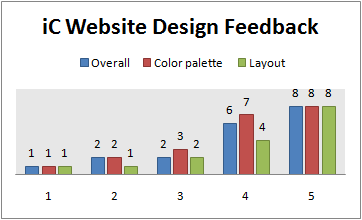
Unfortunately, most people who took the iC Website design survey really liked the new design, so I decided to start working to get this thing done sometime soon. Here is the poll result:

image

Thanks again to all who participated!

So, where are we? First: I am developing the iC website in the open. The source code is available at the project’s BitBucket site, so if you want to see what progress has been made just follow the project’s commit history RSS.

Sadly, Currently the repository is more or less a blank MonoRail template while I am trying to get the XHTML to look like Kristof’s design. I am really trying hard to maintain a clean markup to enable accessibility to all users.

Unfortunately, my CSS skills are somewhat lacking, so I had to learn the hard way that background-position won’t work with background-repeat, and that there is no chance in hell we’ll ever support IE6.

I’m also not sure yet on what license the project should use. I slashed a APL2 license on it just to have one, but I guess we’ll drop that in favor of a CC license.

Read more →

New imagineClub website design poll

I just got email from Kristof  with a raw draft of a new design for the imagineClub website I’m currently building. I’d really like to hear your feedback on this:

iC-sd2

Update: Sorry I didn’t include any more background on the topic. imagineClub is a club that focuses on helping students at Klagenfurt University with their studies and enable them to easily access new Microsoft technology. I wrote a more complete article about the imagineClub some time ago.

Please take a few seconds to answer this little survey. It will help us reach a decision and improve the design:

Read more →