#personal

Posts tagged personal

Windows Live SkyDrive could be smarter

image

Skydrive, one of the cooler things Microsoft released lately under their Live.com brand has somehow replaced my private FTP server for sharing files with myself and others.

It's cool, it's easy and it's free. You get 5 gigs of free storage with your Live.com Id that you can use to upload data to the cloud.
You then get a quite neat folder view online where you can download those files, set their permissions etc.
So, if I want to share some files with a friend I can add them to the folder's permission list and they can see them with their Live.com Ids. If anyone should be able to see something I just add it to my globally shared folder.

So, whenever I need data at university I just upload it to SkyDrive instead of emailing it to myself as I used to do. It's usually just boring university assignments but after a few weeks things start to get messy. I started out by creating one folder for every course, not dividing up into assignments. So now I have 20 files in my dbtec course folder, all called "Dbt_AssX.doc" accompanied by some .sql and .txt files.

I then tried to correct that mistake, created a new folder to split up stuff, and - voila, there is no way to move a file from folder a to folder b! That sucks!
I was already concerned about the missing API (uploading stuff through the browser isn't cool!), but being unable to move stuff around is quite annoying.

If we're at it, I'd really appreciate some sort of slightly more accessible UI. Deleting a folder isn't as easy as clicking the folder and hitting delete, no, you need to click the folder, access it's properties through clicking on it's name and then pressing delete.


Read more →

Klagenfurt University could use a Campus

Don't get me wrong, I love studying at Klagenfurt University, but whenever the weather gets more and more appealing I start dreaming of some cool cafe's and other stuff on the university campus.

Currently the only café that is really located inside the university is the iQ. And that's ok, but the university is lacking more open space. Maybe you get what I mean by this picture.

university (click to enlarge picture)

The red area is university property, while the yellow stuff is parking and the blue stuff is streets (with parking).

What happens is that whenever you step outside the building after 10 meters or so you happen to either reach a parking lot or a street.
If you follow this geo-link you might find that there is plenty of green around the university, but when you are there the perception is that there is only cars :).

So here it comes, cut down some roads and open up the area. Remove the front parking (eastern parking lot) and make it a nice little park for students. Also I'd like to see the road in the east closed down and some nice cafés opened up. Giving so much space to parking is just a waste.

On the parking side: Before you can get anywhere near planning a cooler campus we need to get public transport in Klagenfurt up to speed. There should be a frequent shuttle bus from the nearby train station that may also take students to the Wörthersee in summer, so more people would consider the train a viable alternative to the car. The STW bus should come every 15 minutes at least, having 2 buses per hour is simply unacceptable.

Klagenfurt university may be one of the few universities in Austria that isn't directly located inside the city so you could make something out of the place without having to redesign transportation for a whole city. But as it's currently more space is wasted than really used. It all feels too small and not really comfortable.

Read more →

Offline Web Applications

calendar_sm2_en I've stumbled across several discussions on offline web apps lately and thought I'd share my view on these things.

As a heavy user of GMail, Google Calendar and Goodle Reader I really depend on having a internet connection most of the time. I especially am one of those guys who forgets his timetable the second it gets changed, so whenever I need to make an appointment I either have to search for a computer or postpone the making of the appointment.

So, I find myself too often in the middle of a chat digging out my laptop to look at my timetable.
But although my laptop is starting up quite fast, till I get connected to a wireless (if any at all) I usually have spent 3-5 minutes with meaningless smalltalk and cursing about WIFI and my ubuntu (my laptop is now 4 years, can't prove that the machine got slower over time, but reinstalling XP simply wasn't an option any more).

And then, I stumble across an article by DHH (the guy behind RoR) called: You're not on a fucking plane (and if you are, it doesn't matter)!
So, halfway through I was ready to agree that being able to access web apps all the time isn't necessarily a good thing till I remembered all the hassle I go through when I'm trying to look up my schedule.

For time being, Google did a pretty good job on replacing all my mail/calendar/reading needs by their web applications, and although there are some nice tools like Google Calendar Sync, I really can't use it if there is no network connection available. (Calendar Sync isn't syncing all my calendars, only the main calendar that I only use for personal stuff, university and business calendars are what matters and those don't get synced).
So, Google Gears might be the right way in the right direction, although I still doubt that it's clever to install liteSQL on a client's machine, making all SQL calls through AJAX so that Gears can swap out the real server if disconnected. That's just too much crappy Javascript that needs to be written and executed on the client's side.

Finally, I think DHH has a point in "we're way too online". But there are applications that really need 24/7 availability and those need to be made accessible offline. And while we're at, why not just create something that will work for more than one site?

By the way, my solution to the current calendar problem is already in the works, by June 30th I'll be owning an iPhone, that's gonna be synced with Outlook (that will be synced with my Google Calendar) so that I don't need to get out my laptop any more while also having the calendar offline!

Read more →

Reading suggestion

Sorry for me being so silent for the last weeks. I've been quite busy and for a week or so I am just trying to get my unread feeds back to under 100 again.

That's also why I thought about writing this post.
After I marked 2 consecutive posts as shared on my Google Reader I really had the urge to say this out loud:

Thank you Jeff Atwood for your blog!

I have been following the blog for quite some time now, and I have to admit that there is hardly any other blog I enjoyed reading as much as codinghorror.

It's not really the most informative blog if you are searching for any solid programming hints, but Jeff manages to really keep his focus on geeky - interesting tech topics that can't easily be put in niche like .NET, Java, Ruby, SOA etc..

So, for anyone interested in a really great read you can find Jeff's blog here.

Oh, and the book he derived the term "codinghorror" from, Code Complete by Steve McConnel is a very good read too!

Read more →

The modern age of printing!

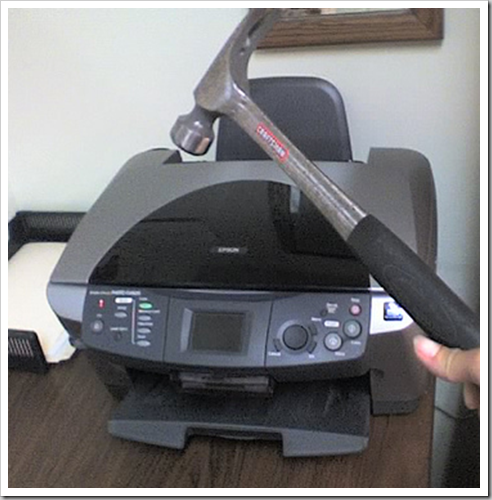
killepson Tomorrow is an important exam on computer organization and design and I was learning. We are allowed to use our records during the exam, so I went through the whole bunch of documentation our professor supplied and searched for helpful stuff I could carry with me tomorrow. Obviously, taking 150 pages of notes with you won't help so I got down to about 25 pages with some meaningful information on them.

So, usually I'd just hit CTRL + P on any page that I think is worth it and print that one page out.
But: Epson managed to totally screw up their drivers (for any OS) so I finally ended up printing everything to XPS, copying it over to the machine where my printer is installed and printing it out manually!
Yes, right: I physically went to another computer that's interconnected through a 100mbit Ethernet to print out 25 pages! (Am I the only one feeling like stone age here?)

So, what went wrong?
I have a Epson EPL-6100L sitting on a Windows XP Professional computer connected through USB.
Drivers and everything are setup and the printer is working.
Only problem? In case you run your printer over the network windows is installing the printer drivers locally to your machine and creates a virtual adapter for that printer to communicate over the network.
I admit, that's not the best possible solution I can think of, but it usually works.
Only that Epson built those stupid monitoring applications into their driver, so whenever I try to print something the printer driver is trying to poll the printer for it's cartridge status and stuff (That printer isn't connected to this computer, so the poll times out). Great stuff about this? During this 10-20 second timeout the application you're using to print freezes completely (read: not responding in taskmanager) until the driver gets over it's problems and finally sends off the doc.
Note that the driver first almost crashes your app, then after printing out something stupid as "Can't find printer status information" it starts sending off my document.
And there are times where the driver completely crashes and I can't print anything.

But, yet I had lived through the above problem on XP. But on Windows Vista it looks like the OS is doing something to the printer driver when you just bring up the printing dialog. So my app freezes for like 5 seconds whenever I start a print dialog.
Taking my user experience to the next level of pain:
Print -> (5 sec wait) -> hit OK -> (30-60 seconds wait) -> clicking stupid messagebox -> (wait 5 secs for the printer to start) -> get printout.

Man was I pissed when I had to go through this tedious process for like the 3rd time. So I lost it and did the XPS -> copy stuff to get it done in a reasonable amount of time.

So yes, Epson really really screwed this one!
Yeah, they really did. And rest assured that I'll never ever buy another Epson printer in my whole life!

But now to you guys, any suggestions on buying a new printer?
I am absolutely sure that I don't need color printing (got another printer for that), I want a fast printer, I want it directly connected to my network (own IP) and that I want all of that pricey!
Suggestions are welcome.

Read more →

Buying yourself an Apple

iDontcare

Did you snicker when you first saw this picture above? If not you are either one of the blessed people out there who don't know Apple or one of those ignorant's who will flame anybody who doesn't think "the Apple way"®.
Personally I think most of my readers will be neither nor.

First things first: My brother wants to buy an iPod.
And, as much as I would love to talk him out of it, I can't.
I simply can't because there is no other device currently available in Austria except for the iPod.

Ok, now you know I hate Apple products. (Flame me!)
I personally don't like the i<SomeProductName> design Apple has been doing for the last years (just personal taste!). But I think I could overlook the design if I wouldn't dislike the message Apple has been delivering together with their products (lifestyle isn't something I define through my mp3-player or laptop). And foremost, I don't like their pricing policy.

But that's all me. Now if you aren't already biased: What mp3 player should you buy if those assumptions hold true:

  • You hear lots of music (>8 gigabyte)
  • You hear music depending on your mood
  • You don't see the price of 250€ as a problem
  • You like the iPod design
  • You like using iTunes (my brother does)

So, let's assume you want an 80 gigabyte mp3-player. And you look at the market and find: Creative, Apple, Sony and some other nonames (that obviously wouldn't be noname anymore if you should consider them).
You see? Something is missing in that list. Something that's a real alternative to the iPod.
I mean, hell yeah, you can buy an Creative ZEN and be happy with it. But the software is and has always been really awful (so they made it compatible to iTunes). So, you're buying a ZEN that you will be using through iTunes: Does it ring a bell? Why bother with ZEN altogether if your iPod works with iTunes much better than ZEN?
And on the Sony side of things: They didn't get their player right imo. While the ZEN shines as a great mp3-player with good sound, Sony just messed up the whole usability concept (and their desktop software sucks too).

So what's left? Some crappy mp3-player that unfortunately is the only choice you are currently presented: iPod.

I am still hoping Microsoft is going to release the Zune in Austria someday soon. Until then, there simply is no viable alternative to the iPod.

Read more →

Alive and kicking

I know I haven't posted for some time, mainly due to the fact that I'm in the middle of exams right now.

While I should be learning Computer Organization & Design for next week's exams (besides some other stuff I should be doing right now), I started off reading my new book Code Complete: A Practical Handbook of Software Construction by Steve McConnell.

While I'm not fully happy with Amazon's delivery (a week late, both books got damaged during the lift), I am very happy with the book itself. Unfortunately it isn't that easy to read, so due to a lack of piece and quiet I haven't read past chapter 4.

McConnell laid out in his first chapter that real Software Development Ideas won't be addressed before chapter 5, so I was pretty much reading through common problems during project inception and the differences between sequential and iterative programming.

Besides reading and learning I also started some ASP.NET MVC experiments, but I think I'll back up on that for now and try to make myself familiar with the pattern behind MVC.

Read more →

Allies &amp; Axis

Axis & Allies Revised Weihnachtsferien beginnen und wie jedes mal trudeln so schön langsam die ganzen Exil-Studenten wieder in Klagenfurt ein.

Wie immer startet damit natürlich auch die Brettspiele Saison :). Da die Meute aber auch noch anspruchsvoll ist wurde es immer schwerer ein halbwegs gutes Brettspiel zu finden das auch gespielt wurde.

Auch wenn sehr schöne Spiele wie: Shogun, World of Warcraft, Risiko und Siedler von Catan zur Auswahl stehen. So richtig konnte keines davon überzeugen in letzter Zeit.

Nachschub musste her, also habe ich wieder mal beim Spielehändler meines Vertrauens nachgeschaut und habe ein neues Prunkstück für meine Sammlung gefunden:

Axis & Allies

Wer sich für Strategiespiele interessiert und genug hat vom alten Risiko-Glücksspiel wird in A&A eine absolut geniale Simulation finden. Das Spiel bietet alles, von liebevoll gestalteten Spielfiguren bis hin zu genialer Balance. Keine der 2 Fraktionen ist eindeutig im Vorteil, keine ist eindeutig im Nachteil. Sieg oder Niederlage entscheidet sich fast ausschließlich durch strategische Finesse, ohne dabei den Faktor Glück vollständig zu eliminieren und somit die Spannung in den Kämpfen aufrechtzuerhalten.

Worum es geht? Die Welt im Jahre 1942: Die Achsenmächte auf dem Höhepunkt ihrer Macht. Russland schwer in Bedrängnis durch ein starkes Deutschland im Westen und Japan im Osten. Amerika steht kurz vor dem Kriegseintritt und England kämpft an mehreren Fronten um das Kolonial-Reich vor den Achsenmächten zu verteidigen. Und das ist auch schon die Handlung. Alliierte kämpfen gegen die Achsenmächte. Die Seite die zuerst eine gewisse Anzahl an Sieges-Städten erobert hat und hält gewinnt das Spiel.

Warum das ganze soviel Spaß macht? Ganz einfach, im Gegensatz zu Risiko beginnen die Fraktionen an fixen Startpositionen mit festgelegten Start-Einheiten und unterschiedlicher Wirtschaft. Dadurch ergibt dass sich jedes Volk grundlegend anders spielt und auch extrem viele taktische Möglichkeiten gegeben sind.

Read more →