#net

Posts tagged net

GDI Drawing: String with word-wrap

GDI drawing is magic and not very well documented. Finding out how to make GDI draw a string inside a fixed width without constraining the height took me about 20 minutes, hopefully this post saves you 20 minutes of your life nobody will give you back :).

The problem with Graphics.DrawString() is that you can either supply a PointF that will be used as the origin, or you supply a RectangleF as layout rectangle. The rectangle’s sizes and position will be forced upon the text and word-wrap will happen to fit the text inside the rectangle, anything not fitting in the rectangle (given the font-size) will be cut off.
So if you don’t want to confine width or the height, setting that property on the RectangleF to 0 will make GDI not "cut off” but expand the rectangle as needed.

Needless to say that this behavior isn’t mentioned on the MSDN page for DrawString, that may have saved me time.

Read more →

Mapping large text or binary values with NHibernate

I encountered the following error when trying to map a large String to my SQL2005 database:

SQL Error Code -2146232060: “String or binary data would be truncated”

The issue here is that Nhibernate maps all string values by default as nvarchar(255) and so inserting something bigger to a field causes this nasty sql error. My mapping declaration looked like this:

<property name="Comments" />

After some searching I found Ayende’s post on NHibernate and large text fields gotchas that almost solved the issue, except for one thing, I didn’t know where to put the sql-type attribute. Turns out it’s defined in chapter 15 of the NHibernate doc (while mapping files are chapter 5).  
The sql-type=”NTEXT” attribute can only reside on the <column node beneath the <property node. So the correct mapping looks like this:

<property name="Comments" type="StringClob">
  <column name="Comments" sql-type="NTEXT"/>
</property>

If you don’t define the sql-type attribute even the StringClob field will be created as a nvarchar(255) by NHibernate (but it can map to a NText field if the schema exists).

Read more →

Don&rsquo;t get spoiled by LinQ To SQL

I got introduced to LinQ through the famous posts by ScottGu on Linq-to-Sql and always thought of LinQ as some really cool language thing that automagically enabled me to write queries within .NET.

All of ScottGu’s samples look like actual SQL Queries with real keywords within the language like:

var result =   from s in strings
               where s.StartsWith("d")
               select s;

So, when I was just briefly trying to get stuff done I used all those keywords as they seemed to fit and didn’t really try to understand the “deeper” concept behind those (as they magically generated SQL queries). MS introduced new keywords into the language, so be it, I was looking them up in MSDN and used them as such when using the LinQ-to-Sql datacontext.

Now, that I (and apparently Microsoft) have departed from LinQ-to-Sql I somehow forgot about LinQ for quite some time simply because I had no need for in-memory-queries for quite some time. And to be honest, I also never really thought about applying that strange LinQ syntax to objects in memory (I considered the above mentioned LinQ query more as a “c# strongly typed version of SQL” rather than a in-memory query method)

So, I was quite amazed of what you can actually do with LinQ if you abandon this strange undiscoverable SQL syntax and simply use method chaining. The above query can be rewritten without any “keyword magic” but with plain objects to look like this:

var result = strings.Where(s => s.StartsWith("d"));

The beauty of it? All the LinQ overloads reside on the IEnumerable<T> interface, and most of these methods will return an IEnumerable<T> so you can “chain” those method calls together like this:

var result = strings
            .Where(s => s.StartsWith("d"))
            .OrderBy(p => p.Length)
            .Select(p => p.Substring(0, 4));

And now the whole thing started to make sense. I can easily grasp how this is supposed to work, instead of looking at awe at the “SQL query” that magically works. And that’s where I went wrong the first time.

Instead of learning LinQ to objects first, I got caught in the database centric world of LinQ-to-Sql that made me not think of LinQ as anything other than a Database query tool.

Read more →

The power of delegates in C#

The common way to learn OOP design and best practices is through books on Java or books on C# that got translated from Java.
And since Java and C# both work pretty similar as far as objects are concerned, I never saw delegates put to good use except for events where they were automagically generated and used by the winforms designer.
I always knew delegates as a method signature that had to be present for an event to work (since the event requires a delegate type), but knew little else about their usage and workings.

So, I was quite amazed when I found out how useful delegates really are besides when doing events.
The delegate is simply put a “method signature type”, something like a interface for a method (or you could call it “function pointer” if you’re an oldschool C guy).
So it is essentially a type that represents a method, allowing you to call or pass around any method that matches that signature as a object.

So imagine the following two classes that share a common signature but no supertype or interface:

public class Class1
{
    public void Notify()
    {}
}
public class Class2
{
    public void Notify()
    {}
}

Now imagine you need to have those Subject classes in a list and you need to loop through them and call Notify on each of them. No problem if they share a supertype or a interface, and if they don’t you could extract an interface easily.

But if you don’t control that code (because it’s from a 3rd party etc), you’re forced to write some sort of adapter class that provides a common interface if you want to call that one method on all of them in some unified way.

Now C# has solved this problem gracefully by treating methods as a type, so if you omit the parentheses on your method call it will return a object representing that method. And that object can then be stored in a variable of a delegate type that matches the original method’s signature.

So I could define a delegate that can then be called to reference methods in different classes as long as they match my delegate signature:

public delegate void doNotify();

I could then create a variable of type doNotify that contains a reference to my Notify method in Class1 and call that variable instead of the concrete method on Class1:

doNotify method1 = new Class1().Notify;
method1();

The real beauty of this is that I can also pass that delegate around to other methods that know nothing about the type, only about that one method signature. Therefore I could write code like this:

public static void DoSomethingAndNotifyAll(IList<doNotify> subjects)
{
    foreach (var notify in subjects)
    { notify(); }
}

Where this came really handy (and where I found out about it) was when doing a pretty simple list interface that had a dropdown field that controlled sorting of the list. It was pretty standard, I had 3 methods that sorted the list (and I know I should have extracted strategy classes, but that seemed too heavy for the task at hand) and depending on the selected item in the dropdown one of those 3 should get called. The usual course of action would be to switch on the value of the dropdown, but that would have created a maintenance nightmare in the long term (inserting and dealing with the value would be somewhat redundant and I’d have to update 2 code passages for one change in the future). So the simplest solution I came up with was to create a delegate for the sort methods (public delegate void doSort()) and create a class that took a text and that delegate and exposed it as fields. Now I could use the DisplayMember property on my dropdown to display the text for the sort function and when needed I could just call the sort function through the delegate.

This then leads me to the apparent lack of generic controls in .NET that make all this interface work feel awkward and wrong because you are casting to and forth all the time, but that’s another story.

That all being said, I can’t say I encourage heavy use of delegates because the concept can be so easily abused. In most cases it’s better to use interfaces and object composition because they are not only better known, but also more explicit (you don’t see the delegate use as easy as some implemented interface). Use them wisely and you have a very powerful tool at hand, overuse it and you will end up with some pretty hard to read code.
Read more →

One thing I miss from the VB6 days

Ok, now I’m doomed. That headline alone should be enought for a death sentence. But still – there was one thing in the visual designer I liked:

Back in the day you could give two labels the same name and then assign them an Index property. The designer then would generate a array of labels with the given indexes. In Visual Studio 200X, this is not possible without altering the designer.cs file and that then leads to problems when changing the form.

I just encountered this because I have some status labels for some kind of wizard interface. One of them has to be bold, the others shouldn’t. And the most natural way to do that would be to simply have them in an array or list of some sort and loop over them changing their font values.

Anyway, guess I’ll be adding the designer created labels to a list and iterating over that.

Read more →

Windows Forms: Form within a panel

I already blogged about Visual Inheritance as a tool for avoiding DRY violation.

Once you’re through with any better book on object oriented design you should have found another important oo principle:

Favor object composition over class inheritance

But how to do that in Windows Forms?
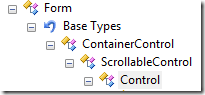
Well, if you dig with Reflector into the Form class you’ll discover that it’s derived from Control. And every container in Winforms accepts Control as it’s child objects.

image

Now, this makes it possible to just create a Panel and say:

panel1.Controls.Add(form);

But after running you’ll get a ArgumentException stating that you can’t add a top level control at this level.

The solution to this is even simpler, you simply need to tell the form to not be top level any more:

form.TopLevel = false;

And you’re done, you just need to set the BorderStyle on your form to get rid of the ugly borders and you’ve successfully embedded a form into another form.

The complete example looks like this:

Form1 form = new Form1();
form.TopLevel = false;
panel1.Controls.Add(form);
form.Show();

Read more →

Conditional breakpoints in Visual Studio

Sometimes you do something and you never really think about what you’re doing.
Like the following code:

public bool TestSomething(bool input)
{
    if (input == true)
    {
        return true;
    }
    else
    {
        return false;
    }
}

It’s so obvious, I never thought about what I was really doing there, let alone seen the mistake I made. I mean, without any knowledge about boolean evaluation you still should figure out how to get rid of the bracket porn and produce something like this:

public bool TestSomething(bool input)
{
    if (input == true)
        return true;
    return false;
}

But that’s only syntactic, the whole statement itself is still silly. The whole == true is completely redundant because you already check a boolean condition to evaluate it to a boolean.


So it boils down to:

public bool TestSomething(bool input)
{
    return input;
}

And that’s it. You just saved yourself 6 lines of code that where completely useless (and I guess the compiler is smart enough to optimize that anyway  Update: actually, this does make a difference. The compiler can’t figure this out and will produce more IL code because of this).

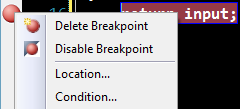
But once I did this I felt I lack the ability to put a breakpoint on the return false statement. And I eventually may have thought about going back to solution #2. But then I found this little thing in Visual Studio that made my day (and all major IDEs have that, only they hide it well):

image

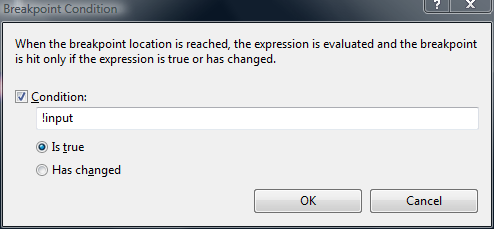
When you right click a breakpoint you can add a Condition to it, so it will only break when that condition is met. I did so, and voila:

image

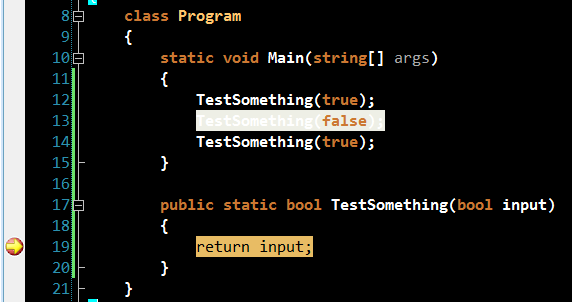
Without having to degrade my code I still could break only when false was returned.
So when I ran it the first break was in the third call:

image

So, thank god for such great tools like Visual Studio and ReSharper (R# hinted to me that I was doing something stupid in the first place)!

Read more →

Virtual member call in constructor and NHibernate

As you may have noticed, I’ve been doing some NHibernate work lately and really had a great time with this absolutely amazing ORM. Especially now that Microsoft abandoned Linq to SQL I really feel good about having made the step towards NHibernate.

Yesterday was one of those tricky days when something breaks and you have no clue why.

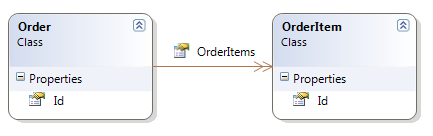
I have a table called “Orders” and there are “OrderItems”.

image

By writing the tests upfront, I found out that I’d like to be able to just say Repository.Add(Order) instead of persisting the Order and afterwards looping through the OrderItems and persisting them too.

To achieve this I changed the mapping to something like this:

<set name="OrderItems" cascade="all">
  <key column="OrderId" />
  <one-to-many class="OrderItem"/>
</set>

The cascade=all statement is what I searched for initially. When the order gets persisted, all OrderItems in the collection get persisted too, and everything is well.

But, since my POCO object looks like this:

public class Order
{
    public virtual long Id { get; set; }
    public virtual ISet<OrderItem> OrderItems { get; set; }
}

I got NullReferenceException whenever I tried to access OrderItems on new Order objects. And I thought, hey.. kinda sucks newing up the collection in my business layer, why not init it in it’s constructor:

    public Order()
    {
        OrderItems = new HashedSet<OrderItem>();
    }

So I could just do Order.OrderItems.Add(OrderItem) without having to instantiate a HashedSet anywhere.
I got a bit cautious when Visual Studio underlined OrderItems and made the cryptic announcement: “Virtual member call in constructor”.


Totally unaware of what this means, I just went on and ran my tests.

Imagine my face when almost all my tests failed due to an omnious nHibernateException:

NHibernate.HibernateException: Illegal attempt to associate a collection with two open sessions

I didn’t figure this out until today, but it had to do with the “Virtual member call in constructor” warning. I discovered this post by Brad Abrams that explains the topic.

Looks like if you set the collection in the constructor of the POCO object NHibernate will break with the above Exception.
Solution to avoid this? Init the collection from calling-code instead of within the object.

What would have helped the issue would be to not have concrete POCO objects but rather use interfaces instead of virtual members (Read Fabio Maulo’s post entity-name in action: Entity Abstraction on that topic).

Read more →

Virtual member call in constructor and NHibernate

As you may have noticed, I’ve been doing some NHibernate work lately and really had a great time with this absolutely amazing ORM. Especially now that Microsoft abandoned Linq to SQL I really feel good about having made the step towards NHibernate.

Yesterday was one of those tricky days when something breaks and you have no clue why.

I have a table called “Orders” and there are “OrderItems”.

image

By writing the tests upfront, I found out that I’d like to be able to just say Repository.Add(Order) instead of persisting the Order and afterwards looping through the OrderItems and persisting them too.

To achieve this I changed the mapping to something like this:

<set name="OrderItems" cascade="all">
  <key column="OrderId" />
  <one-to-many class="OrderItem"/>
</set>

The cascade=all statement is what I searched for initially. When the order gets persisted, all OrderItems in the collection get persisted too, and everything is well.

But, since my POCO object looks like this:

public class Order
{
    public virtual long Id { get; set; }
    public virtual ISet<OrderItem> OrderItems { get; set; }
}

I got NullReferenceException whenever I tried to access OrderItems on new Order objects. And I thought, hey.. kinda sucks newing up the collection in my business layer, why not init it in it’s constructor:

    public Order()
    {
        OrderItems = new HashedSet<OrderItem>();
    }

So I could just do Order.OrderItems.Add(OrderItem) without having to instantiate a HashedSet anywhere.
I got a bit cautious when Visual Studio underlined OrderItems and made the cryptic announcement: “Virtual member call in constructor”.


Totally unaware of what this means, I just went on and ran my tests.

Imagine my face when almost all my tests failed due to an omnious nHibernateException:

NHibernate.HibernateException: Illegal attempt to associate a collection with two open sessions

I didn’t figure this out until today, but it had to do with the “Virtual member call in constructor” warning. I discovered this post by Brad Abrams that explains the topic.

Looks like if you set the collection in the constructor of the POCO object NHibernate will break with the above Exception.
Solution to avoid this? Init the collection from calling-code instead of within the object.

What would have helped the issue would be to not have concrete POCO objects but rather use interfaces instead of virtual members (Read Fabio Maulo’s post entity-name in action: Entity Abstraction on that topic).

Read more →

Unit testing with mocks &ndash; Rhino Mocks basics (Part 2)

In Part1 of this series I have showed you how to create a very simple mock object by hand. In this post I will show you how to use RhinoMocks to create the mock and how to verify this. This post is intended as basic advice, and won’t cover any advanced RhinoMocks topics, just the basic setup/replay/verify steps.

When working with almost any mock framework there are 3 things: Setup, expectation recording and verifying that the expectations where met.
That means, first you tell the mock object what calls to expect. Then you let the method under test do it’s magic and afterwards you let the mock verify that all expected calls where made.
You can get very precise on what to expect and how to expect it, but that will be covered in the next part of this series.

The hand-made mock from Part1 would translate to a test like this when using RhinoMocks:

[Test]
public void ServiceWatcherNotifiesUser()
{
    var repository = new MockRepository();
    var notifier = repository.StrictMock<IErrorNotifier>();

    notifier.NotifyOfServiceDown();

    repository.ReplayAll();

    var watcher = new HttpServiceWatcher(notifier);     watcher.ObserveService();

    repository.VerifyAll(); }

The main things here:
We start the repository and then request a IErrorNotifier object from it.

var repository = new MockRepository();
var notifier = repository.StrictMock<IErrorNotifier>();

The mock object (notifier) is in record mode now, all calls we do to the object aren’t actually executed but will be expected afterwards.
So if we want NotifyOfServiceDown to be called once we simply call it while in record mode:

notifier.NotifyOfServiceDown();

After having set up all expectations in record mode, we tell the Mockrepository to go to replay mode:

repository.ReplayAll();

The mock object still doesn’t do anything. But it expects what we setup in replay. If the watcher calls methods that weren’t specified in replay mode the mock will throw exceptions at us.

Now we construct the object under test:

var watcher = new HttpServiceWatcher(notifier);

And note that we pass the mock object instead of an actual implementation of IErrorNotifier.
Now we call the method under test just as we would normally:

watcher.ObserveService();

That leaves us with only one step left, we tell the repository to verify all mocks that where created and it will throw Exceptions if mocks didn’t get called or did get called too often.

repository.VerifyAll();

Although this is just a very basic example of how to use RhinoMocks, you are able to see the benefits from this. You could write the HttpServiceWatcher class without having to write any concrete IErrorNotifier implementations. You can just concentrate on the HttpServiceWatcher instead of worrying how the underlying Service is going to work.

In the next part I’ll be covering how to make some fancier things with RhinoMocks like returning values and verifying that passed parameters meet certain criteria.

The source code is available through my SVN repository:

svn checkout https://office.pixelpoint.at:8443/svn/tigraine/UnitTesting/trunk UnitTesting –username guest

Notice that all dependencies are also in the svn, so you don’t need to get RhinoMocks or nUnit yourself.

Read more →