#net

Posts tagged net

IEnumerable<T>.Each as C# Extension Method

A very long time ago I went through the Ruby in 20 minutes tutorial when I saw this:

@names.each do |name|
  puts "Hallo, #{name}!"
end

When C# came out later I always wondered why there is no functional equivalent on the IEnumerable<T> interface, since it would be a perfect place for quick inline method calls without having to write a full foreach statement.

At that time my knowledge of extension methods and delegates was too limited to do this myself, but that doesn’t mean it has to stay that way.
I finally remembered that I never got to it last time and implemented it today.

Oh and it’s so damn easy too:

public static class EachExtension
{
    public static void Each<T>(this IEnumerable<T> enumberable, Action<T> action)
    {
        foreach (var item in enumberable)
        {
            action(item);
        }
    }
}

To use this .Each method now you simply need to be using the Namespace where the EachExtension is in and you can write code like this:

IEnumerable<string> x = new[] {"hello", "world", "how", "are", "you"};
x.Each(Console.WriteLine);

Or with multiple parameters:

IEnumerable<string> x = new[] {"hello", "world", "how", "are", "you"};
x.Each(p => Console.WriteLine("{0}", p));

Or, even whole inline method bodies:

IEnumerable<string> x = new[] {"hello", "world", "how", "are", "you"};
x.Each(p =>
           {
               Console.Write("Word:");
               Console.WriteLine(p);
           });

So, Lambdas are fun after all :)
Read more →

Castle Windsor XML Configuration Schema

While creating a Windsor XML configuration for a new project today I found myself looking too much at the reference to get started. I figured this may be because of the lack of a schema that would provide me Intellisense in Visual Studio. Shockingly I couldn’t find a xsd schema file for the Windsor configuration.

I then looked at some w3schools tutorials and figured out how to do a xsd schema myself and tried to remodel the Windsor configuration reference.

You can grab the xsd schema file here: windsor-configuration.xsd

I’ll post a little tutorial on how to load it inside Visual Studio later.

Read more →

Sharing a common AssemblyInfo between projects in a solution

Since I’m doing more and more layering I also started to split up my layers into different projects so I can’t bypass any layer by accident.

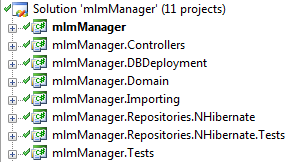
This leads to solutions with 10+ projects sometimes (tests, setup, etc..) and that looks like this sometimes:

image

So, that’s great and I can only recommend that. You get much better view over what dependencies your application has internally.

But that leads to one problem: Versioning the assemblies.
I don’t want to go through 10 projects changing AssemblyInfo.cs to correspond to the real version of my application. Since I only do the splitting into different projects to ease development, I always want all assemblies to have the same version. So, how to tackle this?

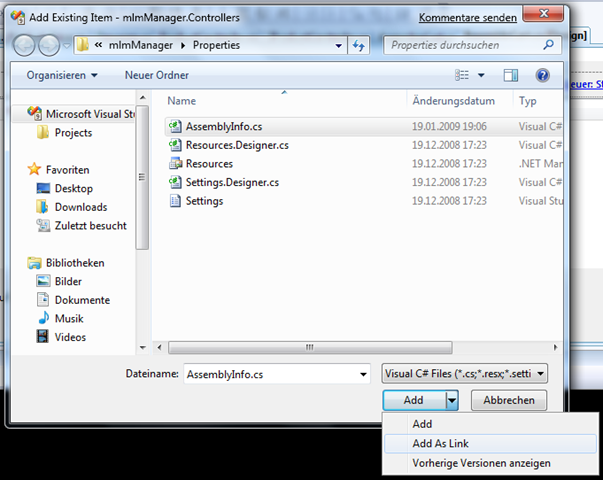
Simple: Create one master AssemblyInfo.cs (just copy one of the existing ones), and delete the others from the other projects. We want to re-insert the file, but this time as a link so changes to one AssemblyInfo.cs cause all projects to have a changed assembly information.

image

Yes, that’s right. There is a way to reference a file without copying it into the folder (well hidden behind that arrow there).

So, now the file shows up in the solution explorer twice, but changes will spread to other projects too:

image 

When having a MSI project, it won’t update a referenced assembly during setup if there hasn’t been a change to it’s version number. So I ended up installing a new version of the GUI component while the changes in the controller assembly didn’t install because there was no increment in version number. Annoying, but not so much of a problem once you know how to handle it :).

Read more →

Change has come to Microsoft

Yes indeed, there have things changed.

After doing so much Winforms development lately I am finally back on the Web side once again. But this time not in swamped webforms land but breathing the fresh air of ASP.NET MVC. You may already know that because I’ve been already ranting about the platform and it’s love for HttpContext.

Anyway, this post is not about MVC, it’s about the great Rob Conery who made my day when I watched the first episode of his MVC Storefront series.

What impressed me?
This is the first and only sample I have seen come out of Microsoft that did not involve dropping a data grid right out of SQL server into the app, tweaking two properties and concluding: “And that’s how easy you can do xy with Microsoft XY.NET”

This is the first demo I see that did really feel like a real world solution and not like demo ware put together in an attempt to impress people with how little work is required to do something.
Developing software is hard, and it takes time and thought.
And Rob sharing his thoughts on testability, separation of concerns and his clever use of the repository pattern is just great fun to watch and follow.

This new way feels good.
I watched that webcast while deciding the structure of a very important project and it helped me very much in getting a better idea of how to tackle MVC. So, thank you very much Rob!

Oh, and yeah, I know I’m late to the party. Rob has put out 25 webcasts of the MVC Storefront series, it just happened that my attention was focused on NHibernate, Windsor, Winforms and RhinoMocks lately. I also have to admit that I dislike Webcasts since you can’t just scan through them to find out if you are interested or not.

Read more →

ASP.NET MVC: Hide the HttpContext services with Windsor and a custom ControllerFactory

ASP.NET MVC was designed to be a very “clean” and testable framework for creating web applications from Microsoft. And they failed really badly in one place: HttpContext!

The fact that the ASP.NET MVC Contrib project has a whole project dedicated to mocking out the whole HttpContext for testing simply illustrates one point: It’s broken, period.
There is this one gigantic god hash table that has 5 other hash tables hanging from it that knows everything about the incoming request. And although it’s possible to fake the whole thing with RhinoMocks (as the MVC Contrib guys do it), it’s still a pretty stupid idea to have all those concerns in one class called “context” (and accessible to the controller code).
So, although the HttpContextBase is already an abstraction of the real context, I wanted to extract those things into specialized service classes that I have full control over (and that could then be used for even more specialized classes that handle data retrieval, thus making “magic strings” go away when dealing with requests and sessions).

I set out to create a request service class that follows a very simple Interface:

public interface IRequestService
{
    string GetRequestField(string fieldName);
}

The actual class is just a Facade for the HttpRequestBase class that gets injected into the constructor.

Problem here: I would have to new up this IRequestService in my controller, and that’s something I didn’t want to do. Object graph construction shouldn’t be in the controller at all, and so I want to inject IRequestService instances into the controller. And that can’t be done without control over the ControllerFactory.

The IControllerFactory interface is rather simple, and it’s the perfect place to leverage the power of a IoC framework to construct the controller objects.
So I simply pass the object creation off to Windsor in the CreateController method:

public class ControllerFactory : IControllerFactory
{
    private WindsorContainer container = new WindsorContainer(
                                        new XmlInterpreter(new ConfigResource("castle")));

    public IController CreateController(RequestContext requestContext, string controllerName)     {                  return (IController)container.Resolve(controllerName);     }

    public void ReleaseController(IController controller)     {         var disposeable = controller as IDisposable;         if (disposeable != null)             disposeable.Dispose();         container.Release(controller);     } }

What then took ages for me to figure out was how to instruct Windsor to use current HttpContext.Request object. Turns out, I was searching in the wrong place: That functionality is in MicroKernel and not in the Windsor container.

public IController CreateController(RequestContext requestContext, string controllerName)
{
    container.Kernel.AddComponentInstance<HttpRequestBase>(typeof (HttpRequestBase),
                                                           requestContext.HttpContext.Request);
    return (IController) container.Resolve(controllerName);
}

The AddComponentInstance method allows you to pass in a concrete instance that should be used when searching for a service. This way when Windsor constructs the RequestServiceFacade class that takes a HttpRequestBase as dependency it will simply inject the one specified instead of trying to construct the HttpRequestBase itself (that doesn’t work ;)).

This now allows me to easily swap out request implementations by just changing the Windsor configuration.

Read more →

DateTime parsing in ASP.NET MVC RouteEngine

After doing so much winforms development lately I am getting started on an upcoming an MVC project. And while thinking about the basic structure of the whole thing and trying out some things I discovered some pretty funny behavior in the DateTime parsing of the routing engine.

Typical example. A route that should map urls like:

http://www.website.com/Archive/10-12-2008/

I have my route laid out like this:

routes.MapRoute("Archive",
                "Archive/{date}/",
                new {controller = "Archive", action = "Show"});

And the controller action looks like this:

public class ArchiveController : Controller     
{
    public ActionResult Show(DateTime date)
    {
        return View();
    }
}

Now, when I open the browser and point it to the following URL it works

http://localhost:51942/Archive/12.12.2008

While this one doesn’t

http://localhost:51942/Archive/15.11.2009

The second one returns the following error:

The parameters dictionary does not contain a valid value of type 'System.DateTime' for parameter 'date' which is required for method 'System.Web.Mvc.ActionResult Show(System.DateTime)' in 'MVCDateTimeParseTest.Controllers.ArchiveController'. To make a parameter optional its type should either be a reference type or a Nullable type.


Needless to say that I am a bit lost at the moment. Both are perfectly valid dates and yet one works the other doesnt. I had the same problem when trying other formattings when I tried dd-MM-yyyy. Why and when dates get parsed correctly is very random it seems.

I didn’t constrain the route on purpose to test out how to create links with dates in them (and doing a 2008/11/12 style link also doesn’t really work too well). The only formatting that seems to be working 100% of the time is http://localhost:51942/Archive/2009-12-12. And that’s not really how I (Austria formats dd.MM.yyyy) like it.

Any suggestions?

Read more →

Printing in .NET is simply broken

Ok, I blogged about the failed GDI+ API yesterday and complained about it. Those of you who are following me on twitter may already know that my little liaison with GDI+ is due to some printing my application has to do and the experience hasn’t been good so far.

My requirement is quite simple, print invoices and some other papers that may (or may not) span multiple pages.
So I came up with a very simple design for my printing needs that lets me reuse all printing dialogs by supplying different strategy classes that do the printing.

image

This has worked out so far, but I’ll have to adjust since I found out that printing multiple pages works totally different from what I expected. In my stupid little world I was thinking that going on to the next page would be as easy as calling NextPage() somewhere and the Graphics object would start drawing to the new page.

And I was so wrong.
Apparently, how it really works is by specifying in your print event that your document has multiple pages and the print event will fire as long as eventargs.HasMorePages is true. Yep, that’s right, the event will fire again!

So apparently, all code that gets called has some way of determining what stuff doesn’t fit on the page (that itself is a huge pain in the ass with graphics.MeasureString and everything) and it also has to find out what parts have already been printed to another page.

So, in a simpler world I’d have a switch statement that would branch depending on the page number like this:

private int pages = 3;
private void PrintDocument_PrintPage(object sender, System.Drawing.Printing.PrintPageEventArgs e)
{
    switch (pages)
    {
        case 1: 
            //print page 1
            break;
        case 2:
            //...
            break;
    }
    pages -= 1;
    e.HasMorePages = pages > 0;
    if (pages == 0)
        pages = 3;
}

The irony of this is that this no longer works if you can hit a new page once your string exceeds one page. You’d have to cut off the string (after heaving measured that it won’t fit), and somehow store it so that when the method gets called next time the “part” that’s not printed yet will get printed. Can it get more stupid than that?
Having multiple entries into one method just seems plain wrong and leaves me no option as to have code everywhere to determine if something has already been printed (no need to say all the hassle there is to cut off something on page A and print the overflow on page B).


This whole RectangleF/SizeF acrobatics with almost static method calls in between feels so much like last century that I am very well inclined to write some OO library in the future to save me the hassle next time.

By the way, first I was thinking that if printing from within .NET turns out to be too hard I had this fallback plan to just generate HTML, display it in a Webbrowser control and print it from there. I should have done it that way, simple things tend to work :).

Read more →

Printing in .NET is simply broken

Ok, I blogged about the failed GDI+ API yesterday and complained about it. Those of you who are following me on twitter may already know that my little liaison with GDI+ is due to some printing my application has to do and the experience hasn’t been good so far.

My requirement is quite simple, print invoices and some other papers that may (or may not) span multiple pages.
So I came up with a very simple design for my printing needs that lets me reuse all printing dialogs by supplying different strategy classes that do the printing.

image

This has worked out so far, but I’ll have to adjust since I found out that printing multiple pages works totally different from what I expected. In my stupid little world I was thinking that going on to the next page would be as easy as calling NextPage() somewhere and the Graphics object would start drawing to the new page.

And I was so wrong.
Apparently, how it really works is by specifying in your print event that your document has multiple pages and the print event will fire as long as eventargs.HasMorePages is true. Yep, that’s right, the event will fire again!

So apparently, all code that gets called has some way of determining what stuff doesn’t fit on the page (that itself is a huge pain in the ass with graphics.MeasureString and everything) and it also has to find out what parts have already been printed to another page.

So, in a simpler world I’d have a switch statement that would branch depending on the page number like this:

private int pages = 3;
private void PrintDocument_PrintPage(object sender, System.Drawing.Printing.PrintPageEventArgs e)
{
    switch (pages)
    {
        case 1: 
            //print page 1
            break;
        case 2:
            //...
            break;
    }
    pages -= 1;
    e.HasMorePages = pages > 0;
    if (pages == 0)
        pages = 3;
}

The irony of this is that this no longer works if you can hit a new page once your string exceeds one page. You’d have to cut off the string (after heaving measured that it won’t fit), and somehow store it so that when the method gets called next time the “part” that’s not printed yet will get printed. Can it get more stupid than that?
Having multiple entries into one method just seems plain wrong and leaves me no option as to have code everywhere to determine if something has already been printed (no need to say all the hassle there is to cut off something on page A and print the overflow on page B).


This whole RectangleF/SizeF acrobatics with almost static method calls in between feels so much like last century that I am very well inclined to write some OO library in the future to save me the hassle next time.

By the way, first I was thinking that if printing from within .NET turns out to be too hard I had this fallback plan to just generate HTML, display it in a Webbrowser control and print it from there. I should have done it that way, simple things tend to work :).

Read more →

GDI Drawing: String with word-wrap

GDI drawing is magic and not very well documented. Finding out how to make GDI draw a string inside a fixed width without constraining the height took me about 20 minutes, hopefully this post saves you 20 minutes of your life nobody will give you back :).

The problem with Graphics.DrawString() is that you can either supply a PointF that will be used as the origin, or you supply a RectangleF as layout rectangle. The rectangle’s sizes and position will be forced upon the text and word-wrap will happen to fit the text inside the rectangle, anything not fitting in the rectangle (given the font-size) will be cut off.
So if you don’t want to confine width or the height, setting that property on the RectangleF to 0 will make GDI not "cut off” but expand the rectangle as needed.

Needless to say that this behavior isn’t mentioned on the MSDN page for DrawString, that may have saved me time.

Read more →