#internet

Posts tagged internet

Disabling del.icio.us on the feed?

delicious I have been using feedburner for a pretty long time now, and one thing I thought is particularly handy is that you can let it incorporate your del.icio.us bookmarks into the feed as daily updates.
This removed the necessity of doing a blog post every week that boils down to a link-collection of the most interesting stuff I read across the web that week.

So the main thing is that due to the great Firefox3 Addon for del.icio.us I started to use del.icio.us more and more as a bookmark tool, so that I am "polluting" my feed with sometimes unnecessary stuff that you may or may not be interested in. This has led to the fact that sometimes there are 3-4 link flares from del.icio.us in between 2 of my blog posts.

So this is one question to my dear feed-subscribers: Should I remove my del.icio.us link splicer from my feed?

Ps: By the way, if you are using del.icio.us too and want to add me to your network feel free to do so through my profile, oh, and if you aren't already subscribed to the feed. You can find it easily to the right or through this link.

Read more →

Quote of the Day: On PHP

If you are following Jeff Atwood at CodeHorror.com you may have already read it. But the statement is so true I really need to repost this quote by Tim Bray:

So here's my problem, based on my limited experience with PHP (deploying a couple of free apps to do this and that, and debugging a site for a non-technical friend here and there): all the PHP code I've seen in that experience has been messy, unmaintainable crap. Spaghetti SQL wrapped in spaghetti PHP wrapped in spaghetti HTML, replicated in slightly-varying form in dozens of places.

Spaghetti-code is the main thing that always comes to my mind when I try to sit down and do a template for this website.

Read more →

Windows Live SkyDrive could be smarter

image

Skydrive, one of the cooler things Microsoft released lately under their Live.com brand has somehow replaced my private FTP server for sharing files with myself and others.

It's cool, it's easy and it's free. You get 5 gigs of free storage with your Live.com Id that you can use to upload data to the cloud.
You then get a quite neat folder view online where you can download those files, set their permissions etc.
So, if I want to share some files with a friend I can add them to the folder's permission list and they can see them with their Live.com Ids. If anyone should be able to see something I just add it to my globally shared folder.

So, whenever I need data at university I just upload it to SkyDrive instead of emailing it to myself as I used to do. It's usually just boring university assignments but after a few weeks things start to get messy. I started out by creating one folder for every course, not dividing up into assignments. So now I have 20 files in my dbtec course folder, all called "Dbt_AssX.doc" accompanied by some .sql and .txt files.

I then tried to correct that mistake, created a new folder to split up stuff, and - voila, there is no way to move a file from folder a to folder b! That sucks!
I was already concerned about the missing API (uploading stuff through the browser isn't cool!), but being unable to move stuff around is quite annoying.

If we're at it, I'd really appreciate some sort of slightly more accessible UI. Deleting a folder isn't as easy as clicking the folder and hitting delete, no, you need to click the folder, access it's properties through clicking on it's name and then pressing delete.

Read more →

Offline Web Applications

calendar_sm2_en I've stumbled across several discussions on offline web apps lately and thought I'd share my view on these things.

As a heavy user of GMail, Google Calendar and Goodle Reader I really depend on having a internet connection most of the time. I especially am one of those guys who forgets his timetable the second it gets changed, so whenever I need to make an appointment I either have to search for a computer or postpone the making of the appointment.

So, I find myself too often in the middle of a chat digging out my laptop to look at my timetable.
But although my laptop is starting up quite fast, till I get connected to a wireless (if any at all) I usually have spent 3-5 minutes with meaningless smalltalk and cursing about WIFI and my ubuntu (my laptop is now 4 years, can't prove that the machine got slower over time, but reinstalling XP simply wasn't an option any more).

And then, I stumble across an article by DHH (the guy behind RoR) called: You're not on a fucking plane (and if you are, it doesn't matter)!
So, halfway through I was ready to agree that being able to access web apps all the time isn't necessarily a good thing till I remembered all the hassle I go through when I'm trying to look up my schedule.

For time being, Google did a pretty good job on replacing all my mail/calendar/reading needs by their web applications, and although there are some nice tools like Google Calendar Sync, I really can't use it if there is no network connection available. (Calendar Sync isn't syncing all my calendars, only the main calendar that I only use for personal stuff, university and business calendars are what matters and those don't get synced).
So, Google Gears might be the right way in the right direction, although I still doubt that it's clever to install liteSQL on a client's machine, making all SQL calls through AJAX so that Gears can swap out the real server if disconnected. That's just too much crappy Javascript that needs to be written and executed on the client's side.

Finally, I think DHH has a point in "we're way too online". But there are applications that really need 24/7 availability and those need to be made accessible offline. And while we're at, why not just create something that will work for more than one site?

By the way, my solution to the current calendar problem is already in the works, by June 30th I'll be owning an iPhone, that's gonna be synced with Outlook (that will be synced with my Google Calendar) so that I don't need to get out my laptop any more while also having the calendar offline!

Read more →

Reading suggestion

Sorry for me being so silent for the last weeks. I've been quite busy and for a week or so I am just trying to get my unread feeds back to under 100 again.

That's also why I thought about writing this post.
After I marked 2 consecutive posts as shared on my Google Reader I really had the urge to say this out loud:

Thank you Jeff Atwood for your blog!

I have been following the blog for quite some time now, and I have to admit that there is hardly any other blog I enjoyed reading as much as codinghorror.

It's not really the most informative blog if you are searching for any solid programming hints, but Jeff manages to really keep his focus on geeky - interesting tech topics that can't easily be put in niche like .NET, Java, Ruby, SOA etc..

So, for anyone interested in a really great read you can find Jeff's blog here.

Oh, and the book he derived the term "codinghorror" from, Code Complete by Steve McConnel is a very good read too!

Read more →

Live Writer and it's transparency

Since I got my 24" HP monitor I really started to fancy the new Vista Aero glass effects that let my desktop shine through borders and stuff.
Although I usually stockpile window upon window, that little blur effect on the windows is something I definitely like about Vista.

Due to all this common Vista look'n'feel I never really noticed that Windows Live Writer is a .NET 2.0 application using Windows Forms AND (&&) having a transparency effect on it's splash screen!

Windows Live Writer

So, why this never came to my mind is something I don't know, but today I closed a background window while starting up WLW and found out that my desktop and the WLW splash where out of sync.

Basically, Windows Live Writer has no transparency of it's own. It just takes a screenshot and handles the transparency effect in it's form.
If the screen behind WLW splash is changing, changes don't reflect onto the slash page (as they do in Vista aero).

Funny stuff, but definitely something I'd keep in mind when it gets to fancy looks on pre-WPF projects.

Read more →

Windows Live!

How many of you know Windows Live?

Microsoft Windows Live

Windows Live is Microsofts new way of doing online applications. They changed almost every one of their services to match the Windows Live brand. Hotmail, MSN Search, MSN Messenger etc, all of those are now called Windows Live Search/Hotmail/Messenger.

And while at it Microsoft also released two cool new desktop applications called Windows Live Writer and Windows Live Photogallery! (You can get them at: get.live.com)
Windows Live Writer

How do you write your blog posts? Most people do so in their browser using those incredibly bad WYSIWYG inline HTML editors their blog software came packed with. When they post Images they do so after resizing it in Photoshop etc etc.

Now, that somehow works. I mean, most blog engines have some AJAX in place to save your drafts every few seconds and uploading works mainly through the browser. So how could this really be improved?

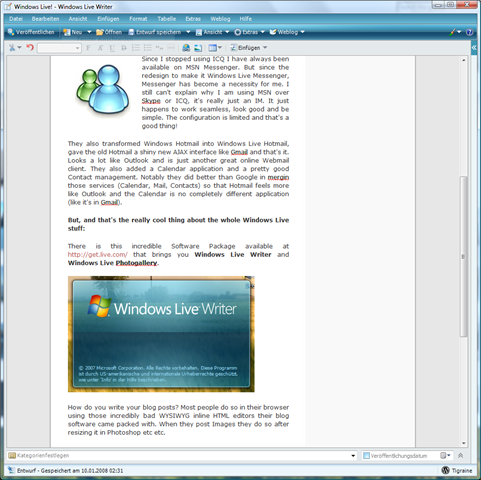
By installing Live Writer, handing over your blog address and login credentials and being set to go. Live Writer downloads the blog styles from the web, automatically checks for supported stuff on the blog engine and presents you with a perfectly intuitive and great interface for writing your blog posts. You can easily drag and drop, insert tables, images, links without any need to ever get down to the HTML source. And of course you can insert images, but instead of firing up Photoshop and doing the resizing yourself, Live Writer is doing it for you (while being able to add blur, shadows, border, watermarks etc).

You can even use Live Writer to edit already published content or create/edit new pages (if your blog engine supports that). To be honest, since I've been using Live Writer I haven't seen my wp-admin page for anything else than deleting Askismet spam!

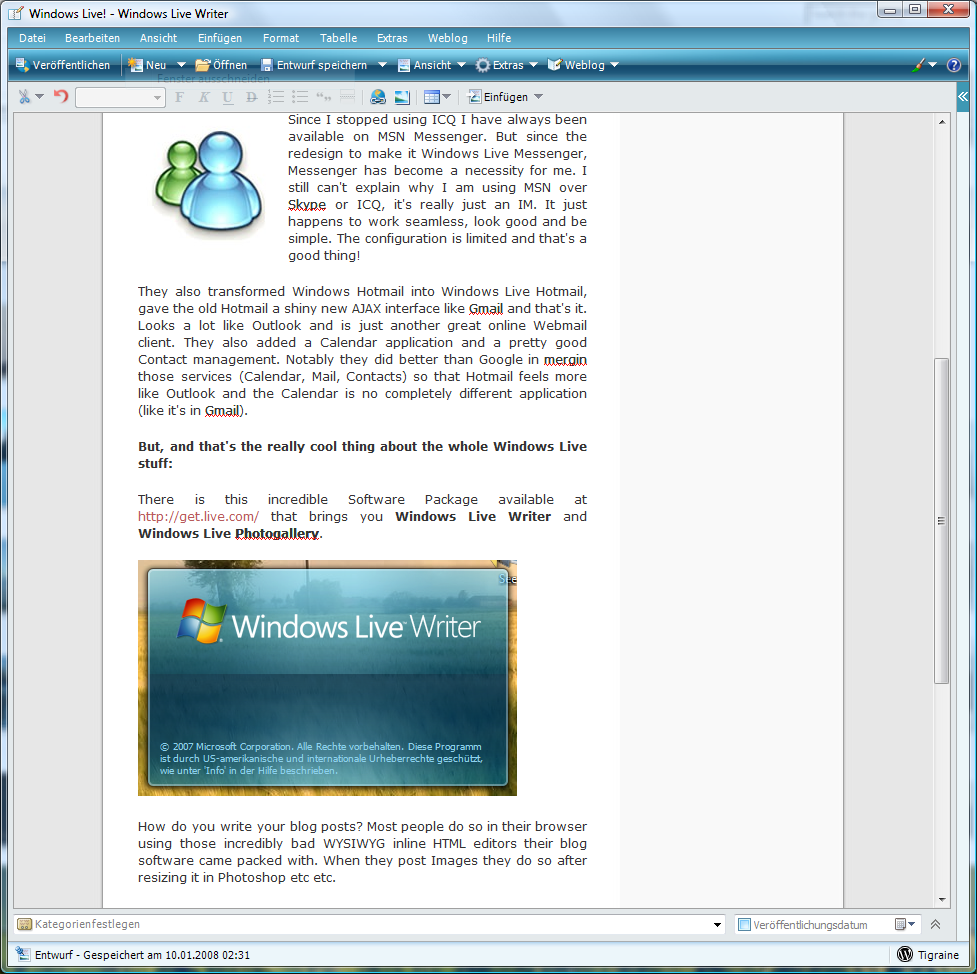
Here Screenshot of Windows Live Writer while writing this post:
Windows Live Writer Screenshot

Windows_Live_Photo_Gallery_logo

Windows Live Photo Gallery is the other great new app coming with Windows Live. Although it's not completely new, it's just a better version of the Windows Vista photo gallery. It does the same thing, it watches the filesystem for changes and shows them in a very clean intuitive way.

What's changed from the Vista default version is built-in support for uploading photos to Flickr or Live Spaces. And, that's why I started using it: It comes with a great new feature called "Create panoramic"!

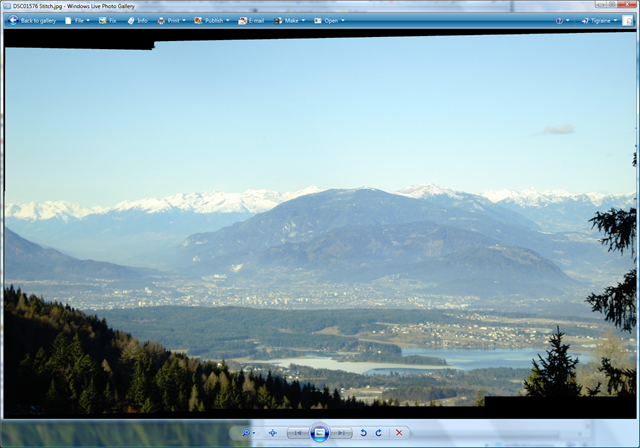
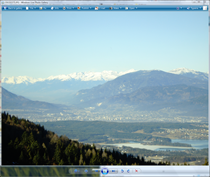
It's so damn simple, take two pictures and click one button. Voila, you get a panoramic view like this:
panorama2 + panorama1 

Result: panoramic3

The final image still needs cropping, but that's something Live Photo Gallery learned since it's appearance in Windows Vista. Simple fixing like red eye removal, cropping, color adjustments or sharpness can easily be done from within Photo Gallery.

Read more →

Computer Programming Quotes

Oh god, I am still laughing after having read this brilliant list of 101 Great Computer Programming Quotes I found on DotNetKicks.

Here are some of my favorites, although I would recommend the whole list to anyone with some spare time!

  1. “Saying that Java is nice because it works on all OSes is like saying that anal sex is nice because it works on all genders.”
    (Alanna)
  2. “Computers are like bikinis. They save people a lot of guesswork.”
    (Sam Ewing)
  3. “Programming is like sex: one mistake and you’re providing support for a lifetime.”
    (Michael Sinz)
  4. “Programmers are in a race with the Universe to create bigger and better idiot-proof programs, while the Universe is trying to create bigger and better idiots.  So far the Universe is winning.”
    (Rich Cook)
  5. “It’s ridiculous to live 100 years and only be able to remember 30 million bytes.  You know, less than a compact disc.  The human condition is really becoming more obsolete every minute.”
    (Marvin Minsky)
  6. “Hardware: The parts of a computer system that can be kicked.”
    (Jeff Pesis)
  7. “I’ve finally learned what ‘upward compatible’ means.  It means we get to keep all our old mistakes.”
    (Dennie van Tassel)
  8. “There are two major products that come out of Berkeley: LSD and UNIX.  We don’t believe this to be a coincidence.”
    (Jeremy S. Anderson)
  9. “There are two ways of constructing a software design.  One way is to make it so simple that there are obviously no deficiencies. And the other way is to make it so complicated that there are no obvious deficiencies.”
    (C.A.R. Hoare)
  10. “Software suppliers are trying to make their software packages more ‘user-friendly’…  Their best approach so far has been to take all the old brochures and stamp the words ‘user-friendly’ on the cover.”
    (Bill Gates)
  11. “There’s an old story about the person who wished his computer were as easy to use as his telephone.  That wish has come true, since I no longer know how to use my telephone.”
    (Bjarne Stroustrup)
  12. “The use of COBOL cripples the mind; its teaching should therefore be regarded as a criminal offense.”
    (E.W. Dijkstra)
  13. “There is no programming language–no matter how structured–that will prevent programmers from making bad programs.”
    (Larry Flon)

Read more →

CES 2008 Keynote

billgates You know that you have some serious affinity toward Microsoft software and technologies when you live in Austria (being GMT+1) and stay up waiting to watch Bill Gates deliver his keynote speech at 6:30 PM Pacific Time (GMT-8) (that's only 9 hours of difference, meaning it's been 3:30 AM here in Austria) at the Sands Expo and Convention Center in Las Vegas!

And hey, I really really regret it!

  • Now I need to get myself a ugly Fiat or Ford to have Microsoft Auto on my car.
  • They made some vague assumptions that the Zune will launch in Europe someday (man I didn't want to spend those 300€).
  • They made me even more eager to buy an XBox360 (man, my girlfriend almost had talked me out of this!).
  • I now seriously need to get myself a Windows Mobile powered cell.

So, frankly - I loved this keynote.
I mean, I've seen most of this stuff somewhere before. There is a reason most of my friends ask whether I am paid by Microsoft for talking about their newest technologies all the time.
But still, Gates and Robbie Bach somehow managed to deliver their message.

Good, but short!

Whoever looked upon the Silverlight technology and it's uses, knows that to showcase Silverlight you clearly need the full keynote, not only some 3 minute spot from NBC.

If you've ever heard word from Microsoft Surface knows that that one technology alone is so freaking great that Steve Jobs would need 2 keynotes to promote it.
You should definitely check out the Videos on the offial Page as well as some on Youtube (like this one, or this one).

Something that also fell short was Microsoft Auto.
Although I didn't knew too much about this service before the keynote, I am very sure that they showed it wrong.
So, basically: Microsoft Auto is your new board-computer in your car. You have access to devices like your Zune, your Cellphone (running Windows Mobile) etc etc.. And that through voice recognition and integration into the car.
So, what did they do wrong? First off, they showed the Zune connected to car through a simple cable. - Heck, I know that the Zune has WiFi, and I am pretty sure it can't be so fucking difficult to build WiFi into my brand-new car! So why do they need that cable? Cables are for iPhones, I've got my Zune to get rid of those cables. They managed to connect my phone through Bluetooth, why not my Zune.
The way they showcased that stuff it looked like the presentation for some built-in hands-free device to control your Zune, not a entertainment and media-system that makes my car more fun!
(They only briefly mentioned a new service that's calling 911 when your airbag goes off and you don't interrupt the car's cry for help.)

On the XBox360, I am very pleased to hear that it's features will go way beyond gaming so that I may have some leverage in my ongoing discussion with my beloved one about buying an XBox360.
The XBox360 will start selling as a set-top box for Microsoft Mediaroom (their new IPTV Service) and in the near future start to broadcast (on the normal XBox360) shows from Disney and abc (Lost, Grey's Anatomy, Desperate Housewives) through XBox Live. So maybe buying an XBox360 is a key to getting my digital home-entertainment system (after Intel failed me with their Viiv technology).


Oh, and by the way, you can watch the Keynote here.

Read more →

Get your labels in place!

While surfing the web I sometimes think that people don't really know or use the <label> tag in XHTML.

Obviously, <label> isn't well known and it's usefulness is limited. But whenever I have to click a combo-button directly I remind myself to not forget that label next time I do something similar!

Here an example:

Option1Option2
Try selecting Option2 by clicking on it's text instead of trying to give a headshot to that small bullet in front of it :).

And here labels come in. By using <label for="<ElementId>">Text</label> you can link the control (Everything, Textboxes, Checkboxes etc) to your description text.

Obviously this als helps search engines to not mix up Form data with real content on your page!

Read more →