Why I moved to Git from Mercurial

Believe it or not, my first encounter with distributed version control was through Mercurial. At the time I was used to SVN and Mercurial (hg) opened my eyes to the painless ways of the DVCS. And while I was very content with the way Mercurial worked, I still had to make sacrifices to the way the tool worked.

After seeing some .NET OSS projects on GitHub, and following GitHub and BitBucket for some time it became clear that GitHub is much more active than BitBucket. So I decided to try out Git and see for myself why everyone is making a fuss about GitHub, and behold: I liked it!

While hg pretty much feels like Subversion but more awesome, Git manages to loose that feeling. Especially the flexibility that git allows through it’s index made it immediately feel “right”. Here is why:

Forgettable me

Sadly, I forget things all the time. And this is especially true while working. Sometimes I commit something and forget to save my Visual Studio project, so my commit only contains loose files. In hg, like in SVN, you are screwed and have to commit a second time to make things right. It’s embarrassing when others see your history littered with “Doh, forget to save XY” commits.

Git solved this with it’s git commit --amend that allows me to add stuff to the previous commit with no hassle. Hg treats all commits as immutable, and that’s just not how I tend to work. I’m stupid, and my tools have to reflect that!

Caveat: You should NEVER mess around with published history. If you amend a commit that is already in a public repository, everyone that pulled that commit will have a very hard time merging with any upstream changes you start to introduce. Just don’t do it, once you push you are committed!

Staging

Same story, different setting. Besides forgetting to commit something, I sometimes even forget to commit at all. You get into the flow of things, and once you look up you finished 3 things that better go into individual commits. With git you can simply add individiual files (or even individual lines inside the files) to the index, commit, repeat until no uncommitted files are left.

This feature is awesome, and it allows a great deal of flexibility without having to think about “damn am I doing too much for one commit?”. It’s like above: I don’t have to think how the tool wants me to behave, I can make my tool behave like I need it do easily.

Mercurial can also do this, but you end up with hg commit --include fileA fileB ... and that’s just not as simple as the Git index.

And that’s just all about it. I went with hg first because people told me that it’s better on Windows, but when I moved to Git afterwards I didn’t notice any problems. Speed is pretty much the same, so you can just pick and choose what you like regardless of platform.

I simply chose Git because it does not interfere with the way I work, and because it makes it easy to fix my screwups afterwards.

Read more →

Goodbye Wordpress, Hello Jekyll!

The title says it all, I’ve finally moved my Blog off Wordpress and replaced it by static HTML files generated by Jekyll

This means: No more security updates to Wordpress, no database roundtrip to display what amounts to static HTML content and best of all: I can version my posts using Git! Naturally, the code is now up on GitHub in it’s own repository Another added benefit is that I can now write my posts using textile instead of HTML, what amounts to a much better editing experience.

What changed for my readers? Nothing, and that’s not really a good thing. I feel like this blog would benefit from a cosmetic overhaul, but until I can convince a designer to help me out with that it will look and feel the same it has always done (boring). I did however clean out the sidebar a bit :)

The migration process

Oh this is where things get interesting. Migrating to Jekyll was not as easy as I thought it should be. Since my hoster does not allow for direct connections to the MySQL database using the migrator scripts within Jekyll was not an option. These require direct database access and I was not very keen on installing MySQL on my machine just for that purpose.

It was a journey from there, I first tried to export MSSQL compatible SQL but suffice it to say phpMyAdmin sucks. (It was also unable to generate sane YAML). I finally found the export function inside Wordpress itself that will generate a RSS style XML document that contains all posts and decided to simply write a Ruby script that exports the posts from the XML into html files for use in Jekyll.

Writing that script was also a bit funny, since Ruby/Jekyll fails totally at reading YAML Front Matter in any format besides ANSI. So I had to find out how to first write a file in ANSI using ruby (it defaulted to UTF-8) and then how to htmlencode text using htmlentities. Anyway, overall I have to say writing that Ruby script was really fun and I may end up doing a bit more Ruby in the future. And btw: I finally managed to learn how to get around Vim. Did I mention that this editor totally rocks?

In the end, the script is still rather simplistic. It will just take a wordpress.xml file and extract all posts into the _posts directory, adding categories, title etc to the YAML Front Matter of each post. You can find it in my GitHub repository: Importer.rb

I’ll put up a series of blogposts about the Wordpress → Jekyll migration in the near future.

Update: Sorry to all my feed subscribers for the spam there. I changed the format of the feed to atom and now your reader may show 20 unread posts when there is really only one.

Read more →

The small things can cause the biggest troubles: List<T>.AddRange and GetHashCode

I just spent some hours performance optimizing an application I wrote a while back. The architecture was actually quite nice and I had implemented my own Lazy-Loading using DynamicProxy. Things worked great and performance was never an issue.

Fast forward 2 years: I left the company after the project was finished and development carried on. Additions to the code where made and after some time performance got a serious problem.

After hours of profiling I finally found the issue: Apparently List<T>.AddRange invokes GetHashCode on all items you add to the list.

Why is that a problem? Well: My Proxy objects where designed to return some key data that was eagerly fetched (stuff like Id, and some filter columns) and once the filter logic had narrowed down the list of thousands of items to the 2 or 3 that were going to be displayed, the Proxy transparently fetched the real data from the database and cached it. So every object in itself was doing a select once a method besides the prefetched data was requested.

I hadn’t thought of GetHashCode and any call to GetHashCode was not handled directly in the Proxy but caused a lazy load. And since .Add does not call GetHashCode but AddRange does, the bug never came up during development.

Imagine my face when I saw this profiler graph:

image

Needless to say that fetching 64 items from the database instead of 1 really brought the app down to a crawl.

Read more →

I&rsquo;m getting a new Virus Scanner

Just yesterday I was sitting around with some friends and telling them how great Microsoft Security Essentials works for me and how unobtrusive and easy to use this thing is. I’ve been using it for 3 years now on all of my machines and never had any reason to complain.

Until yesterday my CPU started running wild at 100%..

Noooooo[4]

I guess I have to consider myself lucky to be running Windows7 so the Trojan never managed to get full access to my system, doing stupid stuff like preventing me to access task manager or shutting me out of my system. That still didn’t prevent it from installing itself in my Registry for launch on System Startup (don’t ask how, as always I suspect I clicked one UAC dialog too many).

Well, here it is:

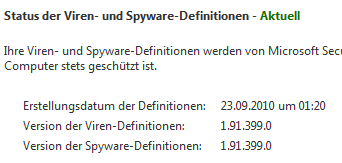
image

Obviously this is malicious code that is running when my system starts up. Nothing too malicious since it is not requesting Admin level privileges, but it’s still code that isn’t supposed to run and should be fairly easy to pick up.

Well Security Essentials doesn’t think so:

image

Even after a deep system scan of 6 hours, Security Essentials still mocks me:

image

Utterly unacceptable.

I still don’t have a clue how this got on my machine. I usually am pretty immune to stuff like that because I (on occasion) THINK while using my computer, and don’t click dialog boxes away without knowing what they were about. But somehow this thing seems to have made it past my usually pretty accurate instincts..

Damn, I really liked Security Essentials Sad smileAnd I really really really hate formatting my PC right now.
Update: I think I managed to kill this stupid virus. Since I’m just too lazy at the moment to pave my PC I’ll just keep an eye on this.

Read more →

Powershell Functions are a different kind of beast!

When you look at functions in C style language there are some things always true:

  1. Return always terminates the function
  2. Return <something> returns a value/reference to the thing you return

Guess what: Powershell is no C style language! It may look like one with all the curly braces and the $ (reminding you of PHP) before variables. But it is no C language, rather it is a shell.. And shells seem to be working differently.

Care to hazard a guess what this will output?

function Test
{
    $a = "Hello World"
    "Sorry World is not available"
    return $a
}

$output = Test
Write-Host $output

If you’d expect it to return “Hello World” you are wrong. Actually the return value of the function Test is an array of 2 System.String:

Sorry World is not available Hello World

Madness I know. But fact is that all things that get written to the “output” (like Write-Host) inside a function is part of the function output. You don’t need to use return.

This also means if you run commands like –match inside a function

$v –match “regex”

–match will output true or false to the output. And thus your method output will include a True somewhere you don’t need it. Like this:

function Test
{
    $a = "Hello World"
    $a -match "World"
    return $matches[0]
}

$output = Test
Write-Host $output

Will output: True World

You can avoid this behavior through redirecting the “output” to $null or by adding the [void] attribute like this:

function Test
{
    $a = "Hello World"
    $a -match "World" > $null
    return $matches[0]
}

$output = Test
Write-Host $output

I never thought I’d have to revisit the workings of a return statement again, but obviously there is always the possibility for someone to come along and teach me something new. This person btw is Keith Hill who wrote an excellent article on Powershell Output that sheds some light on this topic and does a far better job at explaining it than I can possibly do.

Read more →

How to use different layout containers in WPF

WPF is different, that much I knew before I started learning it. But understanding really how different it is really takes a lot of time and effort. Especially when used to Windows Forms and HTML+CSS, WPF feels very alien in it’s way how to do layout. Here is what I learned:

StackPanel:

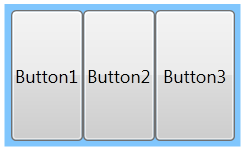
StackPanels are used to layout elements horizontally stacked onto each other.

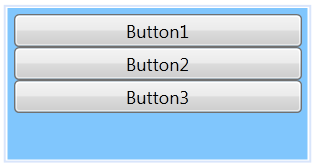
image

By default the elements inside a StackPanel will take up their set height and you can make them fill the whole width by setting their VerticalAlignment to Stretch

They will however never fill the full height of the container when it is resized, no matter how your HorizontalAlign property is set. If the above container got resized in height the buttons would still stick to the top with their individual heights staying just the same.

WrapPanel:

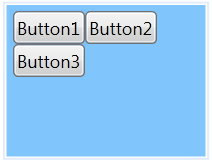
They are the same as the StackPanel, just in vertical. They stack elements vertically and reorder them if there is no more space vertically. However they also don’t allow them to fill the vertical space available to the control.

image

The Dockpanel:

Where both WrapPanel and StackPanel don’t allow Elements to fill vertical space (even with HorizontalAlignment to Stretch) the DockPanel will do just that by default:

image

The trick here is that only the last child really fills the panel, so while resizing the height will resize all 3 buttons, a horizontal resize will only cause the third button to change size. This has to do with the LastChildFill property, where Button3 is considered the filling element.

Why am I telling you this? Well, turns out most UIs look something like this:

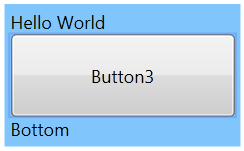
Some header, then one filling list that should resize and then some controls around the edges. Making the list resize with the parent container can’t be achieved by the other panels at all. You have to use a DockPanel and use the DockPanel.Dock attributes on your child controls:

<DockPanel Margin="0,0,0,0">
	<TextBlock DockPanel.Dock="Top" Text="Hello World" />
	<TextBlock DockPanel.Dock="Bottom" Text="Bottom" />
	<Button Content="Button3"></Button>
</DockPanel>

This will make the last element fill all available space left by the elements that where docked to the sides like this:

image

Once you understand these three layout concepts, you can build pretty much everything by nesting panels within each other. There is however also the GridPanel that lends itself very well to creating forms and other stuff that has to be aligned on a grid. But I won’t go into that in this post (and I think it’s markup is just awful. HTML4 tables were more intuitive to write)

Read more →

Good ideas worth spreading: SystemDateTime abstractions

I brought this example up a lot on this blog, but while looking at the code of Mark Nijhof yesterday I noticed a rather nice solution to my ongoing problem of abstracting away System.DateTime.Now calls for testing purposes.

As stated before: Don’t make your tests depend on external factors like the current time or Date, and I even had a solution until now that solved the problem rather nicely through a static factory that returns an instance to your DateProvider.
Why a global factory? Simple: having your IDateProvider be a mandatory dependency on all your objects and services will quite simply clutter up your design. IDateProvider is by no means a really important dependency, and modeling it the same way as say IImportantBusinessRule would not only require you to think about that DateTimeProvider in every test that you run against your object, but also reduce the readability of your constructors dramatically.

What I didn’t think about when writing my IDateProvider abstraction almost a year ago was that with C# 3.5 and lambdas, passing around a function is essentially the same as using a strategy class, but with a lot less ceremony. And obviously so thought Mark Nijhof when he wrote Fohjin (a very nice CQRS example you really should check out on GitHub).

public static class SystemDateTime
{
    public static Func<DateTime> Now = () => DateTime.Now;
    public static void Reset()
    {
        Now = () => DateTime.Now;
    }
}

So simple yet so elegant. In your tests you hardly have to think about this stuff, but if there is a test that depends on the date you can just go ahead and set it like this:

[Fact]
public void ctor_SetsDateAddedTo_CurrentDate()
{
    SystemDateTime.Now = () => DateTime.MaxValue;
    var orderLine = new OrderLine(TestData.Product, 1);

    Assert.Equal(DateTime.MaxValue, orderLine.DateAdded); }

It’s just a small touch, but it saves you 2 classes and still solves the problem nicely.

Read more →

Git: Unstaging all changes and reset the working tree

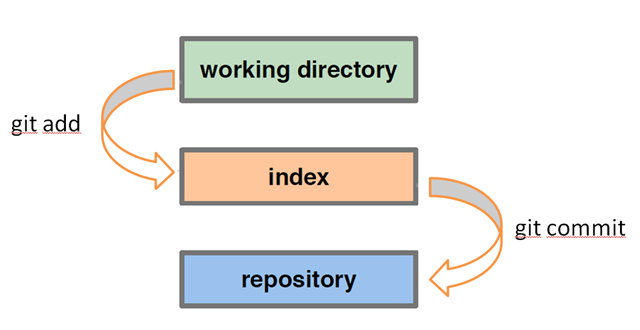
When you commit something to git you first have to stage (add to the index) your changes. This means you have to git add all the files you want to have included in this commit before git considers them part of the commit. To some this added complexity feels like a burden, but to me it’s a blessing.

git working dir / index / repository diagram

Ever forgot that you just did 2 distinct features that really should be in 2 different commits? Well, just add the changes of the first feature, commit, repeat for the second commit and you have everything organized the way you want it to show up in your history.

But: You usually don’t do individual git add commands anyway, if you are anything like me you just hit git add –A (adding all changes in the working directory) and while writing the commit message you realize that there are two files that should not go into this commit. But how do you remove something from the index?

Since you used git add to put them in the index it would be logical to use git rm? Wrong! Git rm will simply delete the file and add the deletion to the index. Meet:

git reset

As with all things in git, git reset can be used in a number of ways. So here is the most common usage in day to day usage:

git reset : Clears your index, leaves your working directory untouched. (simply unstaging everything)

git reset --hard : Clears your index, reverts all changes in your working directory to the last commit. (the same thing as svn revert would do)

Read more →

Beware of &lt;Button IsDefault=&rdquo;True&rdquo;&gt; in WPF/Silverlight

I’ve spent the better part of my weekend finding this bug and thought I’d share it in case someone else is having the problem. I’m building a WPF user interface with a NServiceBus backend and started noticing that sometimes changing data on the client didn’t generate UPDATE statements in my Database. I first assumed it had to do with my backend code, then I started digging through the various libraries I am using (NHibernate and NServiceBus) to find the problem.

After 2 days debugging through the backend code I finally found out that it’s the WPF application that sometimes sent wrong data. The scenario is quite simple:

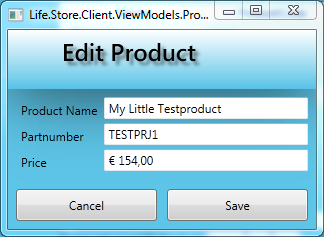
image

This very simple dialog uses a StringFormat to display the Price field. This prevents me from using any other binding than a UpdateSourceTrigger=”OnLostFocus” because otherwise it would reformat the field on every key-press. Rendering it unusable due to a jumping focus caret. 

The issue was that upon hitting Save, sometimes the Save method was executed before the data was bound to the model, sometimes the other way around. I genuinely thought I had a race condition until I noticed one little thing: Since it’s a decimal field I usually fill those in by using the number pad. That also led to me hitting the Enter quite often without thinking about it, thus invoking the Save method while still having the focus on the Price Textbox.

If you set a Button to IsDefault=”True” and hit Enter the Command will be executed without triggering the OnLostFocus Databindings in your Textbox, making your code act on stale model data. The only way around this is to either use UpdateSourceTrigger=”OnPropertyChanged” (not always applicable) or remove the IsDefault attribute from your form.

I still believe this is a bug in WPF, but at least now I know about it and can avoid it.

Read more →

Using Readability on the iPhone

Disclaimer: This is not a post about programming. No code was harmed during the creation of this blogpost.

As you may have guessed from the title, I got myself an iPhone4 some weeks ago and love it ever since. The browser in particular is great, yet sometimes even the best browser can’t change that a website is badly designed. Too often you can’t make the content out in between all the Google Adwords, the fonts are hideous or it’s a fixed width layout that’s way too wide.

On my PC I just hit the Readability bookmarklet and through magic all the ugly stuff goes away and only the content remains. Well, since Readability is just JavaScript you can do the same thing on the iPhone too, it’s just a bit trickier to install.

Here is how a badly readable site looks with Readability (note that it does not remove images that belong to the post!):

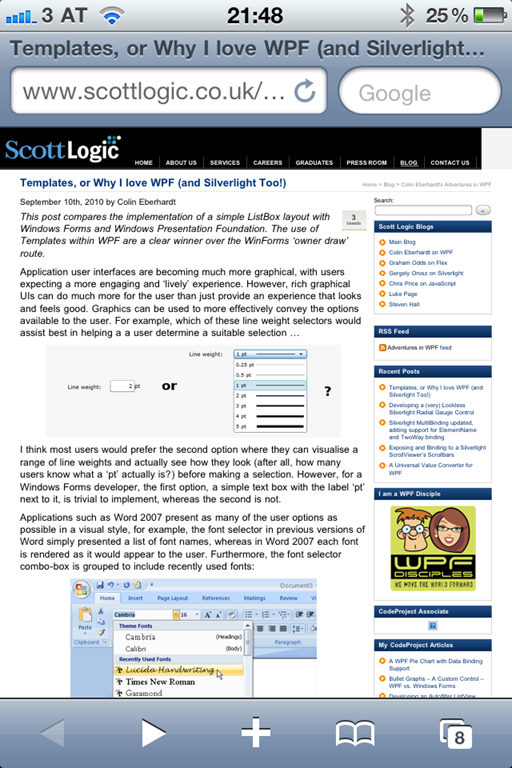
Before – After Readability

IMG_0119IMG_0121

As you can see, the width of the layout is too wide to be easily readable in portrait orientation.

Step 1: Go to http://lab.arc90.com/experiments/readability/ on your iPhone

Select all the text from the textbox on the right and copy it:

IMG_0114

Next, just hit add bookmark on the site and save the Readability site.
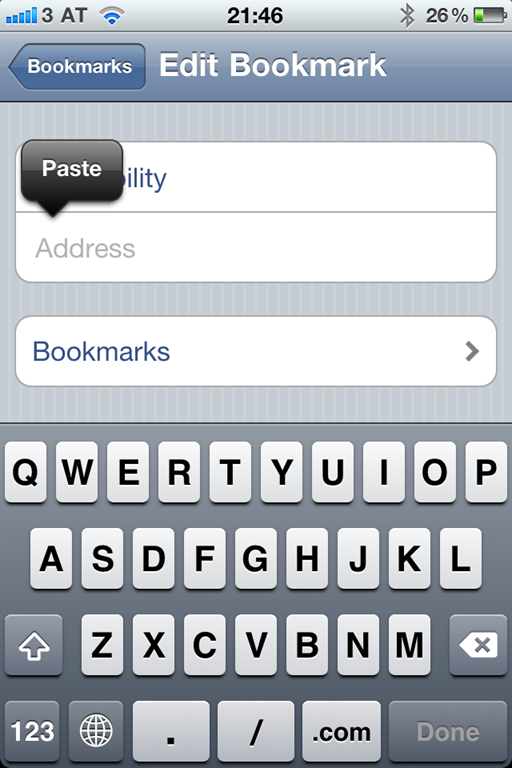
Now go into your bookmarks and edit the readability bookmark.

Delete the previous address and paste the code we copied earlier.

IMG_0117

Et voila, whenever you want to see a page clearer, just open that bookmark and it will convert any ugly site into a rather pleasant read.

Read more →