#programmierung

Posts tagged programmierung

ASP.NET Security

Ok, reinventing the wheel every time you build an application works great, as long as you aren't on a very very tight schedule. So due to time constraints (and my reluctance for spending time) I figured out this time I'll stick to standard ASP.NET role based security.

I never really bothered with trying, mainly because I usually had complex security built into my data structure (like individual access rights for different records).
So, obviously there is a way to do this with custom ASP.NET security providers, but doing security on my own saved me messing around with doing custom ASP.NET security.

So, this time I figured out, doing custom ASP.NET security isn't going to happen. Obviously there is only one administration website that needs authentication all over the place with no special roles and other fancy stuff. Just some plain .htaccess like security on a file-level basis.
.htaccess isn't the most scaleable solution (and quite impractical on IIS ;)) so I just started off by following the quite simple walkthrough on MSDN.

Now, after doing the user-creation you just need to drag the Login-Control onto your design surface and the user is presented with a pretty nice looking login form:
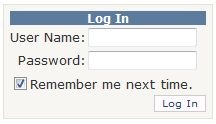
login So, obviously this saves time. I don't need to drag 5 controls to the surface, I don't need to build some fancy cookie-login stuff for my application and the whole thing works. Great isn't it?


Now, where this really shines is when you try to access a folder that ASP.NET security was configured to deny. You get redirected to the Login.aspx file and the Log In control automatically handles redirection to the previously requested page etc.

Now, that's it basically. ASP.NET comes packed with loads of great tools that do authentication for you. Like password recovery dialogs, change password dialogs, create user wizard, login name display etc.
This all combined gives you a very solid toolset to work on from a programming and security perspective.

Read more →

I'm frightening!

Today I really scared the hell out of my co-workers.
Although I don't officially work for pixelpoint I am currently working at their office, and so my fellow co-workers had to witness one of my scarce "I jump up and dance through the room in ecstasy because it works" moments.
No need to say that they where completely shocked and came running with water and tranquilizers :).

Why I am a full of joy currently is because my first prototype of my online food-ordering application works!
I was fighting the whole day with validation and data-binding issues on ASP.NET and finally got it to work.

I'll blog on my experiences with LinQ2SQL and ASP.NET in the future. For now I'll just say that I am very very happy with LinQ2SQL and I am absolutely sure that it saved me almost 3 weeks of development.

The whole application is completely functional after 7 days of development (still lacking a GUI)! I mean, obviously you need to be a programmer to order a pizza through the exposed model, but shopping cart, order checkout and product view functionality is already there.

I will spend next week working on a admin application and meeting with the design guys to get the front-end out.

Read more →

Strange LinQ to SQL oddity

I'm still in the process of doing some research on the tools I'm going to use over the next weeks to build the Pizza.at web app.
So today I tried some LinQ to SQL so I can get used to it a bit. And while doing so I started out with reading through ScottGu's LinQ to SQL series.

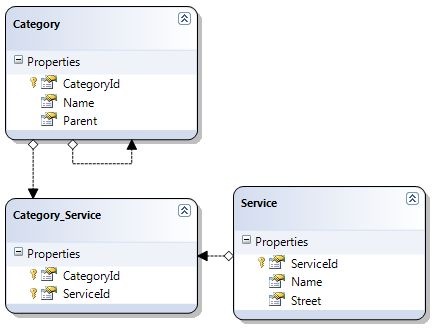
I had already some parts of the database schema in place and so I imported it to the ORM, giving me the following model:

linq1

So, this all worked perfectly and I immediately started doing some select statements (while learning how to use and write Lambda expressions - I'll blog about this later).

linq2

And yippie! It worked, although I was very confused that this statement would return a InvalidOperationException in case the Lambda didn't return something. Although I like the fact that it returns an exception, I think the exception given here is too generic. They could have done better in giving the exception a stronger name.

But, after getting over the exception name, everything went smooth from there. Except for me not seeing one thing:
The C and D in CRUD!

ScottGu showed off in his series that doing a simple Categories.Add and an afterwards call to dbContext.SubmitChanges() should do.
In my version of Visual Studio and LinQ I simply don't find this method. All lists I get from the ORM are IQueryable and don't incorporate any Add and Delete Methods.

I'm getting a bit confused, I must be missing something at this point, there must be something I have overlooked. Any thoughts?

Read more →

SQL Server 2005 GUI complexity

You know what?
I really love SQL Server 2005, just because it got rid of the Enterprise Manager stuff and introduced SQL Server Management Studio.

What's bugging me now is that although the Management Studio is great to work with most of the time, there are some tiny little things I really hate whenever I create new databases!

sqldb

Whenever I want a field to be a primary key id field I need to go to declare it as primary key, and then define the identity specification.

And there is the design flaw. You can't just double click Identity Specification to change it from No to Yes, you actually have to first click the + to expand the section in the property grid before I can set the Yes/No value.
I see the added complexity in some points where the increment or seed aren't appropriate, but to be honest, most of our ids start at 1 and increment by 1. So in 99,9% of the cases you don't need the extra complexity.

Read more →

New job!

Yes, I'm going back to work.

I accepted to work on a new ASP.NET web project as CTO and developer for my previous employer pixelpoint.

So expect to hear new stuff about ASP.NET and AJAX.NET here on my blog during the next weeks.

The project is called Pizza.at and will be a online food delivery service.
I had been working on a previous version that didn't make it to a release while I was working for pixelpoint. Due to time constraints and poor planning the project failed and I was approached some weeks ago to try to get it done during these holidays.

I accepted the deal, mainly because I was offered complete freedom on development (so I can abandon the old codebase).
So, this time around I'm the one to blame if the project goes wrong, because I'm the guy doing all the planning.
I have chosen an agile development process and am currently working on the requirement analysis and some basic design stuff.
Because I want this project to be done fast I decided not to use any fancy new stuff like MVC or Silverlight. The whole project will be done on a SQL 2000 database with normal ASP.NET. Regardless, I'll be using C# 3.5 and some LinQ queries will surely make it into the application.

The whole thing will start later this week after I did another training course at pixelpoint for their employees.

Read more →

Enumerators in C#

I am still trying to figure out if what I did was useful or not.

Based on the assumption that sometimes you may need a variable typed IEnumerable<T> to hold a value that only implements IEnumerable I wrote this adapter class (you find it after the jump).

What's IEnumerator?
IEnumerator it the old non-generic implementation of the Iterator pattern, while IEnumerator<T> is the strongly-typed generic version introduced in .NET 2.0.

IEnumerable<T> implements IEnumerable, but there is no way to cast IEnumerable to IEnumerable<T>. So I wondered how you could comply to the Iterator pattern.

My first suspicion came when I tried foreach on both IEnumerables. Foreach has no problem with both of them, so I dug out my C# language spec and discovered that foreach has to use two different methods for either IEnumerable or IEnumerable<T> (That's not really clear there, anyone to falsify my assumption?).
They could have gone the other way and use the non-generic IEnumerable for the iteration, but that would need an implicit typecast on every iteration (and that would slow things down I guess).

In a scenario like the following one you can't pass the Enumerator created by an Array.GetEnumerator() because it uses IEnumerator instead of the generic version IEnumerator<T>.

public void PrintList(IEnumerable<String> MyList)
{
  
foreach (String Entryin MyList)
    {
      
Console.WriteLine("{0}", Entry);
    }
}

Because IEnumerable<T> implements IEnumerable you could just switch back to the non-generic version, but that's something I don't really like (although it may be more practical).

So here are 2 (very simple) adapter classes that will provide upward-compatibility to your IEnumerable and IEnumerator needs:


public class GenericEnumerableAdapter<T> : IEnumerable<T>
{
    private IEnumerable _Old;
    
    public GenericEnumerableAdapter(IEnumerable OldEnumerable)
    {
        this._Old = OldEnumerable;
    }

#region IEnumerable<T> Members

public IEnumerator<T> GetEnumerator() { return new GenericEnumeratorAdapter<T>(_Old.GetEnumerator()); }

#endregion

#region IEnumerable Members

IEnumerator IEnumerable.GetEnumerator() { return _Old.GetEnumerator(); }

#endregion }

public class GenericEnumeratorAdapter<T> : IEnumerator<T> { private IEnumerator _OldEnum; public GenericEnumeratorAdapter(IEnumerator OldEnumerator) { _OldEnum = OldEnumerator; }

#region IDisposable Members

public void Dispose() { this._OldEnum = null; }

#endregion

#region IEnumerator<T> Members

public T Current { get { return (T)_OldEnum.Current; } }

object IEnumerator.Current { get { return _OldEnum.Current; } }

public bool MoveNext() { return _OldEnum.MoveNext(); }

public void Reset() { _OldEnum.Reset(); }

#endregion }

Read more →

I&apos;m so stupid

Hey! I just wanted to let you know that I was searching for about 20 minutes for the meaning an @!

E.g. in this code:

Regex r2 = new Regex(@"([\{a-z]+)([0-9]*) ");

You may notice that the @ in this Regex is outside the actual String and that has to mean somethign.


Stupid me found the answer!

Placing an @ before a string in C# tells the compiler to NOT use escape sequences within the string.


So you don't need to do stuff like \\ for a single \ etc.

Man why didn't I found out earlier!

Read more →

Gotchas on your way to the Clipboard

We all know that lovely thing nobody can live without: Clipboard.
Have you ever tried to read the clipboard from your C# code?

Your code may have looked like this:

Clipboard.GetDataObject();

Ok, this code works perfectly fine whenever you try it from a normal Windows-Forms Application Template.
Now, go try accessing the Clipboard from within an Console-Application!

Ok, I know you didn't try, that's why I'm writing this anyway.
Clipboard isn't accessible as long as your Main() isn't looking like this:

[STAThread]
        public static void Main()
        {
            
        }

Why? All the magic lies in the STAThread Attribute!


The STAThread Attribute changes the appartment state of the current thread to be single-threaded. This is necessary for some features especially of Windows Forms (where Clipboard resides in). Why?


Mainly because those features are done through COM-Interop and need to be single-threaded.

Great, my whole application relies on MTAThread, now I'm screwed??


No! Thanks to threading you can always fire up a new thread that is using STA.

[MTAThread]
        public static void Main()
        {
            Thread newThread = new Thread(new ThreadStart(StartingPoint));
            newThread.SetApartmentState(ApartmentState.STA);
            newThread.Start();
        }

public static void StartingPoint() { Clipboard.GetDataObject(); }

Voila, now we have a new Thread that can access the Clipboard without having to change the apartment state of our old thread.
Just remember to set the ApartmentState through the SetApartmentState() function before hitting Start()!

You could also just stick the [MTAThread] attribute ontop of your ThreadStart-Method (but that would be too simple wouldn't it?)

So.. be warned, I had an hour of headaches because of this!

Read more →

Get your labels in place!

While surfing the web I sometimes think that people don't really know or use the <label> tag in XHTML.

Obviously, <label> isn't well known and it's usefulness is limited. But whenever I have to click a combo-button directly I remind myself to not forget that label next time I do something similar!

Here an example:

Option1Option2
Try selecting Option2 by clicking on it's text instead of trying to give a headshot to that small bullet in front of it :).

And here labels come in. By using <label for="<ElementId>">Text</label> you can link the control (Everything, Textboxes, Checkboxes etc) to your description text.

Obviously this als helps search engines to not mix up Form data with real content on your page!

Read more →

C# Talk

Now and then I delve through some Java tutorials or Java applications for my studies. And everytime I do so I immediately lack the getter/setter language features of C#.

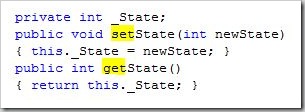
To make myself clear (to non-C# Developers). Java has either Public or Private properties, but no way to add validation Logic etc to those. It is usually considered bad coding technique to expose instance variables outside of the class so almost everything has to be accessed through functions. So to expose a integer variable called State you would have to create something similar to this:

get_set_Java 

It works and once you're used to it you will create setter/getter methods in your sleep. But, when pulling up your IntelliSense (ok, you don't have that in Java, but you know what I mean) on that class you will be somewhat overwhelmed by get/set functions :).

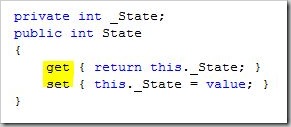
So, how did C# handle this? They borrowed a bit from Delphi and C# and created properties with get/set blocks (nothing new). So our code from above would look like:

get_set_C

The great thing: Intellisense gets easier, you have something clearly marked as property not as function (that's used to access a property). Usability for your API has just increased :).

But, despite the awesomeness of this function (already in the .NET Framework since 1.0) in .NET 3.5 they managed to improve this feature a bit. How? Imagine all those cases where you don't have any validator logic on your properties, you just want a simple public field in your class. In older Frameworks you'd have to create get/set Blocks for this Field although you don't want any logic there (exposing Instance-Variables is stupid no matter how you do it).

So, 3.5 Introduced this:

get_set_35

Great, we came down to 1 line of code, and what happened? .NET creates the private instance-variable automatically and handles the simple get/set stuff for us. When we decide we need validation or something in the get/set blocks we can just come back and expand those blocks without having to change any code outside the class (it was a get/set property all the time)

Read more →