New imagineClub website design poll

I just got email from Kristof  with a raw draft of a new design for the imagineClub website I’m currently building. I’d really like to hear your feedback on this:

iC-sd2

Update: Sorry I didn’t include any more background on the topic. imagineClub is a club that focuses on helping students at Klagenfurt University with their studies and enable them to easily access new Microsoft technology. I wrote a more complete article about the imagineClub some time ago.

Please take a few seconds to answer this little survey. It will help us reach a decision and improve the design:

Read more →

Using ELMAH Error logging with Castle MonoRail Rescues

On my last project I made ELMAH (the ever awesome ASP.NET error logging framework) work with ASP.NET MVC by modifying the routing logic a bit. It was quite simple since ASP.NET MVC throws HttpExceptions around quite liberally and you are frequently presented with a YSOD that then gets logged by ELMAH.

Using MonoRail the general routine of setting up ELMAH still applies (even simpler), but it’s customary to have a general rescue view that informs the user when something went wrong. Since the rescue concept in MR basically swallows Exceptions and prevents them from reaching ELMAH we need to serve them to ELMAH through ErrorSignaling.

Defining a rescue in MonoRail according to the tutorials looks like this:

[Rescue("generalError")]
public class DemoController : SmartDispatcherController
{
    [Rescue("indexError")]
    public void Index()
    {
        throw new DivideByZeroException();
    }
}

The string passed to the RescueAttribute identifies the name of the view to load within your Views\rescues\ folder if an exception occurs. This is bad for us because we can’t execute any code to signal ELMAH on the way to the view and within the view.

This is where the RescueController overload for RescueAttribute comes into play. You can define a whole controller that will handle exceptions and we can execute code there before rendering a view. To do so we just need to implement IRescueController and inherit from SmartDispatcherController:

[Layout("default")]
public class RescueController : SmartDispatcherController, IRescueController
{
    public void Rescue(Exception exception, IController controller, IControllerContext controllerContext)
    {
        ErrorSignal.FromCurrentContext().Raise(exception);
        RenderSharedView(Path.Combine("rescues", "generalerror"));
    }
}

We can use this new controller by changing the Rescue attribute:

[Rescue(typeof(RescueController))]
public void Index()
{
    throw new DivideByZeroException();
}

Now in case you want to have multiple error-pages (like one general and one telling the user he did something wrong) you could also define multiple rescue methods inside your RescueController and call each of those when needed:

[Rescue(typeof(RescueController))]
public class DemoController : SmartDispatcherController
{
    [Rescue(typeof(RescueController), "IndexRescue")]
    public void Index()
    {
        throw new DivideByZeroException();
    }

    public void List()     {         throw new NotImplementedException();     } }

If an exception was to occur in List() it would get handled by the Rescue method inside your RescueController, if Index throws MR will try to call a method called IndexRescue. And both can be logged by ELMAH.

Read more →

New office feels liberating – outside is still better

It’s been kind of a slow week for me in programming, but I made up for it in renovating my office and learning new stuff! I managed to get hold of some really nice office furniture so decided it’s time to repaint and throw out the old crap I’ve been sitting at for years.

Sadly I don’t have a before-shot of what my setup used to look like, but it was basically a combination of two tiny desks (one actually being a very old dressing table), one holding my screen and the other hosting keyboard and mouse. While it worked for many years, especially when working with paper it was very uncomfortable since there was hardly any space left besides keyboard and mouse. Also, I have to admit it always felt very cramped since the desk was hardly bigger than the chair I’m sitting in.

So, this is how awesome it looks now:

The old furniture was dark wood and the walls needed new paint pretty badly, so by repainting and putting in bright furniture the whole room has lit up. Everything feels bigger and less depressing :).

The new setup allows me to easily switch between my PC and the little workspace on the right (where I plan to have my laptop sitting mostly) and also makes room for a second screen I’ve been planning on buying for quite some time now.

Now, the only problem that remains is cooling. Without air conditioning I frequently get temperature to rise above 30°, making work during the day almost unbearable. 3 computers generate a lot of heat in a small room, and the big screen doesn’t really help either. Unfortunately having AC setup is nearly impossible without breaking the wall’s insulation so I’ll have to abandon base during the hot hours:

This picture is taken from a very nice little cafe at Wörthersee called Schamandra. They have good ice cream and really nice coffee and view. Unfortunately there is no free wifi, but 3G reception is very good. Another place I love to go to when in need of piece and quiet is Unterkreuth. A very nice bar on the top of a mountain usually frequented by paragliding enthusiasts, since they started serving coffee there is really no better place to be.

Both places are easily reachable from Klagenfurt in 10-15 minutes by car and provide exactly the piece and quiet I require when I need to watch a screencast or read a book.

Ps: I’d like to thank Robert for lending me his superhuman strength for two days and making the new office happen.

Read more →

Don’t forget the Refactor in Red-Green-Refactor

When first learning about TDD all sources I read focused pretty much on one thing: writing the tests.

Few sources really talk about the full TDD workflow:

  • Write a failing test
  • Make it pass
  • Refactor the code
  • start over

Arguably that the hardest part of doing TDD is 1+2, while possibly the most important one is 3!

Some people tend to stress the fact that automated tests can be a safeguard against breaking existing code. And although I like this aspect, I believe if your code is structured well and was built with the open-closed principle in mind,  chances are you’ll never touch old code in the process of implementing new features.

But during refactoring, you play to TDDs strengths. You don’t write new stuff, you focus on the stuff that’s already there and that already works. You search for ways to improve what’s already there while not changing it’s behavior. And very often this final refactoring step is the only thing that really brings value to your process, since it not only uses those tests you just wrote, it also facilitates future change allowing you to produce cleaner code than you would without refactoring.

Think of refactoring as fortifying the wall you’ll be building the next floor upon. Without it the you may be fine, but 3 floors from now you’ll have a lot of work at your hands to be able to commence work.

Getting things right the first time is incredibly hard. On my last project it even took me some quality pair programming once to come up with something great, and 80% of the pair programming was mostly spent on refactoring a raw idea from a 80% solution into a 100% solution. So, don’t spend too much time with hunting the ideal of writing a 100% solution the first time, rather try to get it 80% right and don’t stop improving it until you are at 100%!

Read more →

Pandora now likes concrete classes

While getting into WPF and the MVVM pattern (you should check out this Webcast by Jason Dolinger if you need a tutorial to get started on MVVM) I found myself somehow dealing more with concrete classes then I was used to. Usually I hide everything behind some interface and try to think really hard before violating that habit. Nonetheless, ViewModel classes are just that, ViewModel classes very special to their View and you really can’t hide them behind a meaningful Interface (without looking too silly).

So, after writing a fairly small application with only 3 ViewModel classes I found myself writing this utterly meaningless block of code:

container.Register(p =>
{
    p.Service<PersonViewModel>()
        .Implementor<PersonViewModel>();
    p.Service<AddressesViewModel>()
        .Implementor<AddressesViewModel>();
    p.Service<ProductViewModel>()
        .Implementor<ProductViewModel>();
});

It’s not completely meaningless after all, everything that keeps me from writing new PersonViewModel() somewhere in my code is just awesome. Only, it’s a bit too much of ceremony for something that simple. By asking for a concrete type you already tell Pandora everything it needs to know.

So, now Pandora can resolve concrete types directly if there is no registration that says otherwise. If you ask for a concrete class A, you’ll get a concrete class A even if the container is totally blank.
Now, if a class A is registered with the container it will use that one, if not Pandora will try to figure it out.

That also leaves open one way of extending your system. You can start off with an implicitly registered concrete class A, and if you want to subclass it later to modify behavior you only register the new subclass B as implementor for service A with Pandora and you’re set.

So, quick recap on how this works:

When a concrete type is requested and can’t be found in the configuration it will be instantiated if:

  1. It’s a concrete type
  2. You are not resolving to a name
  3. The dependencies of the requested type can be satisfied.

Also keep in mind that the default lifestyle for Pandora is singleton, so once you request A, you’ll always get the same instance back as long as you don’t change that through an explicit registration.

As always you can grab the source from the BitBucket site. There is no new binary release (I only moved up a minor version), but compiling Pandora is a pretty straightforward process as long as you have Visual Studio installed.

Ps: I was amazed how easy it was to implement this. Basically all I did was write a wrapper around the ComponentLookup service to implement the new functionality. It’s all in one place :).

Read more →

Help! My provider hijacks my DNS requests!

Today I followed a link to a no longer active domain and suddenly found myself on UPC’s (my provider) search looking for that URL:

image

My first reflex was to check if my default search provider may be set wrong:

image

Woot? No, my search provider is Google. I just queried a DNS record that does not exist, and I got a result back instead of a DNS error. Now, imagine my head going red and some danger lights starting to flash.

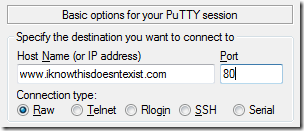
First test I did to confirm my suspicions: open a raw putty connection on port 80 to some random DNS I know doesn’t exist:

image

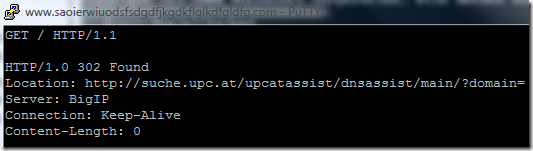
Then I just did a basic HTTP GET request from my console to see what the server would return:

image

Ok, so what just happened here? First of all, there should be no web server to accept my connection! Hell, I shouldn’t even be able to resolve to an IP address!

So, running a quick nslookup turned up something interesting:

nslookup www.lksdafklsdlkfdsf.com Server:  viedns09.chello.at Address:  195.34.133.21
Apparently, UPC is abusing the trust I place in them (by using their DNS server) and resolves ALL requests that can’t be resolved (don’t exist) to their own server that will redirect all HTTP traffic with a 302 status code to their search service.

Now, why is this bad? Isn’t search something I like when mistyping a URL?

Oh, it’s bad I promise you. It’s bad for many different reasons:

  1. All browsers will search anyway if a URL can’t be resolved
  2. My browser thinks the bad domain name actually exists
  3. UPC search sucks
  4. I can’t do anything about it short for changing my DNS server
I do set that search provider inside my browser quite consciously, and I do that for a reason. Google knows my preferences, Google has a search history I use quite often, Google is set to US so it won’t sort German results to the top of the list. And most important: Google has a cached version of almost every page on the interwebz so even expired sites can be looked at with Google.

So, whenever UPC is hijacking my bad DNS request to redirect me to their stupid little search, they take away my freedom of choice and force me (and all users of Chello/Inode in Austria) to override my browsers default behavior in favor of an inferior solution so they generate more search volume on their stupid service!

Only Solution: Pick another DNS. There are plenty of DNS servers out there that will gladly satisfy requests, only drawback is that they aren’t located in my provider’s subnet and therefore won’t be as fast as the one I used before.

This is just sad. Very very sad.

Read more →

Medical Guesswork

Warning: This post is strictly non-technical. No .NET code was harmed during the writing of this and if you go on reading this you may lose 10 minutes of your life you’ll never get back! So proceed with caution and only if you don’t mind reading about my personal life.

My girlfriend recently went to see an orthopedist because her right wrist was hurting. After examining her for some time he said:

Could be [weird desease that involves necrosis inside the joint], let’s run some tests.

And off she went with an appointment 2 weeks down the road, waiting for the tests to prove that she has a necrotic bone inside her right wrist.

At 21 you don’t take such things very lightly (especially if they involve permanent damage to the right hand), and those two weeks of waiting for the “real thing" proved to be quite stressful for her. Thank god the tests came back and proved that the pain was caused by something else!

Now, fast forward one month, I went to see the same doctor because I felt pain in my left wrist over the last week. After doing a 3 minute examination (if you want to call some touching my wrist that way) he said:

Could be carpal tunnel, otherwise the wrist looks fine. Let’s run some more tests.

He then gave me the number of 3 other doctors to go to and run tests, to find out if I’ve really got carpal tunnel.

Guess what? I don’t care. I won’t go to see any of those and I certainly won’t ever go back to see that one again.

Why? Simple: I’m a programmer, my wrists are a very very valuable thing to me. I just wanted to make sure that everything is ok, not embark on a 3 week roundtrip to 3 doctors with the thought in mind “This CTS thing could ruin my life”. (And the pain was really just a small annoyance I wanted to get checked out, nowhere near actual pain)

Seriously? What doctor tells his 21/24 year old patient his “first guess” at a diagnosis? Especially such a bad one? Do I walk around my customers and tell them “Hey, from the look of the app I get the impression this codebase is unrecoverable, I’ll run some analysis but prepare to pay for a rewrite.”?

I guess you have figured out that I’m slightly annoyed right now. But rest assured that I am currently at perfect health. If my wrist-pain comes back I’ll see a (better) doctor – I promise.

Read more →

WebKit like focus indicator for WPF Windows

If you like Chrome/Safari or not, one thing that both have and all others lack is a good focus indicator that graphically shows me where my focus currently is. Jeff Atwood wrote something interesting on the topic of Where the Heck is My Focus:

But even if developers do remember to test for basic keyboard behavior, there's a deeper problem here. Keyboard navigation relies heavily on the focus. In order to move from one area to the next, you have to be able to reliably know where you are. Unfortunately, web browsers make it needlessly difficult to tell where the focus is.

I believe he not only has a valid point here, but also that his criticism this should not be limited to web browsers. Most if not all Windows applications do this thing badly, and it’s up to us developers to fix it.

So, I decided to try to put my recent WPF research to good use and tried to implement a small class that applies/removes a WebKit like focus caret:
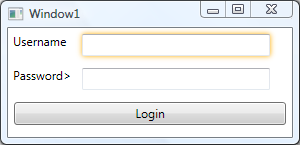
image

The whole implementation is completely encapsulated inside a class named WebkitFocusEffect that only needs to be initialized during your window construction:

public Window1()
{
    InitializeComponent();

    WebkitFocusEffect.Initialize(this); }

How does it work?

First of all, the source is available on BitBucket in my repository, so you can just go ahead and look at it. But I’ll also try to shed some light about what goes on there.

Routed Events

WPF introduced a cool concept called RoutedEvents, meaning that an Event like GotFocus/LostFocus will travel through the object model to the point where it gets handled and stops there. This technique is important because, unlike Windows Forms, WPF controls can contain other UIElements. This gives you far more control over the look and feel of your application, allowing for crazy things like a button with a image instead of text:

<Button Width="100">
    <Image Source="http://upload.wikimedia.org/wikipedia/commons/thumb/8/85/Smiley.svg/100px-Smiley.svg.png"></Image>
</Button>

Resulting in this:
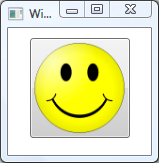
image

And that leads to the point of RoutedEvents: How do you know that the button was clicked? The event that was fired was the image’s click event, not the button. So, WPF introduced the concept of RoutedEvents that can traverse the object tree upwards and downwards. What means that the image’s ClickEvent gets passed on to it’s direct parent (our friend the button) to get handled there.
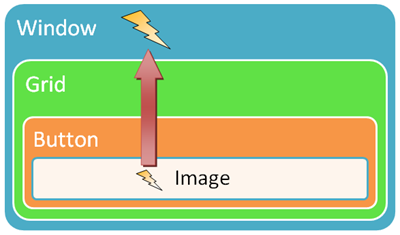
 image

If not handled at some level the event would travel up through the whole tree until reaching the root.

I used this technique to hook up the GotFocus/LostFocus events on our window (being the root element), relying on the fact that any GotFocus events by it’s children will bubble upwards the graph eventually reaching the window’s handler.

The handler then just unwraps the event’s source object (the source of the RoutedEvent gets passed along through the RoutedEventArgs parameter) and modifies it’s Effect property:

protected virtual void WindowGotFocus(object sender, RoutedEventArgs e)
{
    try
    {
        if (!(e.Source is UIElement)) return;

        var element = (UIElement) e.Source;         if (element.Effect == null)         {             var effect = new DropShadowEffect {Color = Colors.Gold, ShadowDepth = 0, BlurRadius = 8};             element.Effect = effect;             removeEffect = true;         }     }     catch (Exception ex)     {         Log(ex);     } }

One problem still remained: RoutedEvents can stop bubbling if they get handled at a lower level. This is how the button stops the image’s click event from spreading to it’s parent element, therefore containing it. So if you set an RoutedEventArgs.Handled property to true, it will stop bubbling up the tree:

private void LoginButton_GotFocus(object sender, RoutedEventArgs e)
{
    //This Event was handled and will not call Window's GotHandled eventhandler
    e.Handled = true;
}

Cool though is that RoutedEvents can’t really be stopped from bubbling, they do so anyway. Handled events just don’t invoke any event handlers up the tree any more, and that can be overridden explicitly when subscribing to the event:

window.AddHandler(UIElement.GotFocusEvent, new RoutedEventHandler(WindowGotFocus), true);

The last parameter is “handledEventsToo” and if set to true the event handler will be fired even if the event was already handled at a lower level. Allowing us to still do our thing while not getting in your way when subscribing to GotFocus / LostFocus events.

Effect

One little limitation is there though. Currently there is no EffectGroup container similar to the BitmapEffectGroup, and therefore only one effect can be applied to any UIElement at one time. So WebkitFocusEffect will just skip elements that already have a Effect defined.

I consciously went with the DropShadowEffect and not with the OuterGlowBitmapEffect because Effects are hardware accelerated (means they get processed by your idle graphics card instead of the CPU) and will not slow your application down as BitmapEffects would.

You can download the WebkitFocusEffect.cs through Bitbucket.

Read more →

imagineClub &ndash; Students for Students

In Austria every university has a institution called ÖH that is there to support students throughout their studies. They provide legal advice, course material and many other things.
The downside of this great service is that it’s directly associated with the university and therefore subject to some regulations regarding what they can do and what not.

Amongst the things that the regular ÖH isn’t able to do is provide course material other than the official things the professors provide. Student generated content could be wrong and that would look bad for the organization.
imagineClub was founded to solve this problem in 2007 and had a lot of success by requiring members to pay for their membership through term-paper submissions to contribute to the overall knowledgebase.

imagineClub also managed to partner with Microsoft and therefore was allowed to offer the MSDN-Academic Alliance service to all of their members. Allowing members to freely download and use Microsoft development software like Visual Studio, Windows etc..

Why am I telling you all of this?

Well, half a year ago I agreed to become the assistant chairman of imagineClub! The old team is still there, but jobs and other things have taken over, so I was brought in to try to get iC back on track and to again provide real value to our members.

Right now, one of the major roadblocks for imagineClub is it’s website. In it’s current state none of the board members are able to add news or change anything about the site since the input forms are broken. Paper submissions have to go through email and get added to the database through raw SQL, making the MSDN-AA subsection of the site the only “working” part that doesn’t require direct SQL manipulation. Naturally, all of this has led to a terribly outdated website, no new papers since 2008 and besides MSDN-AA no real service for our members.

I’m planning to change this through writing a completely new website that does what it’s supposed to do, but also is completely open source!
I decided to go with the Castle MonoRail framework on this one since I already did enough ASP.NET MVC Projects in the past. A positive side-effect of this should also be to work on the MonoRail documentation to get it updated once again.

The whole project is once again up on Bitbucket, currently more of a project skeleton than a real application. But I do plan to finish the site sometime in July. I’m also very happy to announce that Kristof, a young designer/artist I’ve had the pleasure working with during my last projects, has agreed to contribute a brand new site design. He promised me to finish it this week, so work on the site should start pretty soon.

Read more →

My beef with Ruby/Python

I just spent some time poking around Ruby after some poking around Python. And both times I find the typing concept awkward.
Not so much because there is none, but because there is one visible to the trained programmer, implicit but still there.

That being true for primitive types, for classes this makes a whole lot more sense, since we can use the concept of duck typing:

"when I see a bird that walks like a duck and swims like a duck and quacks like a duck, I call that bird a duck."

Some patterns we came to use in static languages are just obsolete in dynamic settings. But the cost to me is that I also have no metadata present about the object I am currently dealing with. It could be anything, and I don’t know before I execute it.  
In C# I can simply hit object. and see all available methods/properties/events, allowing me to look at their documentation and so on. In Ruby, not even the smarter IDEs like RubyMine can do that for you. 

That in itself is no big deal if you are only working with your own classes and methods, where you know how they work or have a general understanding of how they work. Where I really need this metadata is when working with complex frameworks and libraries that expose tons of stuff through protected members from superclasses, that are just invisible to me. That said, to me the whole Ruby/Python experience was more of a running around and hunting method signatures rather than getting something done.

I guess that experience is normal and I am rather sure I’ll get the hang of it rather sooner than later. But coming from years of static typing dynamic languages just feel weird and especially their way of interacting with you as a programmer are different (no Intellisense being my #1 problem with all of them)

Read more →