#programmierung

Posts tagged programmierung

Linq to Sql Association weirdness

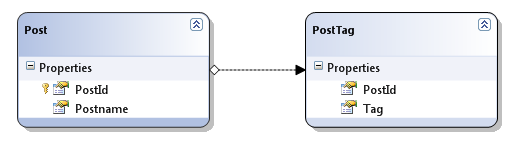
When your dbml designer shows an association, you’d expect to be able to traverse it in code don’t you?

image

So, funny thing. The Post entity lacks a “PostTags” Field that should be there according to the designer.

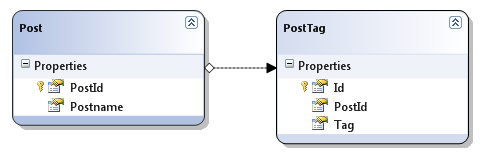
After a few minutes of tinkering, I realized that PostTag has no primary key of it’s own. Since in my real application it’s a m:n association table and no entity on it’s own I didn’t use a primary key. But apparently Linq to Sql needs a primary key to work with, so once I changed the table to have a PK magically a PostTags field appeared:

image

Once again I get how “version 1” Linq to Sql really is, but sadly there won’t be a version 2 since Microsoft is now pushing all resources towards the Entity Framework.

Why not EF? Too complex, once I reach a level of complexity that would justify the use of EF, I use NHibernate.
What I need out of Microsoft right now, is some Linq enabled ORM that’s dead simple with a very DB-centric view that works. Something like Linq to Sql v2.

Read more →

IEnumerable<T>.Each as C# Extension Method

A very long time ago I went through the Ruby in 20 minutes tutorial when I saw this:

@names.each do |name|
  puts "Hallo, #{name}!"
end

When C# came out later I always wondered why there is no functional equivalent on the IEnumerable<T> interface, since it would be a perfect place for quick inline method calls without having to write a full foreach statement.

At that time my knowledge of extension methods and delegates was too limited to do this myself, but that doesn’t mean it has to stay that way.
I finally remembered that I never got to it last time and implemented it today.

Oh and it’s so damn easy too:

public static class EachExtension
{
    public static void Each<T>(this IEnumerable<T> enumberable, Action<T> action)
    {
        foreach (var item in enumberable)
        {
            action(item);
        }
    }
}

To use this .Each method now you simply need to be using the Namespace where the EachExtension is in and you can write code like this:

IEnumerable<string> x = new[] {"hello", "world", "how", "are", "you"};
x.Each(Console.WriteLine);

Or with multiple parameters:

IEnumerable<string> x = new[] {"hello", "world", "how", "are", "you"};
x.Each(p => Console.WriteLine("{0}", p));

Or, even whole inline method bodies:

IEnumerable<string> x = new[] {"hello", "world", "how", "are", "you"};
x.Each(p =>
           {
               Console.Write("Word:");
               Console.WriteLine(p);
           });

So, Lambdas are fun after all :)

Read more →

Beware of smart customers

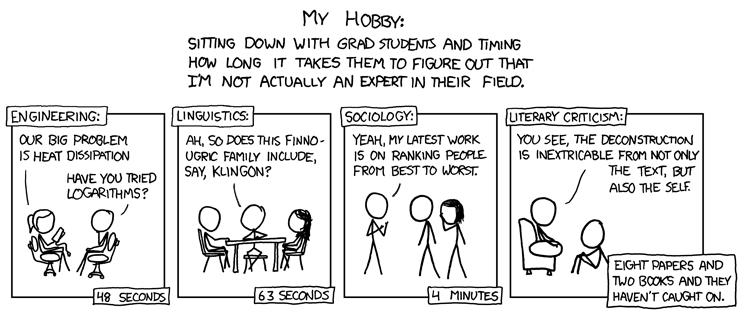
XKCD Comic

I shipped a accounting application in January and got asked to implement some new features into the software lately.
That customer I worked for on that project was absolutely amazing, we really found a common ground to communicate about the needs of the business and my implementation of it. I tried to apply domain driven design as much as possible, and it really worked out exceptionally well.
The customer now has a basic knowledge of what I’m doing and how I’m doing that, while I understand most of his business needs and how to translate those to code.

The dark side of this is that the customer now started to use the system in ways I never intended it to because he knew how to achieve his desired output.

For example, the system has no built-in support for selling set-products. Meaning that buying 1 meta product actually is selling 5 different products for a different set-price.

We once briefly talked about that feature, but neglected it to get more important stuff done, and it never came up since then.

Turns out, the customer implemented that feature himself, by creating a product representing the set, and whenever selling it, he added the set and the 5 sub products to the order. Changing the price of the 5 sub products to zero caused the bill to appear right while still removing the items from storage.

This bit me yesterday when I was asked to implement another feature did some calculations that aren’t based on the actual sell price of the products but on their base price. This screws my complete calculation because now that data is indistinguishable from another kind of data in the system that has to be treated differently.
So I end up with a new type of sale that the system has no means of identifying (without doing some rather complicated and error prone rule matching stuff I want to avoid).

Now, a rather trivial feature has turned into a major system refactor since I need to re-implement the set functionality and some creative ways how to fix the old sales to reflect that change.

Time I would have rather spent working on other things, instead of running with scissors :).

Watch out for how you communicate with your customers and make sure they tell you anything about the system and their intended uses. If you give them enough power through the UI, they will start to fill in bogus values to achieve their business needs without you knowing.

Read more →

Extensibility can equal configurability

The following code is extensible and configurable:

public class Worker
{
    private IValueCalculator valueCalculator = new DefaultValueCalculator();

    public IValueCalculator ValueCalculator     {         get { return valueCalculator; }         set { valueCalculator = value; }     }

    public decimal Work(int number)     {         return valueCalculator.Calculate(number);     } }

What happens here is that I am using the strategy pattern to implement different behaviors to keep my Worker class safe from changes to the calculator code.
Basically I’m doing dependency injection here, but I don’t inject the class through the constructor but through setter injection.

Since I am not bound to the construction phase of the object, I can easily swap IValueCalculator implementations during the worker’s lifetime without having to reconstruct the whole object.

Now, why is this extensible AND configurable?

It’s extensible because it’s easy to implement the IValueCalculator interface and supply it to a worker instance, without changing any of the plumbing around it.
If I want to change the behavior for just one call i can do that very easily:

var worker = new Worker();
var oldCalculator = worker.ValueCalculator;
worker.ValueCalculator = new AlternativeCalculator();
worker.Work(1701);
worker.ValueCalculator = oldCalculator;

But the real beauty of the whole thing is that an inversion of control container like Castle Windsor can also inject setters, so in absence of a configuration file, the default implementation from the code will be used.


But once a Windsor configuration is found you can swap the strategy classes through the configuration even without recompiling like this:

<components>
    <component 
        id="Worker"
        type="Blog_Sample.Worker, Blog_Sample" />
    <component
        id="Alternative.Calculator"
        service="Blog_Sample.IValueCalculator, Blog_Sample"
        type="Blog_Sample.AlternativeCalculator, Blog_Sample" />
</components>

If you want the default behavior just delete the Alternative.Calculator component and no setter injection will happen. If a service implementing IValueCalculator is present that one will be injected to the Worker.

Read more →

Inevitable leaking of control Information

I’m wondering if anyone of you has a better solution (or thoughts) for this.

Assume I have a business rule that states “If there is already a bill for one special order, the user should be warned when trying to create another bill”.
So, obviously I simply display a MessageBox telling the user he’s about to do something stupid (but he should have the choice).

I see a “leak” of business logic from the Controller to the GUI when I have the GUI question the controller layer if there is already a bill for the Order. The decision about whether to proceed or not has to happen in the GUI since it’s the only layer capable of displaying a messagebox to the user (simply reference wise). But the semantics of this decision actually belong into the controller. And frankly, I can’t really find a viable way to separate the logic from the Gui on this case.

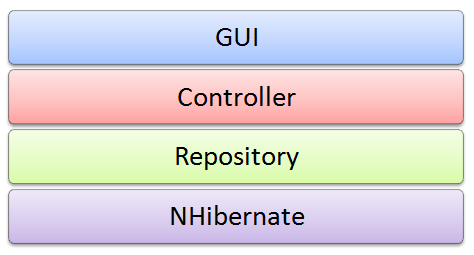
The system is layered as follows:

image 

The root cause of this problem is that I’m not really following the MVC pattern on this one. The GUI always calls down to the controller instead of the controller calling the GUI. This way I often see myself struggling to somehow push logic down into the controller while trying to keep the GUI free from logic. But when it comes to complex interaction I realize now that the GUI is actually driving the whole thing, and that makes this whole thing a pain to re-wire later.

One way to detect things like this is when your controller classes don’t contain actual state. Most of my controller methods are just taking input and applying logic to it, not actually controlling the information flow inside the application (and that should have made me suspicious a long time ago).

So, I guess I can blame myself on this one and will have to try to minimize the damage done until I get time to refactor the system at a later stage.
Still bugs me that I fell for this, but the whole point in failing is to be able to learn from mistakes. :)

What also supports my case is that the controller and repository layers are very well tested, so I may be able to divide the controller layer into multiple strategy classes (logic dumps) while reworking how control flow is handled by the system.

Read more →

DateTime parsing in ASP.NET MVC RouteEngine

After doing so much winforms development lately I am getting started on an upcoming an MVC project. And while thinking about the basic structure of the whole thing and trying out some things I discovered some pretty funny behavior in the DateTime parsing of the routing engine.

Typical example. A route that should map urls like:

http://www.website.com/Archive/10-12-2008/

I have my route laid out like this:

routes.MapRoute("Archive",
                "Archive/{date}/",
                new {controller = "Archive", action = "Show"});

And the controller action looks like this:

public class ArchiveController : Controller     
{
    public ActionResult Show(DateTime date)
    {
        return View();
    }
}

Now, when I open the browser and point it to the following URL it works

http://localhost:51942/Archive/12.12.2008

While this one doesn’t

http://localhost:51942/Archive/15.11.2009

The second one returns the following error:

The parameters dictionary does not contain a valid value of type 'System.DateTime' for parameter 'date' which is required for method 'System.Web.Mvc.ActionResult Show(System.DateTime)' in 'MVCDateTimeParseTest.Controllers.ArchiveController'. To make a parameter optional its type should either be a reference type or a Nullable type.


Needless to say that I am a bit lost at the moment. Both are perfectly valid dates and yet one works the other doesnt. I had the same problem when trying other formattings when I tried dd-MM-yyyy. Why and when dates get parsed correctly is very random it seems.

I didn’t constrain the route on purpose to test out how to create links with dates in them (and doing a 2008/11/12 style link also doesn’t really work too well). The only formatting that seems to be working 100% of the time is http://localhost:51942/Archive/2009-12-12. And that’s not really how I (Austria formats dd.MM.yyyy) like it.

Any suggestions?

Read more →

Printing in .NET is simply broken

Ok, I blogged about the failed GDI+ API yesterday and complained about it. Those of you who are following me on twitter may already know that my little liaison with GDI+ is due to some printing my application has to do and the experience hasn’t been good so far.

My requirement is quite simple, print invoices and some other papers that may (or may not) span multiple pages.
So I came up with a very simple design for my printing needs that lets me reuse all printing dialogs by supplying different strategy classes that do the printing.

image

This has worked out so far, but I’ll have to adjust since I found out that printing multiple pages works totally different from what I expected. In my stupid little world I was thinking that going on to the next page would be as easy as calling NextPage() somewhere and the Graphics object would start drawing to the new page.

And I was so wrong.
Apparently, how it really works is by specifying in your print event that your document has multiple pages and the print event will fire as long as eventargs.HasMorePages is true. Yep, that’s right, the event will fire again!

So apparently, all code that gets called has some way of determining what stuff doesn’t fit on the page (that itself is a huge pain in the ass with graphics.MeasureString and everything) and it also has to find out what parts have already been printed to another page.

So, in a simpler world I’d have a switch statement that would branch depending on the page number like this:

private int pages = 3;
private void PrintDocument_PrintPage(object sender, System.Drawing.Printing.PrintPageEventArgs e)
{
    switch (pages)
    {
        case 1: 
            //print page 1
            break;
        case 2:
            //...
            break;
    }
    pages -= 1;
    e.HasMorePages = pages > 0;
    if (pages == 0)
        pages = 3;
}

The irony of this is that this no longer works if you can hit a new page once your string exceeds one page. You’d have to cut off the string (after heaving measured that it won’t fit), and somehow store it so that when the method gets called next time the “part” that’s not printed yet will get printed. Can it get more stupid than that?
Having multiple entries into one method just seems plain wrong and leaves me no option as to have code everywhere to determine if something has already been printed (no need to say all the hassle there is to cut off something on page A and print the overflow on page B).


This whole RectangleF/SizeF acrobatics with almost static method calls in between feels so much like last century that I am very well inclined to write some OO library in the future to save me the hassle next time.

By the way, first I was thinking that if printing from within .NET turns out to be too hard I had this fallback plan to just generate HTML, display it in a Webbrowser control and print it from there. I should have done it that way, simple things tend to work :).
Read more →

GDI Drawing: String with word-wrap

GDI drawing is magic and not very well documented. Finding out how to make GDI draw a string inside a fixed width without constraining the height took me about 20 minutes, hopefully this post saves you 20 minutes of your life nobody will give you back :).

The problem with Graphics.DrawString() is that you can either supply a PointF that will be used as the origin, or you supply a RectangleF as layout rectangle. The rectangle’s sizes and position will be forced upon the text and word-wrap will happen to fit the text inside the rectangle, anything not fitting in the rectangle (given the font-size) will be cut off.
So if you don’t want to confine width or the height, setting that property on the RectangleF to 0 will make GDI not "cut off” but expand the rectangle as needed.

Needless to say that this behavior isn’t mentioned on the MSDN page for DrawString, that may have saved me time.

Read more →

Feeling like Bruce Wayne

IMG_1861

Although I don’t dress up with a fancy black suit and hunt criminals by night, holiday season means living a double life for me.
Most of my friends study in Vienna or Graz and only visit during holidays, so whenever they are all in town I have to maintain a student life during the night while still working during the day. That usually means getting up at 9am while staying up till 5am.

Believe me, when 6 people don’t accept no for an answer and want to play poker at your place, you’d better restock on coffee and make sure you eat light so you don’t ruin your stomach completely. (I start regretting having built my own poker table)

And still, it’s holidays so trying to maintain a 8 hour per day pace is almost impossible. Besides your family obligations at various christmas celebrations and the usual shopping madness there isn’t really enough space to get focussed on something long enough to actually finish it in a good way.

So today I came back to office and started filling out the holes in my application I left during the holidays. Working my way from //TODO: statement to the next, revisiting the old code I noticed one thing: Code quality doesn’t matter.

When I write code I can’t forget it afterwards. I mean, I suck at remembering syntax or class names (man I love google for bringing back my memories over and over again), but if I feel like a solution isn’t elegant enough or a module should be restructured to make more sense I’ll think about it whenever not occupied and eventually come up with something better.
What would have taken me hours to get right the first time, was fixed in a matter of minutes after I had time to think about it. So this leads to the interesting conclusion that nothing I’ll write today will actually matter next week, as long as I constantly rethink and rework my code I’ll end up with high-quality code no matter how bad it was when I first wrote it.

So the most important thing to consider when writing code the first time is not let implementation details “leak” out to other parts of your system, so reworking one part of the system won’t affect the other. Also writing tests for one-line methods may seem dumb and repetitive, but once you start juggling around stuff while a release date is coming at you at alarming speed, those one-line tests will assure that your app won’t blow up once deployed.

Read more →

Don&rsquo;t get spoiled by LinQ To SQL

I got introduced to LinQ through the famous posts by ScottGu on Linq-to-Sql and always thought of LinQ as some really cool language thing that automagically enabled me to write queries within .NET.

All of ScottGu’s samples look like actual SQL Queries with real keywords within the language like:

var result =   from s in strings
               where s.StartsWith("d")
               select s;

So, when I was just briefly trying to get stuff done I used all those keywords as they seemed to fit and didn’t really try to understand the “deeper” concept behind those (as they magically generated SQL queries). MS introduced new keywords into the language, so be it, I was looking them up in MSDN and used them as such when using the LinQ-to-Sql datacontext.

Now, that I (and apparently Microsoft) have departed from LinQ-to-Sql I somehow forgot about LinQ for quite some time simply because I had no need for in-memory-queries for quite some time. And to be honest, I also never really thought about applying that strange LinQ syntax to objects in memory (I considered the above mentioned LinQ query more as a “c# strongly typed version of SQL” rather than a in-memory query method)

So, I was quite amazed of what you can actually do with LinQ if you abandon this strange undiscoverable SQL syntax and simply use method chaining. The above query can be rewritten without any “keyword magic” but with plain objects to look like this:

var result = strings.Where(s => s.StartsWith("d"));

The beauty of it? All the LinQ overloads reside on the IEnumerable<T> interface, and most of these methods will return an IEnumerable<T> so you can “chain” those method calls together like this:

var result = strings
            .Where(s => s.StartsWith("d"))
            .OrderBy(p => p.Length)
            .Select(p => p.Substring(0, 4));

And now the whole thing started to make sense. I can easily grasp how this is supposed to work, instead of looking at awe at the “SQL query” that magically works. And that’s where I went wrong the first time.

Instead of learning LinQ to objects first, I got caught in the database centric world of LinQ-to-Sql that made me not think of LinQ as anything other than a Database query tool.

Read more →