#programmierung

Posts tagged programmierung

Setting a InsertedOn Field with Castle ActiveRecord

If I want a field to contain the date of insertion I’d usually have to hook into the Create method somewhere be it my repository or whatever.
With Castle ActiveRecord it’s as simple as overriding the Create() method in your Entity:

[ActiveRecord]
public class Comment : ActiveRecordBase<Comment>
{
    [PrimaryKey]
    public long Id { get; set; }
    [Property]
    public DateTime CreatedOn { get; set; }
    [Property]
    public string Message { get; set; }
    private void SetInsertionTimestamp()
    {
        CreatedOn = DateTime.Now;
    }
    public override void Create()
    {
        SetInsertionTimestamp();
        base.Create();
    }
    public override void CreateAndFlush()
    {
        SetInsertionTimestamp();
        base.CreateAndFlush();
    }
}

Read more →

My very own Inversion of Control container: Pandora

Almost a year ago or so I listened to a .NET Rocks episode about the Castle MicroKernel/Windsor and the speaker was saying something along the lines of: “Writing a simple IoC container isn’t all that difficult, it’s basically a hashtable of types and 20 lines of code”.

I always felt that it can’t really be that easy so today I decided to try it for myself. Not so much because I want to use my own container (Windsor does everything I want it to do), but out of curiosity and to learn some things about creating classes with reflection etc.
Also I wanted a small project that I use to improve my TDD and API design skills.

So, here it is. Meet: Pandora

It’s a very lightweight IoC container that is more or less a hashtable of services with their implementing type as value.

[Fact]
public void CanResolveClassWithoutDependencies()
{
    var componentStore = new ComponentStore();
    componentStore.Add<IService, ClassWithNoDependencies>();

    var container = new PandoraContainer(componentStore);     var result = container.Resolve<IService>();

    Assert.IsType<ClassWithNoDependencies>(result); }

Pandora will look at the implementing type’s constructor and try to resolve any dependency found there (in a recursive manner). Going from the biggest constructor to the smallest.

One obvious limitation right now is that only one implementing type per service can be provided at the moment.
Also there is no detection of circular dependencies and no lifestyle management (meaning every time I call Resolve I get a new object graph).

Now, this is far away from a useable product. But writing it allowed me to look at some of the problems involved in the process and I had to learn a thing or two about reflection and generics.

One thing I wanted was to avoid having Type parameters. Having to write something like

container.AddComponent(typeof(IService), typeof(Implementor));

feels awkward every time, so I decided to go with generics to enable a syntax like this one:

container.AddComponent<IService, Implementor>();

Much cleaner and I could even add the constraint that Implementor must inherit from IService:

public void AddComponent<T, TImplementor>()
    where T : class
    where TImplementor : T
{
    componentStore.Add<T, TImplementor>();
}

Now, the problem with this is that you can’t convert a Type to a generic call afterwards. Once I needed to resolve dependencies that are of a different type I couldn’t simply write Resolve<myType>().
To invoke a generic method in the current instance with a Type argument you need to use generics to create that method, like this:

MethodInfo method = typeof (PandoraContainer).GetMethod("Resolve");
MethodInfo generic = method.MakeGenericMethod(myType);
generic.Invoke(this, null)

So, it works but I guess it’s not the best way to regularly use reflection to call methods, so I went back to Type parameters and created overloads for the generics. (And now I see why Windsor has Type parameter overloads for everything ;))

Pandora is open source and licensed under the Apache License 2.0. I strongly suggest you do not use this anywhere near production systems but strictly for educational purposes.

Read more →

kaernten.at &ndash; Caching and Lazy loading

In my last post on the technology behind www.kaernten.at, I concluded with the fairly bold statement that all objects are kept in memory to ease querying.

That’s not really true, but also not really false.
When the article list is loaded initially, only a slim index of all articles is retrieved from the database. All information relevant to querying and sorting (id, tags, publication date, visibility) gets fetched at once. I used Castle DynamicProxy2 to create proxy objects that pose a the real thing to lazy load the article data on access. So although there may be 10.000 articles currently in memory, only those that have really been viewed by a user have been fully loaded, while all query criteria are present in memory.

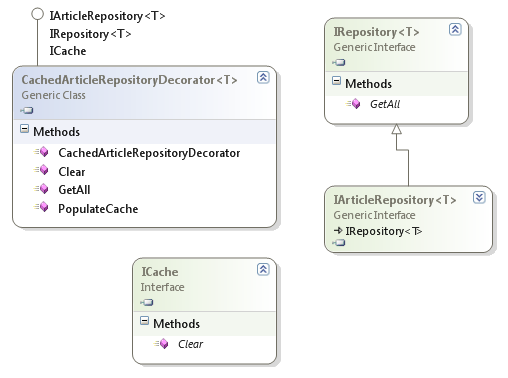
But lazy loading wouldn’t work if the list of proxy objects wouldn’t get cached somewhere, and that’s what I wanted to go over in this post. All articles retrieved (in their proxied form) come from the generic IRepository<T> interface that only has one method: GetAll(). I wanted to avoid having the caching be tied into the Repository at all costs since it would make my life hell when testing the repository itself. So I decided that the best course of action would be to create a decorator that took care of the caching, separating caching from the Repository implementation (and it’s also really easy if there is only one method to implement):

image

Switching caching on or off is now as simple as removing/adding one line to the Windsor configuration. And the caching code is shared among all Repository implementations, for any type of IArticleRepository<T>.
If it needs to get cleared I can simply ask the Windsor container to retrieve all ICache implementing classes (they are singletons) and call ICache.Clear() on them.

Now, the most interesting thing here is that the cache is asynchronous. If it gets cleared, a background worker process gets spawned on the PopulateCache() method, generating the updated data from the system, while subsequent requests to the Repository (while it’s being populated) still return the outdated list of data. Once the background worker is done populating, it simply swaps out the references and the old data gets collected by the garbage collector.
This result in some pretty sweet response times, since except for the very first startup of the system, every request is served directly from memory, without any data fetching at all.

This part was also crucial to the whole thing since fetching the data is a rather long running and cpu heavy task, taking up to 60 seconds while testing it against 10.000 articles (with a debugger attached on my laptop).
Initially I tried to speed the querying and object building up to allow for a synchronous cache refill, but although I did some optimizations (like not using some LinQ methods) the attempt to reduce the execution time to something acceptable was futile.

Right now the cache is implemented by just a simple List<T> that stores everything the repository returned, but if need arises it can easily be changed to use memcached or some other more sophisticated caching method.

Read more →

Locking with Linq to SQL&rsquo;s deferred execution

If you have been reading this blog lately you may have noticed that I’m currently working on a project where I chose Linq to Sql as my data-source, inspired by the IQueryable<T> Repository Rob Conery introduced in his MVC Storefront series.

The basic idea of the IQueryable<T> repository is to have the repository return a IQueryable list of C# domain objects that can then be filtered, queried, parsed at higher layers of the application.
So things like paging, filtering etc (all business concerns) can be applied to the query at a later stage instead of having to propagate all of these requirements down to the Repository (Ayende wrote something great on the death of Repository you should check out).

So my business code would call the repository for all objects and then apply logic to it:

var preferredUsers = 
    repository.GetAll()
    .Where(p => p.JoinDate < DateTime.Now.AddYears(-1))
    .Skip(PAGE_SIZE*pageNumber)
    .Take(PAGE_SIZE);

I loved it. Not having to propagate concerns like paging and filtering to the DAL was awesome, and since the interface is so damn simple I very quickly came up with decorators that did error handling, caching and logging at the DAL level.

Since I’ve become a dependency injection nut, I then came up with a injectable datacontext so my repositories don’t have anything to do with the data context creation (thus sparing me the configuration concerns in that class).


My concrete repository implementation then looked like this:

public class UserRepository : IRepository<BlogUser> 
{
    private DataClassesDataContext context;

    public UserRepository(DataClassesDataContext context)     {         this.context = context;     }

    public IQueryable<BlogUser> GetAll()     {         return from u in context.Users                select new BlogUser                           {                               Id = u.Id,                               Username = u.Name,                               Password = u.Password                           };     } }

You see, the context gets injected and besides the query there is nothing in the repository, SRP .. check.

Now, the logical thing to do in my IoC configuration was to have the repositories be singletons, and so every repository has one datacontext attached to it.

And this is where it blew up in my face, having multiple threads access the repository leads to some nasty race conditions for the datacontext, and I found no sane way of dealing with this at the DAL level.
Try this:

public static void main()
{
    var repository = new UserRepository(new DataClassesDataContext());
    new Thread(() => ThreadStart(repository)).Start();
    new Thread(() => ThreadStart(repository)).Start();
}

public static void ThreadStart(IRepository<BlogUser> repository) {     const int PAGE_SIZE = 10;     int pageNumber = 1;     var preferredUsers =         repository.GetAll()         .Where(p => p.JoinDate < DateTime.Now.AddYears(-1))         .Skip(PAGE_SIZE*pageNumber)         .Take(PAGE_SIZE);     preferredUsers.ToList(); }

The same query as before, but two threads that share the same repository, therefore sharing the same datacontext. Once started, the whole thing will blow up with a InvalidOperationException stating that the connection is closed.

I didn’t bother to go into the DataContext source and check out why they are closing the connection, but apparently after the query is executed it takes some time for the context to “recover” and be able to accept a new query.

I immediately tried to solve the problem by adding a lock on the datacontext in the repository class (since the contexts are pooled, it was the only thing that made sense since I don’t need to lock all connections, just the one I’m currently using).

public IQueryable<BlogUser> GetAll()
{
    lock (context)
    {
        return from u in context.Users
               select new BlogUser
                          {
                              Id = u.Id,
                              Username = u.Name,
                              Password = u.Password
                          };
    }
}

I intentionally said I tried, because it didn’t work. The lock gets executed alright, but the query isn’t run inside the lock{} but rather at the calling code, in my business class (the power of deferred execution). So the only way to prevent a race condition for my datacontext would have been to add locking to the business code:

const int PAGE_SIZE = 10;
int pageNumber = 1;
var preferredUsers = 
    repository.GetAll()
    .Where(p => p.JoinDate < DateTime.Now.AddYears(-1))
    .Skip(PAGE_SIZE*pageNumber)
    .Take(PAGE_SIZE);
lock(repository)
{
    preferredUsers.ToList();
}

Omg right? So, besides the fact that I can’t guarantee that two repositories don’t use the same datacontext (and therefore racing against each other), I just opened the Pandora's box of possible errors (give me a month and I’ll forget the locking at least 3 times).
Also, it’s just painful to see an implementation detail of the data access layer leak into the business code for no apparent reason.

And the only way I found on how to solve that problem was to supply a new datacontext to every query, so I get rid of the whole locking. I did so by injecting a datacontext factory into the repository and call the factory every time I execute a query.

This fixed the issue for now, but I don’t feel too good about the solution. Creating new datacontext object for every query somehow feels wrong, and I’d love to hear suggestions from you on how to change that.
Read more →

ELMAH ASP.NET Error logging on MVC

Some of you may already know ELMAH, a great error logging tool that hooks into ASP.NET applications logs all exceptions encountered during runtime.

There are some great articles on how to set up ELMAH for traditional ASP.NET articles in their wiki, but ASP.NET MVC is not mentioned (it’s really simple nonetheless).

Step 1: Referencing the assemblies

First, grab the latest binary release of elmah from the project’s page and extract the \bin folder to your application folder.
I’m a huge fan of having all external assemblies in a lib folder besides the app, so to my delight elmah requires no installation, you just have to drop the 3 files in \bin to your lib folder and reference the Elmah.dll from within your app.

Step 2: Edit your web.config to call ELMAH

First add the following code to your <configSections> to make ELMAH read it’s configuration from web.config:

<sectionGroup name="elmah">
  <section name="security" requirePermission="false" type="Elmah.SecuritySectionHandler, Elmah" />
  <section name="errorLog" requirePermission="false" type="Elmah.ErrorLogSectionHandler, Elmah" />
  <section name="errorMail" requirePermission="false" type="Elmah.ErrorMailSectionHandler, Elmah" />
  <section name="errorFilter" requirePermission="false" type="Elmah.ErrorFilterSectionHandler, Elmah" />
</sectionGroup>

Next go to your <httpHandlers> section and add the elmah file handler:

<add verb="POST,GET,HEAD" path="elmah.axd" type="Elmah.ErrorLogPageFactory, Elmah" />

This will reroute all requests to a file called elmah.axd to the ELMAH error-overview page. So when you want to look at the list of errors you’ll access http://server/elmah.axd . The name doesn’t matter, feel free to rename it, but be aware that the extension has to be mapped to the ASP.NET pipeline inside IIS (so naming it .html wouldn’t work if not configured correctly).

At last add the ELMAH logging module to your <httpModules> section:

<add name="ErrorLog" type="Elmah.ErrorLogModule, Elmah"/>

Step 3: Configure ELMAH

I’d suggest you read the wiki articles on how to configure ELMAH correctly, but for my application I chose to log all errors to a XML file by simply adding this code to the web.config:

<elmah>
  <errorLog type="Elmah.XmlFileErrorLog, Elmah" logPath="~/App_Data" />
</elmah>

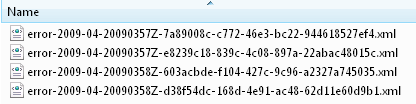
This instructs ELMAH to create xml files in your App_Data directory (so make sure the ASP.NET process has sufficient access rights to that folder) and generate output like this:

image

Step 4: Configure routing 

Up until now we were 100% true to the normal configuration routine for normal ASP.NET applications, there is only one slight adjustment to making it work in MVC.

You need to allow the requests to the ELMAH frontend (elmah.axd in this example) to pass through the MVC routing logic unchanged so that it gets handled by normal ASP.NET behind MVC. This is as trivial as adding a ignore route to your routing table in Gobal.asax.cs:

public static void RegisterRoutes(RouteCollection routes)
{
    routes.IgnoreRoute("elmah.axd");

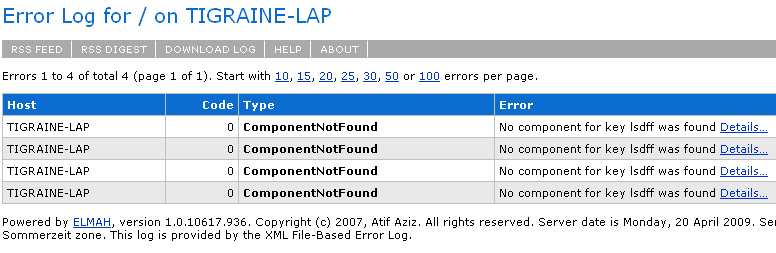
Once all the above is done, you’ll see all unhandled exceptions that result in a yellowscreen-of-death be also logged into the XML files inside your App_Data and you can then watch them remotely by accessing http://server/elmah.axd. You’ll get a rather nice overview page like this one:

image

Having no errors in the first place is a way to make this work obsolete, but it’s nice to know for sure that your users aren’t encountering errors when using  your site. There are advanced configuration guides in the wiki on how to set up email notification and security, but I’ll leave that to the project wiki.

Read more →

Missing SortedList?

I made it a habit to always program towards an Interface if possible. So all my lists in code are of type IList<T> and the IList<T> lacks the .Sort() method of the List<T> class.

Usually this isn’t a problem since there is LinQ’s .OrderBy to save the day. But this time my class is too generic for that so I have to fall back to good old OO principles with comparer classes etc.

Now, my problem is that I need a simple IList that is sorted on insertion. I first thought, no problem I’ll just use the SortedList<Tkey, Tvalue> that’s already in the framework. But there is always a catch: SortedList is more of a dictionary than a list. Duplicate key items aren’t accepted, there is no collision handling. Trying to insert a duplicate key will result in a ArgumentException:

[Fact]
public void SortedList_AcceptsNoDuplicateKeys()
{
    SortedList<int, string> list = new SortedList<int, string>();
    var key = 1;
    list.Add(key, "test");
    Assert.Throws(typeof (ArgumentException), () => list.Add(key, "test2)"));
}

Now, what I need is a real sorted List that allows duplicate values (as would a List.Sort()).

Implementing the IList interface isn’t that hard after all, so I gave it a shot with a SortedKeylessCollection<T> that wraps a real List<T> (to use it’s .Sort(), I know I’m lazy):

public class SortedKeylessCollection<T> : ICollection<T> where T : class
{
    private readonly IComparer<T> comparer;
    private readonly List<T> list = new List<T>();

    public SortedKeylessCollection(IComparer<T> comparer)     {         this.comparer = comparer;     }

    public SortedKeylessCollection() : this(Comparer<T>.Default)     {     }

    #region ICollection<T> Members

    public void Add(T item)     {         list.Add(item);         SortList();     }

    public void Clear()     {         list.Clear();     }

    public bool Contains(T item)     {         return list.Contains(item);     }

    public void CopyTo(T[] array, int arrayIndex)     {         list.CopyTo(array, arrayIndex);     }

    public bool Remove(T item)     {         bool b = list.Remove(item);         if (b) SortList();         return b;     }

    public int Count     {         get { return list.Count; }     }

    public bool IsReadOnly     {         get { return false; }     }

    public IEnumerator<T> GetEnumerator()     {         return list.GetEnumerator();     }

    IEnumerator IEnumerable.GetEnumerator()     {         return list.GetEnumerator();     }

    #endregion

    public void SortList()     {         list.Sort(comparer);     } }

You can download the file here: SortedKeylessCollection.cs.

I didn’t call it List but Collection because IList<T> has a defined contract through InsertAt that can’t be fulfilled by a self-sorting list (since the insertion at a position shouldn’t be possible).

Also, as someone at StackOverlow pointed out there are already implementations of such lists like the Wintellect Power Collections for .NET but I didn’t want to bring yet another dependency into my codebase just for one puny little class.

Read more →

How to make a LinQ2SQL DataContext IoC friendly

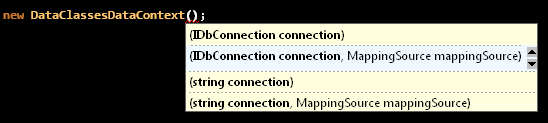
I’d really like to meet the guy who came up with the genius idea to call all parameters the same on the LinQ DataContext object:

image

So, when I tried to provide the connection through a named parameter with Castle Windsor I failed since the container can’t resolve what constructor to use (trying to match the key “connection”).

Thank god Microsoft didn’t seal the class so you can battle this problem by simply subclassing the construction:

public class InjectableDataContext : DataClassesDataContext
{
    public InjectableDataContext(string connectionString) 
        : base(connectionString)
    {
        
    }
}

Note that I directly subclassed my own LinQ2SQL DataContext (called DataClassesDataContext in this example).

Now I can have my configuration inject a connection string:

string myConnectionString = "DataSource...";
Component.For<DataClassesDataContext>()
    .ImplementedBy<InjectableDataContext>()
    .Parameters(Parameter.ForKey("connectionString").Eq(myConnectionString));

And the resolving code doesn’t change a bit:

var dbContext = container.Resolve<DataClassesDataContext>();

Read more →

Reversing Comparers in .NET

Since LinQ stepped onto the stage I rarely think about sorting, selecting etc any more. A simple IEnumerable<T>.OrderBy(p => p.Id) does the trick quite nicely.

But, there are cases where I wanted the list to be sorted in itself, and so I turned to the SortedList and SortedDictionary classes in the System.Collections.Generic namespace.

Usage is incredibly easy, they are just ordinary IDictionary<Tkey, Tvalue> implementations that behave in every way as expected (no duplicate keys mind you), but in order to use them effectively you should be aware of some minor things about comparers.

Internally both collections will use a TreeSet structure that sorts itself by using a given IComparer<TKey> to determine their sort order. So all we need to do is add some pixie dust as the IComparer<TKey> to interfere with the order.

And since I don’t want to write one IComparer<T> for every type in the framework, I did a find-inheritor search with Reflector on the IComparer<TKey> interface only to discover that there is only one implementation: StringComparer. All other types get compared either by a custom comparer or the following call:

Comparer<TKey>.Default;

The static method Default will return an appropriate comparer for the given TKey type (taken from the IComparable<T> interface that has to be implemented by TKey).

So, in order to reverse the list, we just have to supply a custom comparer that reverses the default comparer.  (Since the LinQ .Reverse() method is out of the question :)).

And that’s rather easy once you know where to get the default comparer from:

public class ReverseComparer<T> : IComparer<T> where T : IComparable<T>
{
    private readonly IComparer<T> comparer;

    public ReverseComparer() : this(Comparer<T>.Default)     {     }

    public ReverseComparer(IComparer<T> comparerToReverse)     {         comparer = comparerToReverse;     }

    public int Compare(T x, T y)     {         return comparer.Compare(y, x);     } }

This generic class will reverse any given comparer type (you can even supply your own IComparer<T> to get reversed).

I am not perfectly sure why this isn’t in the framework, maybe I just overlooked it or there are other ways to reverse a list. But for the moment this works just fine.

Read more →

Divide two integers in .NET

Ok, this is really simple, but it just has cost me 15 minutes because I ignored a compiler warning:

double result = myInt1/myInt2;

The compiler will underline that there is a possible loss in fraction, but I ignored it while not seeing anything wrong with the code at all.

Whatever values I calculated, the result was always an integer. Turns out, dividing two integers will also create an integer instead of a double (so I got weird results like 31/10 = 3 ).

To bypass this, you need to promote at least one of your integers to a double so a double divide will occur:

double result = (double)myInt1 / myInt2;

Hope this helps, took me far too long to figure out.

Read more →

Tests should last forever

There is one excellent point Roy Osherove made while reviewing the tests in NerdDinner.com I wanted to share with you.

Don’t write tests that change over time!

Often I have initialized objects for tests like this:

[Fact]
public void Test()
{
    DateTime date = DateTime.Now;
    ...
}

Until recently I thought that’s cool, after all the tests passed every time I ran them.

But what if the passing tests are just a coincidence?
What if I am testing a financial application that will only accept orders between 8am and 6pm on weekdays, and the order-date gets initialized to DateTime.Now in my test?


Given the normal work days in most countries that code would run for most developers just fine, but when some notorious late-worker like me comes in the tests start failing for no apparent reason.

Time or place of execution, should not have an impact on a test at all. Given the same code and the same test, the result should always be the same.

So, whenever you initialize a value to something from your current execution context (time being the prime example here), you create a possibility that this test will break in some unexpected ways over time.

So if you really want to fill some DateTime with a value for testing use a constant (like DateTime.MinValue/MaxValue). So whenever you re-run this test all inputs are the same as they have been when you wrote the test.

Read more →